
Crochet teacher filming close-ups
You want to make loops and insertion points easy to see. So, first measure the distance to your crochet and check that both the stitches and your moving hands stay in frame.


First, decide where to position the camera and measure the distance from there to your crochet. Then check whether the model can focus at that distance and keep both your hands and your stitches in frame. A webcam is suited to recording through a computer, while a standalone camera can record without one. A higher resolution won’t make an out-of-focus recording sharp.
You want to make loops and insertion points easy to see. So, first measure the distance to your crochet and check that both the stitches and your moving hands stay in frame.
You’re looking for a camera position that keeps the camera and its mount out of the way. Decide whether an overhead view or an angled shot is better for what you want to show.
You’re choosing between recording through a computer and using a standalone camera. Think about the connection, storage and how you want to record your spoken instructions.
A good fit if: you already record through a computer and can mount the webcam above or beside your desk.
Bear in mind: you’ll need a compatible computer connection, and the focus range must suit your chosen video settings.
A good fit if: you want to record without a computer and can position the camera away from your workspace.
Bear in mind: storage and mounting; a built-in stand isn’t necessarily suitable for an overhead view.
A good fit if: you also want to use the same camera for moving or vertical shots, and the stated focusing distance is suitable.
Bear in mind: stabilisation doesn’t replace a suitable fixed mount for filming from above.
| What to consider | What should you check? | Who is this important for? |
|---|---|---|
| Sharp, clearly defined stitches | Measure the working distance and check the focus range at the video setting you want to use. | If I want to show loops and insertion points clearly, focusing at close range is my main concern; around 36% of consumers give clearly defined stitches top priority. |
| Clear workspace and framing | Check where you can mount the camera and take a test shot while moving both hands. | If I want to film without the camera or mount getting in the way of my hands and yarn, positioning is key; around 29% of consumers prioritise a clear workspace and steady framing. |
| Recording setup | Check the computer and USB requirements for a webcam, or the required card type for a standalone camera. | If I’d rather record through my computer or film without one, I’ll choose a setup that suits me; around 21% of consumers put this choice first. |
| Texture and instructions | Make a test clip using your usual lighting and spoken instructions; assess the picture and sound separately. | If I want both the stitches and spoken instructions to come across clearly, I’ll consider lighting and sound as well as the camera; around 14% of consumers make this combination their top priority. |
A subject outside the focus range will still look blurred. Elgato lists different focus ranges for the Facecam 4K at 4K and 1080p.
Measure your working distance and compare it with the range for the video setting you actually plan to use.
The Canon PowerShot V10’s stand gives you different placement options, but it won’t automatically provide an unobstructed overhead view of a small workspace.
Mark out the area you want to film and check that the mount is stable and leaves both hands enough room to move.
You may need a suitable mount; also consider how much space this setup will take up.
Elgato describes the Facecam Pro as legacy/EOL. Its focus specifications aren’t the same as those of the Facecam 4K.
Check the full model name and focusing method before comparing specifications.
The PowerShot V10 is a compact standalone camera for anyone who wants to record without a computer.
The Osmo Pocket 3 is a compact standalone camera for desk videos and moving or vertical shots.
The Facecam 4K is a webcam for a fixed recording setup with a compatible computer.
The ZV-1 II is a compact zoom camera for makers who want to adjust the framing.
The Brio 4K is a webcam for a computer setup, with a tripod mount.
This selection includes webcams and standalone cameras for recording video at a small desk. Check the focusing distance for each model and whether you can mount it in a way that keeps your workspace clear.
 No image available
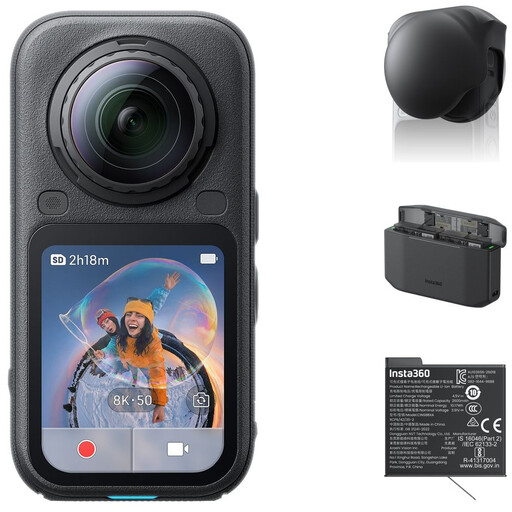
360° recording could be useful if you want to choose different frames from a single recording; check whether the camera can focus at your working distance and be mounted suitably.
The bundle lists a standard bundle, lens cap, Xtreme Battery and Fast Charge Case. The product description mentions 8K 50fps 360° video and 5K 60fps in traditional action camera mode.
 No image available
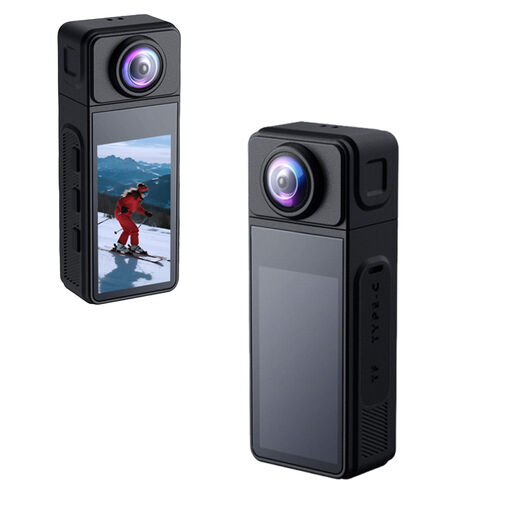
The rotating lens and magnetic mount could help you position and aim the camera; first check whether the focusing distance suits your crochet.
The title lists a 270° rotating lens, a 1.86-inch IPS screen, Wi-Fi, Type-C, a TF card slot and a 1/4-inch thread.
 No image available
The handle with tripod thread gives you a mounting option away from the desktop; check whether the camera can focus at the distance to your crochet.
The product title lists 4K/240fps, 2× lossless zoom, 107 GB of built-in storage and a handle with a 1/4-inch thread.
 No image available
This webcam suits a computer-based recording setup; check the focusing distance and whether your chosen mount leaves the workspace clear.
The product title lists autofocus, two built-in microphones, a privacy shutter and the EU version.
 No image available
This standalone model could suit you if you also want to film moving shots; DJI lists a minimum focusing distance of 0.2 m, so measure your working distance first.
The product title lists 4K/120fps video, 3-axis stabilisation and an included microphone. The Osmo Pocket 3 requires a microSD card for recording storage.
Not on its own. First check that your crochet is within the focus range and appears large enough in frame. Elgato lists different focus ranges for the Facecam 4K at 4K and 1080p.
Try lighting placed beside the camera and record a short test clip while you crochet. Compare an overhead view with an angled shot if the height of the stitches isn’t clear; the results will depend on your lamp and workspace.
It depends on the model. DJI says the Osmo Pocket 3 has no built-in recording storage and uses microSD; Canon lists microSD, microSDHC and microSDXC as recording media for the PowerShot V10. Also check which card is compatible with the exact version you’re buying.
For distance purchases from a business in the Netherlands, you generally have a 14-day cooling-off period, according to the Netherlands government. Your statutory guarantee is separate from any manufacturer’s warranty: if a product used normally develops a fault sooner than you could reasonably expect, the seller is responsible for providing an appropriate solution. There is no general fixed two-year term for the statutory guarantee, according to ACM ConsuWijzer.
Not necessarily. According to the Dutch Data Protection Authority, recognisable people in a video are personal data; the exception for purely personal or household use doesn’t apply when sharing publicly. You’ll then need a lawful basis under the GDPR, which in many cases means consent.