
Filming from a fixed overhead angle
You want to keep your hands and the clay in focus throughout the recording, with little desk space available for the camera.


When filming clay at a small desk, the distance between the lens and your work surface is the first thing to consider: the camera needs to focus at that distance while keeping both your hands and the clay in shot. A compact camera suits a fixed setup. A Pocket gimbal camera is an option if you also want to shoot moving footage, but the gimbal is no substitute for a secure mount above your work surface. Sony Netherlands gives the ZV-1F a focusing distance of approximately 5 cm from the front of the lens; DJI gives the Osmo Pocket 3 and Pocket 4 a focusing range starting at 0.2 m. Also check the mounting options, power supply and storage.
You want to keep your hands and the clay in focus throughout the recording, with little desk space available for the camera.
You want to show small techniques individually, so you need to check that the camera can focus at close range.
You alternate between a fixed shot of your workspace and moving footage, weighing up that flexibility against a simple desk setup.
First, check the focusing distance and framing where you plan to position the camera. Then choose a mount that leaves your hands free. Only after that should you consider whether moving shots, sound or longer recordings call for extra features or accessories.
| What to consider | What should you check? | Who should prioritise this? |
|---|---|---|
| Focus and framing at close range | Check the focusing range and where it is measured from. Sony Netherlands gives the ZV-1F a focusing distance of approximately 5 cm from the front of the lens; DJI gives the Osmo Pocket 3 a focusing range starting at 0.2 m. Try framing a shot at your intended camera height. | If the lens is close to the work surface, I want to know whether my hands and the clay will both stay in focus in the shot. This is the top priority for around 36% of consumers. |
| A stable setup that leaves you room to work | Check the mounting options and whether there will still be room for your arms and lighting. Canon lists a built-in stand and tripod mount for the PowerShot V10; the stand on its own is not an overhead mount. | I want to be able to move my hands freely around the clay and position the camera securely. A clear, stable workspace is the top priority for around 29% of consumers. |
| Long recordings and what you need | Check the storage, power options and exact kit contents. DJI does not list built-in storage for the Osmo Pocket 3; Canon lists a memory card in the PowerShot V10 Essential Kit, but no USB-C charger. | For a longer session, I want to know whether I can keep recording comfortably and what I’ll need to do so. Practicality and long recording times are the top priority for around 21% of consumers. |
| Moving shots and spoken explanations | Decide whether you want to move the camera while filming and how you want to record sound. DJI lists a gimbal and three microphones for the Osmo Pocket 3; Canon lists stereo microphones for the PowerShot V10. Also check that it can focus at your working distance. | If I want to record moving footage or explanations as well as a fixed shot of my work surface, I’ll take those features into account without losing sight of the setup. This is the top priority for around 14% of consumers. |
A recording setting won’t tell you whether the camera can focus at your working distance or capture the whole process.
Test the focus and framing at the planned height above your desk before making a decision.
A gimbal is designed for camera movement. A fixed shot above your work surface also needs a suitable, stable position.
Choose a gimbal camera for the moving shots you want to create, and check separately how to position it securely without getting in the way of your hands.
Depending on your setup, you may need to buy a suitable mount separately.
Contents vary by model and version. DJI does not list built-in storage for the Osmo Pocket 3; Canon includes a memory card with the PowerShot V10 Essential Kit, but no USB-C charger.
Check the contents of the exact kit and what storage and power accessories you’ll need.
Depending on the model and kit, you may need to buy a memory card or charger separately.
OM SYSTEM lists a Microscope macro mode and 4K video for the Tough TG-7, but does not confirm that both features work together in the video mode you want.
Check the available video modes in the manual or make a test recording before choosing the camera for close-up shots of small clay details.
The ZV-1F is a compact fixed-lens camera to consider for a cramped workspace and close-up shots.
The Osmo Pocket 3 and Pocket 4 are gimbal cameras to consider if you also shoot moving footage.
The PowerShot V10 is a compact option for desk-based recording, with a built-in stand and tripod mount.
The Tough TG-7 is worth comparing if you want to show very small details of your clay work.
These cameras are options to compare for filming clay, from compact cameras to Pocket gimbal cameras. Check each model’s focusing distance, framing and setup requirements for your desk.
 No image available
This vlog combo is an option if you also want to shoot moving footage. The product information lists a 20 mm wide-angle lens and 4K video; according to the same information, 4K/240 fps is only available in slow-motion mode.
 No image available
The gimbal makes this version worth considering if you want to shoot moving footage as well as fixed shots. The product name lists 4K/240 fps, 3-axis stabilisation, 107 GB of built-in storage and a 2-inch rotating screen. DJI gives the Pocket 4 a focusing range starting at 0.2 m, so bear this in mind for very close-up details.
 No image available
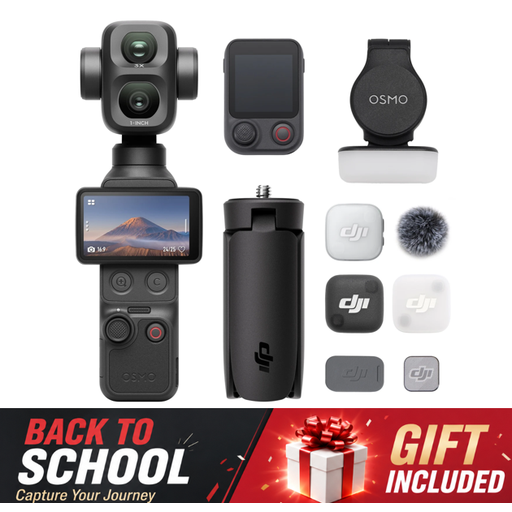
This combo is an option if you want to record moving footage and spoken explanations. The product name lists 4K/120 fps, 3-axis stabilisation and an included microphone. DJI gives the Pocket 3 a focusing range starting at 0.2 m and does not list built-in storage, so check the minimum focusing distance and whether you’ll need a memory card.
 No image available
This pocket camera is worth comparing if you’re looking for a compact camera for video and photography. The product name lists 4K and 44 MP for photography; the product description mentions autofocus and 16× digital zoom. Test whether the focus and framing suit the distance between the camera and your clay work.
 No image available
This compact vlogging camera is worth comparing for video recording in a small workspace. The product information lists 4K video, autofocus, image stabilisation and a tilting touchscreen. Check the focus and framing at the distance you plan to use the camera.
Measure the distance from the lens to the clay, frame a test shot with both hands in view, and check whether the camera can focus at that distance. Sony Netherlands gives the ZV-1F a focusing distance of approximately 5 cm, measured from the front of the lens; DJI gives the Osmo Pocket 3 a focusing range starting at 0.2 m.
Don’t assume so. Canon lists a built-in stand and a standard tripod mount for the PowerShot V10. For a shot directly above your work surface, check that you have a suitable mount.
Check what’s included in the exact kit and what you’ll need for storage and power. Canon includes a memory card with the PowerShot V10 Essential Kit, but no USB-C charger; DJI does not list built-in storage for the Osmo Pocket 3. For consumer purchases in the Netherlands, statutory rights are separate from any manufacturer’s warranty: ACM ConsuWijzer says the seller must offer an appropriate solution if a product breaks during normal use earlier than expected.
Not necessarily. The Dutch Data Protection Authority considers recognisable people in footage to be personal data and says the exception for personal or household use does not apply when you share footage more widely. If the GDPR applies, you need a lawful basis. Consent is one possible lawful basis, but it is not automatically the only one in every case.
For eligible distance purchases by consumers, the Dutch government says you’ll usually have a 14-day cooling-off period. Check the terms of the specific purchase, as not every online transaction legally counts as a distance purchase.