
Maker of close-up tutorials
You want to show finger movements, tool marks and small shapes up close. The lens you choose and its focusing distance are therefore important considerations.


For close-ups of small clay details, a mirrorless camera with a suitable close-up lens is a good option. Canon lists 4K/30p and interchangeable RF lenses for the EOS R50, but the lens you choose also determines how close you can focus while filming. A webcam makes more sense if you want to work live through a computer, while a compact gimbal camera suits moving shots around your work. For every option, check the focusing distance, framing and mounting position where you plan to film.
You want to show finger movements, tool marks and small shapes up close. The lens you choose and its focusing distance are therefore important considerations.
You want to keep your work surface and both hands steadily in frame. The angle of view, mounting height and shooting direction all need to work together.
You want to share footage through a computer while sculpting, so a practical connection and a fixed camera position are your main priorities.
A good fit if: close-ups of texture and tools are your main aim, and you can match the lens to your working distance.
Keep in mind: consider the camera body, lens and mounting setup as a whole. 4K alone won't tell you whether small details will be in focus from your mounting height.
A good fit if: live viewing or recording through a computer is your priority. Logitech lists autofocus, USB and a ¼-inch tripod thread for the Brio 4K.
Keep in mind: check that the image is sharp at the distance from your clay, and that the framing doesn't show too much of the surrounding area.
A good fit if: you want to capture moving shots around your work as well as footage at the table.
Keep in mind: DJI lists a minimum focusing distance of 0.2 m for the Osmo Pocket 3, so it won't focus at shorter distances. Stabilisation isn't a substitute for a fixed overhead setup.
First decide what matters most to you: close-up detail, an overview of your work surface, live footage through a computer or movement around your work. Logitech lists an adjustable field of view and a tripod thread for the Brio 4K; check that its framing and mounting options suit your table.
| What to consider | What should you check? | Who is this important for? |
|---|---|---|
| Sharp close-ups of clay details | Check the focusing distance of the exact camera and lens combination, then test your desired framing at the planned mounting distance. With a mirrorless camera, the lens needs to be compatible with the body. | If I want to show texture and small movements clearly, I focus mainly on the lens and working distance. Around 36% of consumers prioritise close-up detail. |
| A steady view of the whole work surface | Measure the mounting height and check that your work and both hands fit within the frame. Also see how the camera attaches to your chosen support. | I want to keep my work and both hands in one fixed shot, without anything falling out of frame. Around 29% of consumers mainly need an overview of their work surface. |
| Live footage through a computer | Check the connection, compatibility with your recording software, field of view and focus at your working distance. Canon also lists a USB webcam function for the EOS R50. | If I want to record or stream through a computer while sculpting, a suitable webcam setup matters to me. Around 21% of consumers prioritise live footage. |
| Filming while moving around your work | Check the focusing range and whether you'll also need a fixed setup at the table. DJI lists a minimum focusing distance of 0.2 m for the Osmo Pocket 3. | I want to capture not only the making process but also moving shots around my work. Around 14% of consumers prioritise moving footage. |
Resolution alone won't tell you whether a small clay detail will appear sharp and large enough in frame from your mounting height.
Check the working distance, framing and lens first; then compare the video resolution you need.
The kit you choose determines which lens you receive. Canon describes the RF 35mm F1.8 MACRO IS STM as a separate lens, so it won't necessarily be included with every EOS R50 kit.
Check the exact contents of the kit and whether the lens is compatible with your chosen camera body.
DJI gives the Osmo Pocket 3 a minimum focusing distance of 20 cm. Positioning it closer to your work is outside that stated distance.
Before buying, measure the distance between the planned camera position and your work surface.
The EOS R50 is a mirrorless camera for makers who want to pair video recording with interchangeable RF lenses.
The ZV-E10 II is a mirrorless camera with interchangeable lenses and a range of video formats.
The Brio 4K is a webcam for a fixed recording or live-streaming setup connected to a computer.
The Osmo Pocket 3 is a compact camera for makers who also want to record moving footage.
The LUMIX G100D is a mirrorless camera option; Panasonic describes the DC-G100DK version as including a 12–32mm lens.
These product picks include webcams for use with a computer, mirrorless cameras and compact cameras for moving footage. For each model, check that the focusing distance, framing and mounting options suit your work table.
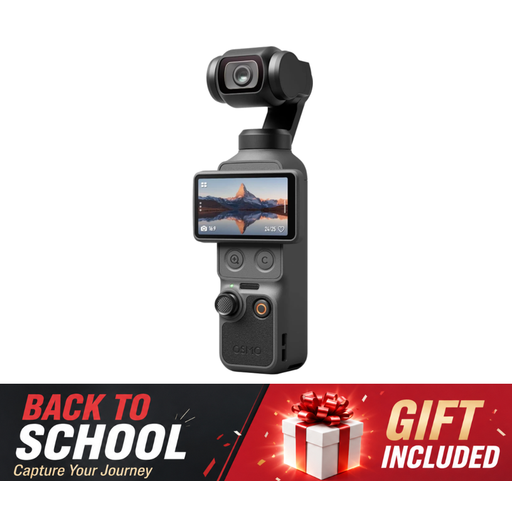 Image unavailable
A compact gimbal vlog camera for moving footage around your work.
The product name lists 4K/240fps, 1″ CMOS, 3-axis stabilisation, 2× lossless zoom, 107GB of built-in storage and a 2″ rotating screen.
 Image unavailable
A webcam option for recording or sharing video through a computer.
The product name lists 4K UHD, 8MP, autofocus, two built-in microphones, a privacy cover and EU Version, Black.
 Image unavailable
A webcam for video through a computer; the product name mentions clip mounting.
The product name lists 2K QHD, a noise-cancelling microphone and the EU Version, Silver variant.
 Image unavailable
A pocket camera whose product name lists video recording as a use.
The product name lists 4K, 44MP, 16X zoom and the colour Pink.
 Image unavailable
A mirrorless camera with a zoom lens for choosing between different framings.
The product name lists a 16–50mm zoom lens and the colour Black.
Check the focusing distance of the exact camera and lens combination where you plan to film. DJI gives the Osmo Pocket 3 a minimum focusing distance of 20 cm; with a mirrorless camera, close-up suitability also depends on the lens you choose.
Yes. Several models can be used with a computer: Logitech describes the Brio 4K as a USB webcam, and Canon lists a USB webcam function for the EOS R50. Also check that your computer, recording software and mounting setup suit the way you work.
Check whether the lens and mount you need are included with the specific offer. For consumer purchases in the Netherlands, you are entitled to a product that meets the required standards; the Dutch government advises contacting the seller if there is a problem with a product. For distance purchases, the cooling-off period is usually 14 days.
If you film and publish on behalf of a business or organisation for professional or commercial purposes, the Dutch Data Protection Authority says the GDPR applies and you need a valid legal basis. Consent can be one example; don't assume the same rules apply to purely private use.