Who is this guide for?

Puzzlers who want to film the whole board

You want a steady overhead view that keeps both your hands and the puzzle in shot. Measure your work surface and compare it with the camera’s capture area; for example, IPEVO lists a maximum of 440 × 330 mm for the V4K PRO 120.

Anyone explaining small details

You want to capture numbers, letters and individual steps clearly, so framing, focus and lighting matter. Elgato lists a minimum focusing distance of 10 cm for the Facecam Pro; the final image’s clarity also depends on the recording distance and crop.

Live puzzle streamers

You record explanations or stream via a computer, and want your camera, recording app and audio to work well together. Logitech describes a downward-facing Show Mode for the MX Brio; also check the mounting options and audio setup.

What should you consider when choosing?

Document camera

A good fit if: you mainly want to film a work surface from above and your puzzle fits within the capture area of the model you choose.

Bear in mind: a large capture area doesn’t automatically mean small letters will be clear in the video. Check the connection and recording app too.

Webcam

A good fit if: you record or stream via a computer and also want to use the camera to explain things at your desk.

Bear in mind: a downward-facing mode doesn’t guarantee that the whole puzzle will appear straight and fully in shot. Check how it can be mounted.

Mirrorless camera

A good fit if: you want to choose your own lens and audio setup, for example for separately recorded explainer videos.

Bear in mind: the lens, recording distance and mount all affect whether the whole puzzle fits usefully in shot. Check what’s included in the kit too.

What to consider What should you check? Who should pay particular attention?
Full overhead view Measure your puzzle and check the stated capture area or achievable camera height. Also test with your hands in shot. If I want to show the whole puzzle and my hands at the same time, I need to know the work surface will fit in shot. Around 36% of consumers prioritise a full overhead view.
Clear details Film the smallest text in your actual lighting conditions, then check the focus, reflections and saved recording. If small numbers or steps matter, I want to be able to read them on the final screen too. Around 29% of consumers give clear detail the highest priority.
Live video and audio Check your computer port and recording app, then test video and audio together. Decide whether you need a separate microphone. If I’m explaining things live, I want my computer, camera and spoken commentary to work together. Around 21% of consumers focus mainly on a practical live setup with audio.
Long recordings Test a recording as long as your planned session and check the power supply, storage space and whether the recording continues uninterrupted. If I want to record a full puzzle session, I don’t want to miss a step halfway through. Around 14% of consumers prioritise uninterrupted recording.

Common buying mistakes

  • Assuming 4K will automatically make small puzzle details clear

    The puzzle’s size and the crop both affect how large a character appears on screen. A wider frame may show the whole board, but make small clues harder to see.

    Film your own puzzle and review the saved footage at the size your viewers will see it.

  • Choosing a webcam without planning how to mount it overhead

    A feature that tilts the webcam down doesn’t guarantee a straight, complete view of the work surface.

    Check whether you can position the lens above the centre of the puzzle, then make a test recording with your hands in shot.

    Your setup may require a suitable mount and separate lighting.

  • Assuming all mirrorless camera kits are the same

    The camera body and lens together determine the framing, and kit contents can vary.

    Check everything included in the kit and make sure the lens and recording distance suit the size of your puzzle.

    A suitable lens, mount or extra audio equipment may be part of the setup you need.

  • Confusing the Facecam Pro with the Facecam 4K

    Elgato lists variable focus for the Facecam Pro and fixed focus for the Facecam 4K.

    Check the full model name and focusing specifications of the version you’re looking at.

Camera brands to consider

IPEVO

The V4K PRO 120 is IPEVO’s USB document camera, with an adjustable arm for filming a work surface from above.

  • IPEVO lists autofocus, USB-A and a maximum capture area of 440 × 330 mm for the V4K PRO 120.
  • Measure your puzzle and make a test recording to check that small characters remain clear.

Logitech

The MX Brio is a webcam for computer recording, with Show Mode to angle the camera down towards work on a desk.

  • Logitech lists 4K at 30 fps or 1080p at 60 fps, along with adjustable image settings.
  • Show Mode alone doesn’t tell you whether a large puzzle will fit fully in shot from directly above. Check the mounting options.

Elgato

The Facecam Pro is a webcam for computer recording that lets you adjust the focus yourself.

  • Elgato lists autofocus and manually lockable focus for the Facecam Pro, with a range starting at 10 cm.
  • Elgato specifies USB 3.0 Type-C and no built-in microphone. Check your computer port and arrange separate audio if needed.

Canon

The EOS R50 V is a mirrorless camera for a setup where you choose the lens yourself and want to control audio separately.

  • Canon lists interchangeable RF lenses, a microphone input and a headphone output.
  • How well the camera captures a puzzle also depends on the lens you choose and how you mount it.

Sony

The ZV-E10 II is a mirrorless camera with an interchangeable lens, for anyone who wants to put together their own recording setup.

  • Sony lists video up to 4K 60p and offers, among other options, a kit with a 16–50 mm power zoom lens.
  • The video specifications don’t confirm whether the lens can capture your entire puzzle at your chosen recording distance.

Joybuy products

This selection includes webcams and video cameras for recording on a computer or in a home studio. Check whether each model’s mount, camera angle and recording app suit an overhead puzzle setup.

DJI Osmo Pocket 4 Standard Combo, black

DJI Osmo Pocket 4 Standard Combo

A possible choice if you’re looking for a pocket-sized vlogging camera for video recording. Check whether your mount lets you film the puzzle from above.

The title lists 1″ CMOS, 4K/240fps, 3-axis stabilisation and 107GB of built-in storage.

Joybuy
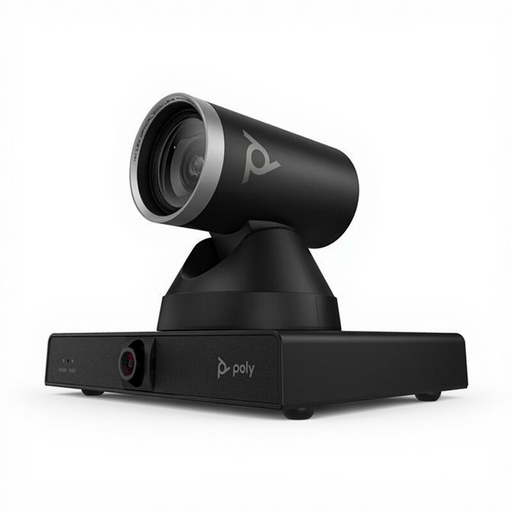
HP Poly Studio E60 Smart Camera

HP Poly Studio E60 Smart Camera

A video conferencing camera can work for this setup only if you can position it securely above the puzzle and capture the entire work surface.

The product title lists 4K, MPTZ and 12x optical zoom. Check that your mount can support its weight of 1,79 kg.

Joybuy

HP Poly Studio E70 Smart Camera

HP Poly Studio E70 Smart Camera

Before using this smart camera to film a puzzle, check that you can position it above the work surface and capture the view you want.

The title identifies this model as a smart camera. The stated setup uses mains power and HP Poly software.

Joybuy

Philips 4000 Series 4K UHD Webcam, EU Version, Black, SPL6408BT/00

Philips 4000 Series 4K UHD Webcam, EU Version, Black, SPL6408BT/00

Could suit computer recordings with spoken commentary. Check that you can mount the webcam securely above the puzzle and get the framing you want.

The title lists 8 MP, autofocus and built-in dual microphones.

Joybuy

Insta360 Link 2C Standard Bundle, Graphite Black

Insta360 Link 2C Standard Bundle, Graphite Black

Could work for computer recording or streaming. Test whether the camera angle and mount are suitable for filming a puzzle from above too.

The title lists a 4K webcam for PC and Mac, a 1/2″ sensor and HDR.

Joybuy

Frequently asked questions

How can I check whether small numbers or letters are clear?

Make a short recording using your own puzzle, your hands and the lighting you plan to use. Review the saved footage rather than relying only on the live preview; a large capture area doesn’t guarantee clear details.

Do I need a computer to use a webcam or document camera?

For the IPEVO V4K PRO 120, IPEVO lists a USB-A connection for use with a compatible computer or supported app; Elgato specifies USB 3.0 Type-C for the Facecam Pro. Before buying, check that your device supports the connection and recording app.

Should I buy a microphone and lighting straight away?

Not necessarily. First check whether your hands and the characters are visible and whether your commentary is clear. Make sure you check the exact model: Elgato says the Facecam Pro has no built-in microphone. A different audio setup may be enough for a voice-over recorded later, compared with speaking live.

What are my rights if I’m unhappy with a camera bought online or it’s faulty?

For online consumer purchases, you generally have a 14-day cooling-off period from delivery, subject to exceptions. Separately, the seller is responsible for the legal guarantee if a product doesn’t meet what you could reasonably expect. ACM ConsuWijzer explains the cooling-off period; the Netherlands Authority for Consumers and Markets covers the seller’s responsibilities under the legal guarantee.

Can I publish a video of my puzzle if other people are recognisable in it?

The exception for personal or household use may apply if you keep your recordings private or share them with a very small group. It doesn’t apply to wider publication; for recognisable people, you’ll need an appropriate legal basis under the GDPR. The Dutch Data Protection Authority distinguishes between private use and sharing with a wider group.
