Start with the smartphone you already own if it can take the photo you need; you don’t automatically need a new camera for a single school project. If you do want a separate camera, compare a compact camera with a fixed lens for simplicity with a mirrorless camera and suitable lens if you’d like to take portraits more often and have greater control. Whatever you choose, check that the whole group will fit in the space available and work out how you’ll get yourself in the photo.
Who is this guide for?
Taking the family group photo
You want everyone, including yourself, to be clearly in focus and recognisable within the space available. Think about framing, positioning everyone and how to trigger the camera remotely. Canon Netherlands also covers where to position family members for group portraits.
Taking portraits by a window
You’re taking photos indoors and want faces to be well lit. The combination of light, lens and settings matters more than a high megapixel count alone. Canon Netherlands explains how the aperture setting affects depth of field.
Taking photos for a one-off project
You mainly need a photo for this project and want to check whether your existing phone will do the job before buying a camera and any extra accessories. The Consumers’ Association explains the differences between compact cameras and cameras with interchangeable lenses.
What should you look for?
First, take a test shot in the place where you want to take the photo. For a group portrait, distance, available light and enough room to frame everyone properly are at least as important as the camera itself.
Your existing smartphone
Choose this option: if you mainly need a simple photo for this project and your phone delivers the result you want from the spot you’ve chosen.
The trade-off: you may avoid an extra purchase, but assess the actual test shot rather than assuming every phone will work in every situation.
Compact camera with a fixed lens
Choose this option: if you want a separate camera without changing lenses; check that the wide-angle setting captures the whole group.
The trade-off: the lens can’t be changed. The Consumers’ Association warns that a very wide zoom range on compact cameras can go hand in hand with a small sensor and lower photo quality.
Mirrorless camera with a suitable lens
Choose this option: if you’d like to take portraits more often after the school project and want to be able to change the lens or settings.
The trade-off: a body without a lens isn’t a complete camera kit. A wide aperture can make a single portrait stand out, but if people’s faces are at different distances, you’ll also need to make sure there’s enough depth of field.
| What to consider |
What to look for when buying |
Who is this important for? |
| Getting everyone in focus |
Test the angle of view from the distance you plan to shoot at; where possible, position faces roughly in the same plane. |
If I want to photograph the whole family in a small room, everyone needs to fit in the frame and be in focus. Around 31% of consumers prioritise group framing and focus. |
| Indoor portraits |
Assess test shots in the room’s lighting and consider the combination of sensor and lens. The Consumers’ Association points out that both contribute to photo quality. |
For a portrait in the room where the project will take place, I want to know what I can achieve with the available light. Around 25% of consumers prioritise getting usable indoor portraits. |
| Getting yourself in the photo |
Check whether the model has a self-timer or remote control, and try out the setup in advance. |
If I want to be in the group photo too, I need to be able to start the shot after joining the family. Around 19% of consumers prioritise being in the picture themselves. |
| Keeping things simple for a one-off project |
First, take a test shot with the equipment you already own; if you’re considering a mirrorless camera, check whether the kit includes a lens. |
For a single school project, I want to avoid unnecessary purchases and extra equipment. Around 25% of consumers prioritise simplicity and spending appropriately. |
Buying pitfalls
-
Focusing only on the megapixel count
A high megapixel count alone doesn’t tell you how well a camera will take a portrait. The Consumers’ Association points out that the lens and image sensor both play an important part; low light can also affect the result.
Compare test shots taken in lighting similar to the place where you’ll be taking the photo, and consider the sensor and lens alongside the resolution.
-
Comparing a camera body on its own with a complete kit
With a mirrorless camera, the lens may be sold separately. A body-only version is therefore not the same camera kit as a version that includes a lens.
Check exactly what’s included in the version you’re considering before making a decision; buying a separate lens also means making an extra choice.
-
Prioritising maximum zoom for a small room
When the group is nearby, the first thing to check is whether everyone fits in the frame using the wide-angle setting. The Consumers’ Association notes that a very wide zoom range on compact cameras can go hand in hand with a small sensor and lower photo quality.
Test the wide-angle setting from the distance available, and only then consider whether you need extra zoom.
Brands to compare
Canon
The EOS R50 with RF-S 18-45mm kit lens is a mirrorless camera option for anyone looking to take both group and individual portraits.
- Canon specifies an APS-C sensor, eye and face detection, and support for RF and RF-S lenses for the EOS R50.
- Check the lens and setup separately: Canon doesn’t list sensor-shift image stabilisation in the camera body.
Panasonic
The LUMIX DC-TZ99 offers a compact option with a fixed zoom lens for anyone who doesn’t want to carry separate lenses.
- Panasonic specifies 30× optical zoom and a 24 mm full-frame equivalent wide-angle setting.
- The zoom range doesn’t prove that the camera will perform better indoors for a family portrait; the lens can’t be changed.
Nikon
The Z50II with NIKKOR Z DX 16-50mm f/3.5-6.3 VR kit lens is a mirrorless camera option for anyone who may want to use other lenses in future.
- Nikon describes the kit lens as suitable for shots ranging from wide-angle to portrait, and specifies that the lens has image stabilisation.
- Whether the group fits in the frame also depends on the distance available. Check that the version you choose actually includes the lens.
Sony
The ZV-E10 is a mirrorless camera option if you want to be able to join a group photo after setting it up.
- Sony specifies an APS-C sensor, E-mount and 2-, 5- and 10-second self-timer settings for the ZV-E10.
- Check whether the version includes a lens or is body-only; these specifications don’t automatically make the camera suitable for every group setup.
Joybuy products for family portraits
These options range from an instant camera and compact cameras to mirrorless cameras with lenses. Think about how you want to frame the group, whether you want to be in the photo yourself and what’s included with the version you choose.
 No image available
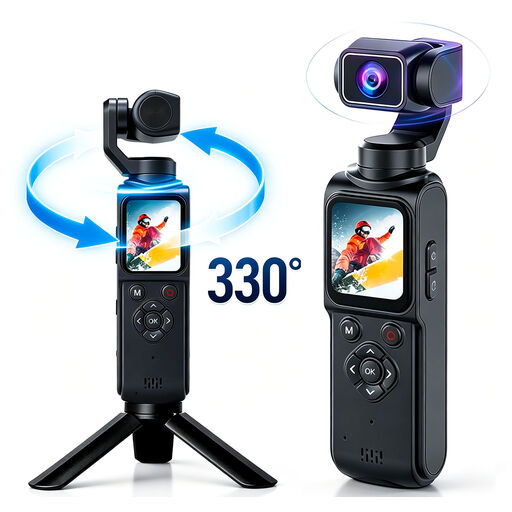
4K action camera with 330° rotating lens
This could suit you if you’re looking for a compact camera with a self-timer; take a test shot in advance to check the framing and controls for your group photo.
The product information lists a 1.72-inch touchscreen, autofocus and photos up to 64 MP with a 16 MP CMOS sensor.
A high-speed memory card is required; a memory card isn’t included.
View at Joybuy
 No image available
NAXSIR 4K Ultra HD digital camera
The product information lists a self-timer; try the camera in your planned setup to check whether it captures the whole group from the distance you want.
The title specifies photos up to 64 MP, 18× digital zoom and a 32 GB memory card.
View at Joybuy
 No image available
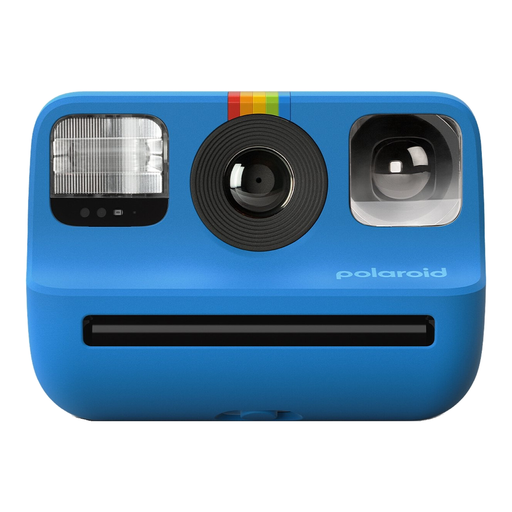
Polaroid Go Gen 2 - Blue
An option if you want to take a physical photo for your project; the camera uses Polaroid Go film. Check whether film is included with the version you choose.
The product information lists a self-timer, flash and selfie mirror. The print size is 66,6 × 53,9 mm.
View at Joybuy
 No image available
Sony ZV-E10 + 16-50mm Zoom Black
A mirrorless camera option if you want an interchangeable lens and the ability to check the framing in advance; the product information lists a tilting screen.
This version is listed with a 16–50mm zoom lens and a 24,2 MP APS-C sensor. Sony specifies a 2-, 5- or 10-second self-timer for the ZV-E10.
View at Joybuy
 No image available
Sony Alpha A6100 + 16-50mm f/3.5-5.6 OSS II
A mirrorless camera with a lens for anyone who wants to frame and focus on faces; try it out with the whole group in advance.
The product information lists a 24,2 MP sensor, viewfinder, tilting screen and Eye AF for people. This version includes a 16–50mm kit lens.
View at Joybuy
Frequently asked questions
Do I need to buy a camera for this one school project?
Not necessarily. First, take a test shot of the whole group with the phone you already own, in the place you plan to take the photo. It’s only worth considering a separate camera if the result or the controls don’t meet your needs.
How can I stop some family members being out of focus?
Where possible, position faces at roughly the same distance from the camera, then check the focus in the photo you’ve taken. On a camera with an adjustable aperture, a smaller aperture increases depth of field; bear the available light in mind. Canon Netherlands explains how aperture and depth of field are linked.
What should I check when buying a new mirrorless camera?
Check whether the version you’ve chosen includes a lens, and see which battery, charger and storage options are included. An offer for the body only isn’t the same purchase as a lens kit.
Who should I contact if a camera I’ve bought breaks too soon?
According to ACM ConsuWijzer, the retailer is responsible for the statutory guarantee. If a product breaks while you’ve been using it normally, the retailer must offer an appropriate solution free of charge. A manufacturer’s guarantee doesn’t replace this right.
Can the school publish identifiable photos of pupils from the project?
There are rules about consent for identifiable images taken or published by a school. The Dutch Data Protection Authority states that parental consent is needed for a pupil under 16; from the age of 16, the pupil can give consent themselves. This doesn’t automatically mean you can’t take a private family photo for homework: ask how the school will use the image you submit.


