For a simple set-up without changing lenses, a compact camera with a macro mode is a practical option. If you want more precise control over magnification and camera angle, consider a mirrorless camera with a suitable macro lens. Always check the lens or macro mode on the exact model: a kit zoom lens is not automatically a macro lens. Leave room for soft lighting and take test shots, as metal and enamel can reflect light, while close-ups require precise focusing.
Who is this option for?
Pin maker who needs detailed photos
If you want to capture tiny lines, letters or edges in close-up, it’s worth comparing the magnification offered by the actual lens or macro mode. Canon Netherlands notes that precise focusing in macro photography can be difficult because of the shallow depth of field.
Seller with shiny pins
To keep metal and enamel clearly visible in your photos, it’s important to leave room for soft lighting around the table. Proshoots highlights reflections as something to watch out for when photographing metal objects.
Maker with limited set-up space
If you want to photograph both a whole pin and a few close-ups, without lots of separate equipment, compare compact cameras with a macro mode. Make sure the working distance leaves enough room for lighting.
What should you look for in a camera for pins?
Compact camera with macro mode
Suitable for: anyone who wants to photograph both a whole pin and its details without changing lenses. OM SYSTEM lists a Microscope Macro mode for the TG-7.
Bear in mind: shooting at close range can leave less room for lighting. The TG-7 with the LG-1 is a specific bundle, not the same as the camera on its own.
Mirrorless camera with a macro lens
Suitable for: anyone who wants to adjust magnification, lens choice and camera angle separately. Canon confirms that the EOS R50 supports RF and RF-S lenses.
Bear in mind: consider the camera body and lens together. A kit zoom lens is not automatically a macro lens, and the working distance you need depends on the lens.
Mirrorless camera with focus stacking
Suitable for: anyone looking to capture sharpness across different depths of a pin. OM SYSTEM lists focus stacking for the OM-5 Mark II; the Canon EOS R50 manual describes focus bracketing and an adjustable in-camera merge function.
Bear in mind: stacking requires multiple shots and a stationary subject. It doesn’t remove the need to manage reflections.
| What to consider |
What to check before buying |
Who should consider this? |
| Magnifying small details |
Compare the maximum magnification of the exact lens or the capabilities of the macro mode. Test both a whole pin and its smallest important detail. |
If I want to show fine lines or letters in close-up, I need to know what the chosen lens can actually capture. Around 33% of consumers put detail magnification first. |
| Managing reflections |
Check whether there’s room around the camera and pin for diffused light or a diffuser. Assess reflections with a test set-up. |
With shiny enamel, I want to avoid distracting reflections of the surroundings or lighting. Around 27% of consumers prioritise managing reflections. |
| Getting the whole pin in focus |
Take a test shot first. Then compare the focusing method and any stacking function available on the exact camera and lens combination. |
If both the raised edge and the centre of my pin need to be sharp, I want to see how the camera handles different focusing distances. Around 20% of consumers prioritise depth of field. |
| A simple set-up |
Check which items are included in the offer, then plan where to place the pin, camera and lights within the space available on your table. |
With limited space, I want as few separate items as possible, while still leaving room to light the pin properly. Around 20% of consumers prioritise a simple set-up that suits their needs. |
Common purchasing pitfalls
-
Mistaking a kit zoom lens for a macro lens
The 1.4x magnification quoted by Canon applies to the separately sold RF 100mm F2.8L Macro IS USM, not to every EOS R50 bundle.
Compare the lens actually included in the offer with the smallest detail you want to photograph.
A suitable macro lens may need to be bought separately.
-
Focusing only on the minimum working distance
Shooting very close up can leave less room for lighting. Proshoots highlights reflections as something to watch out for when photographing metal; OM SYSTEM specifically describes the LG-1 as a light guide that prevents shadows from the TG-7.
Plan where to position the camera, pin and lights, and test for reflections on an actual pin before choosing your set-up.
-
Relying solely on the manufacturer’s warranty
The Government of the Netherlands distinguishes between a manufacturer’s warranty and your statutory rights. If a product is faulty, the retailer is your point of contact; there is no fixed statutory warranty period in the Netherlands.
Keep your purchase and bundle details, and compare any extra warranty on offer with the rights that apply to your purchase.
Camera brands to consider
OM SYSTEM
The TG-7 offers a compact camera option with a Microscope Macro mode; the OM-5 Mark II is a mirrorless camera option with focus stacking.
- OM SYSTEM lists focus stacking for the OM-5 Mark II.
- The LG-1 comes with a specific TG-7 bundle; the light-guide feature is not automatically included with every TG-7 sold on its own.
Canon
The EOS R50 paired with a separately chosen RF macro lens is an option for anyone who wants to tailor magnification and focusing to each lens.
- Canon documents RF and RF-S lens compatibility for the EOS R50, along with focus bracketing and an adjustable merge function.
- Canon specifies maximum 1.4x magnification for the separately sold RF 100mm F2.8L Macro IS USM; this is not a specification for every EOS R50 kit zoom lens.
Nikon
A Nikon Z camera body paired with a separately purchased Z macro lens is an option if you’re looking for a system with interchangeable lenses.
- Nikon lists 1:1 magnification for the NIKKOR Z MC 50mm f/2.8 and states that Z-mount lenses can be used on the Z50II.
- The macro lens is not automatically included with a Z50II body offer, so check what’s in the bundle.
Sony
Sony’s E-mount macro lenses include the E 30mm F3.5 Macro, an APS-C option.
- Sony specifies a 1:1 reproduction ratio and a minimum focusing distance of 2.4 cm for the E 30mm F3.5 Macro.
- Check whether the chosen camera body and crop leave enough room to light a pin on a small table.
Cameras at Joybuy
This selection includes compact and mirrorless cameras for general photography. For each model, check whether the lens, macro magnification and set-up are suitable for photographing pins; a zoom specification alone tells you nothing about macro magnification.
 No image available
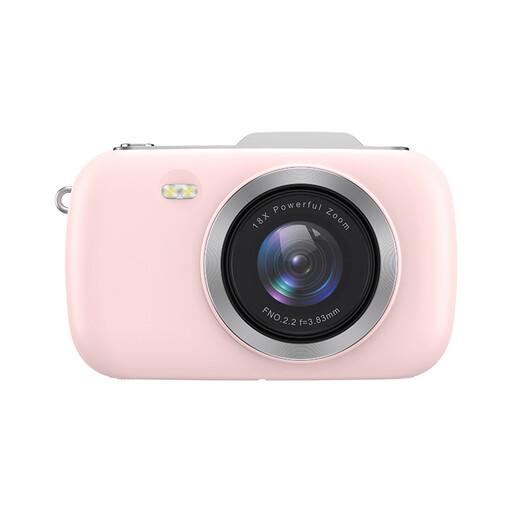
KOMERY G7-A 4K digital camera, pink
A digital camera for photography; the listed 18x zoom is not a measure of macro magnification.
The product name lists 80MP, 4K and a portable camera.
View at Joybuy
 No image available
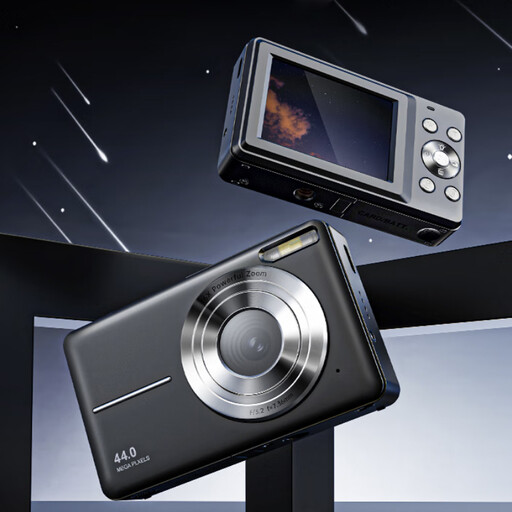
Songdian 4K pocket camera, 44MP, black
A compact camera for photography and video; the description lists autofocus.
The product name lists 44MP, 4K and 16X zoom. Zoom is not the same as macro magnification.
View at Joybuy
 No image available
Sony Alpha A6100 with 16–50 mm f/3.5–5.6 OSS II
This offer includes a lens. Check whether the combination leaves enough working space on your table and whether the lens suits your close-up needs.
The product information lists a 24.2MP APS-C sensor and a 16–50mm lens.
View at Joybuy
 No image available
Sony ZV-1 compact camera
A compact camera for anyone considering a fixed camera set-up. Take a test shot to check whether you can get the close-up you want.
The product information lists 20 Mpx, 2.7x optical zoom and support for JPEG and RAW photos.
View at Joybuy
 No image available
Sony ZV-E10 mirrorless camera, body only
This is the camera body only; no lens is included, so you’ll need to choose one that suits the shot and set-up you want.
The product information lists an APS-C sensor and compatibility with Sony E-mount lenses.
View at Joybuy
Frequently asked questions
Do I need a macro lens if I already have a camera?
Not necessarily: start by taking a test shot with your current set-up. Check that both the whole pin and the detail you want are sharp and large enough in the frame. Canon Netherlands notes that focusing for macro shots can require precision.
How do I start lighting a shiny pin?
Place the pin securely and try using diffused light from the side. Move the light or camera if you can see distracting reflections in the metal; a camera won’t create this lighting set-up for you.
Are focus bracketing shots automatically merged on the Canon EOS R50?
Not always: the Canon EOS R50 manual describes both an in-camera merging setting and the option to save only individual images. Check your chosen setting before taking a series of product photos.
What should I know about warranties and online returns in the Netherlands?
When you buy as a consumer, the retailer is responsible for faulty products; the Government of the Netherlands states that there is no fixed statutory warranty period in the Netherlands. For online purchases from a business, you generally have a 14-day cooling-off period. Check whether these rules apply to your purchase and what terms or exceptions may apply.


