You don’t need a new camera for every enamel pin photo. For an overview shot, start by trying your current phone in a fixed setup with controlled lighting. If you need fine lines and edges to stand out clearly, choose based on the lens’s magnification and working distance. A compact camera with close-up modes needs fewer separate components, while a mirrorless camera with a suitable macro lens gives you more lens options. Neither option will, by itself, make the background white or prevent reflections.
Who is this camera choice relevant to?
Pin maker showcasing details
You want fine lines and the finish to remain recognisable in close-ups. First decide how large the smallest detail needs to appear in the frame, then choose a suitable lens and camera body. Canon Netherlands, Nikon Netherlands and Sony Netherlands publish lens specifications for individual models.
Online shop owner with lots of pins
You want consistent crops, a clean white background and similar colours across your photos. A fixed camera and lighting setup helps you shoot the whole range in the same way. Canon Netherlands describes a tripod as a way to keep framing and backgrounds consistent.
Beginner with limited equipment
You want to take usable product photos without immediately buying both a camera body and a separate macro lens. Adobe lists a smartphone as one possible starting point. Take a test shot first and check that the details remain visible at the size you want to display them.
What should you look for in cameras for enamel pins?
Your current smartphone
Choose this option if: you mainly need overview shots and want to test whether your current phone captures enough detail. Adobe lists a smartphone as one possible option for product photography.
Bear in mind: the result depends on your phone’s close-up capabilities. Check a test image at the size you intend to display it.
Compact camera with close-up modes
Choose this option if: you want to photograph small pins without changing separate lenses. OM SYSTEM describes the Tough TG-7 as a compact camera with a fixed lens and macro modes.
Bear in mind: a fixed lens gives you less freedom to choose a different lens later. Also check how much space there is around the pin for lighting.
Mirrorless camera with a macro lens
Choose this option if: you want to show fine edges or individual details at a larger size, and choose the camera body and lens separately. Sony and Nikon specify 1:1 magnification for the E 30 mm F3.5 Macro and NIKKOR Z MC 50mm f/2.8 respectively; Canon specifies a maximum of 1:2 for the RF 35mm F1.8 Macro.
Bear in mind: check the lens mount, what’s included in the kit and the clearance in front of the lens. The magnification figures quoted are manufacturer specifications and don’t, by themselves, tell you which complete setup will produce the better pin photo.
| Consideration |
What should you check? |
Which consumers? |
| Capturing small details clearly |
Check the maximum magnification, lens mount and available working distance. If possible, take a test shot showing the whole pin and its smallest detail. |
I want fine lines and the edge of my pin to remain recognisable in a close-up. Around 33% of consumers give capturing enough detail their top priority. |
| Colour and a white background |
Check whether you can set the white balance and whether RAW shooting matters for your editing. Canon Netherlands explains that the light source can affect how white appears. |
When I photograph pins for an online shop, I want the colours to look right and the background to appear clean and white. Around 27% of consumers put colour and background first. |
| A repeatable series of photos |
Check whether you can mount the camera on a tripod and see the screen from your chosen shooting position. Keep the lighting setup as consistent as possible. |
When photographing a series of pins, I want to be able to repeat the framing and exposure easily. Around 20% of consumers give a consistent, repeatable process their top priority. |
| As little extra equipment as possible |
First compare a test shot with your current device, then check exactly which lens is included with a camera kit. A camera body with a standard zoom isn’t automatically a complete macro setup. |
I want to know whether I can use my current equipment before buying a camera body and a separate lens. Around 20% of consumers give simplicity and minimal extra equipment their top priority. |
Common mistakes when choosing
-
Mistaking a kit zoom for a macro lens
A standard zoom and a separate macro lens can have different maximum magnifications. Canon specifies a maximum of 0.16× at 45 mm with autofocus for the RF-S 18-45mm, and a maximum of 0.5× for the RF 35mm Macro.
Check the full lens model and the maximum magnification of the exact kit on offer.
You may need to buy a separate compatible macro lens as well as a camera body to get the close-ups you want.
-
Focusing only on the minimum focusing distance
A stated focusing distance may be measured from the image sensor. The clearance between the front of the lens and the pin also affects where you can position your lighting.
Check the point from which the distance is measured and assess the clearance in front of the lens at the magnification you want.
You may need to adjust the position of the lighting or the pin to get the light where you need it.
-
Expecting a different camera to fix the background and reflections
A white background can look different under different lighting, while shiny parts of a pin can reflect light. Adobe recommends a controlled environment and good lighting; Canon Netherlands explains how white balance affects colour reproduction.
First test a setup with diffused light and assess the background, colours and shiny areas before choosing based on camera body specifications.
A fixed setup takes preparation and may require extra background materials or time for editing.
Camera brands and suitable macro options
Canon
EOS R mirrorless cameras can be paired with a suitable RF or RF-S lens. The EOS R50 and RF 35mm F1.8 Macro are examples specified separately for close-ups.
- Canon specifies a maximum magnification of 1:2 for the RF 35mm F1.8 Macro.
- The RF-S 18-45mm kit zoom has a different maximum magnification. Don’t assume one lens has the same close-up capabilities as another. These are manufacturer specifications, not an independent comparison.
Nikon
The Z50II is a Nikon Z camera body. Nikon also says that the separate NIKKOR Z MC 50mm f/2.8 can be used on a DX body.
- Nikon specifies 1:1 magnification for this lens.
- At the closest focusing setting, Nikon states that there is approximately 5 cm between the front of the lens and the subject. Check that there’s enough room for diffused light and that the lens is actually included in the kit on offer.
Sony
A Sony E-mount camera body such as the ZV-E10 can be paired with the separate E 30 mm F3.5 Macro lens, model SEL30M35.
- Sony specifies 1:1 magnification for the lens and lists RAW shooting for the ZV-E10.
- The stated focusing distance of 0.095 m is measured from the image sensor to the subject; it isn’t the clearance in front of the lens. These specifications don’t prove that the final photo will be better than with other options.
OM SYSTEM
The Tough TG-7 is a compact camera with a fixed lens and macro modes, for anyone who doesn’t want to choose an interchangeable macro lens.
- OM SYSTEM lists 12 megapixels and RAW shooting.
- The fixed lens limits your options for changing lenses later. The weather protection highlighted by the brand isn’t, by itself, a deciding reason to choose this model for photographing pins on an indoor table.
Joybuy products for photographing pins
These Joybuy products are cameras and camera kits you can compare for product photography. Check each model to make sure the lens and close-up capabilities suit the crop you want for an enamel pin.
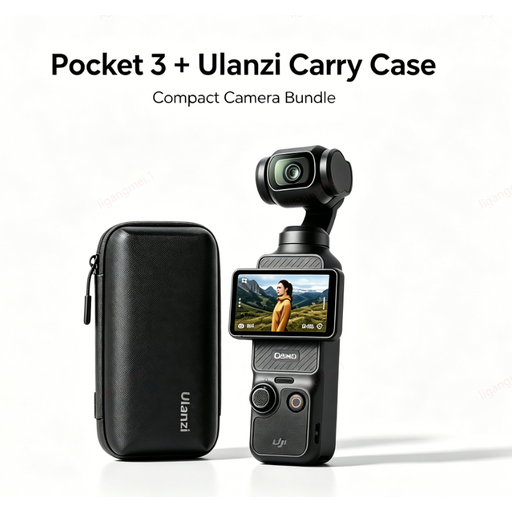 Image unavailable
DJI Pocket 3 camera with Ulanzi Custom Storage Carry Case
Check whether its close-up capabilities suit the crop you want for a pin; the product name doesn’t specify a macro lens.
The product name mentions a Ulanzi Custom Storage Carry Case.
View at Joybuy
 Image unavailable
KINSI Mini Vlog Camera 4K, 64 MP, 330° Rotatable Lens
Check whether this camera can capture the small details of your pin at a large enough size; the product name doesn’t mention a macro lens.
The product name lists 64 MP and a 330° rotating lens.
Also listed: a 1.72-inch touchscreen, face recognition, a tripod and Type-C.
View at Joybuy
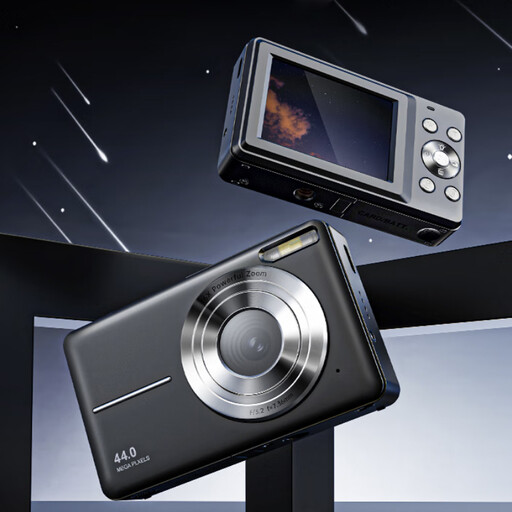 Image unavailable
Songdian Pocket Camera 4K, 44 MP, 16× zoom, black
Before choosing this camera for small details, check whether it can take the close-up of a pin you want.
The product name lists 4K, 44 MP and 16× zoom; the zoom is digital.
View at Joybuy
 Image unavailable
Sony ZV-E10 with 16–50mm zoom lens, black
The kit name lists a 16–50mm zoom lens. Check whether its magnification is enough for the smallest details on your pins.
Also check that the lens included in the offer is suitable for the close-ups you want to take.
View at Joybuy
 Image unavailable
Sony ZV-1 compact camera
If you’re considering a compact camera, check that its close-up capabilities are suitable for the crop you need.
The product description lists RAW shooting, 2.7× optical zoom and a tilting touchscreen.
View at Joybuy
Frequently asked questions
Do you need a macro lens for every enamel pin photo?
No, not for every overview shot. First take a test photo with your current phone. If the fine details still look too small, compare the magnification and working distance of a suitable lens or close-up camera. Adobe lists a smartphone as one possible option for product photography.
Why does my white background have a colour cast?
The light source can affect how white appears in the photo. Canon Netherlands explains that white balance can help correct a colour cast. Check the setting under the lighting you’ll actually use to photograph your pins.
How can I keep the framing consistent across a series of pin photos?
Keep the camera and lighting in fixed positions, and use a tripod if it suits your setup. Canon Netherlands describes a tripod as a way to keep framing and backgrounds consistent.
What can I do if a camera I bought online develops a fault?
For a consumer purchase, ACM ConsuWijzer says the seller is your point of contact if a product breaks sooner than you could reasonably expect under normal use. A suitable solution could be a free repair, replacement or refund.
Can I use someone else’s photo in my product listing without asking?
Not necessarily. According to the Government of the Netherlands, you need the creator’s permission to use and publish someone else’s copyrighted photos. You can’t simply distribute a copy for your own use.


