For close-ups of individual stitches, a camera and lens combination with suitable magnification and enough space to light the bag is a sensible choice. For a full view, the framing you want and a stable setup matter more. A compact camera with built-in close-up capabilities keeps your kit simple, while a system camera with a macro lens gives you more choice of magnification and framing, but also requires a separate lens and possibly other accessories.
Who is this choice relevant for?
Embroidery detail maker
You want to capture stitches, thread and texture individually. So look at the magnification, a compatible lens mount and the space left for lighting. Nikon, Fujifilm and Sony describe macro lenses with magnification and distance specifications that are relevant to your choice.
Handmade bag seller
You regularly take both overview and detail shots, and want consistent framing and a recognisable rendering of colour and material. Canon UK discusses product photography as a way to make a design and its texture visible.
Photographer with a simple setup
You want to shoot close up without having to manage an extra lens. Check whether the fixed lens gives you the framing you need for both the bag and its embroidery. OM Digital Solutions describes the close-up capabilities of the Tough TG-7.
What should you look for when choosing?
Compact camera with close-up function
Choose this option if: you don’t want to change lenses and the built-in lens gives you the framing you need.
Bear in mind: the lens is fixed, so check in advance that you can capture both the whole bag and small details clearly.
System camera with close-up lens
Choose this option if: you want to take larger embroidery detail shots as well as overview photos, and the magnification of a close-up lens is sufficient.
Bear in mind: according to Canon, the Canon RF 35mm F1.8 MACRO IS STM does not offer 1:1 magnification and is a separate lens.
System camera with 1:1 macro lens
Choose this option if: you want to capture small stitches with a 1:1 lens and it is compatible with your camera body.
Bear in mind: a short working distance can limit the space available for lighting. A changeable lens also means a more extensive kit.
| What to consider |
What should you check? |
Who is this important for? |
| Magnification of stitches |
Check the maximum magnification of the exact lens and compare it with the detail framing you want. |
If I want to capture individual stitches at a large size, I look at the lens magnification. Around 36% of consumers prioritise the magnification needed to capture stitches. |
| Repeatable photos |
Assess the framing of the whole bag with your chosen lens, and whether you can position the camera steadily. |
If I want to regularly photograph overview and detail shots in the same style, I look for consistent framing and a suitable lens. Around 29% of consumers prioritise repeatable photos of the whole bag and its details. |
| Kit without changing lenses |
Check whether the fixed lens can focus close up and gives you the framing you want. |
If I’d rather not manage an extra lens, I first want to know whether one camera can handle the framing I need. Around 21% of consumers prioritise a simple setup. |
| Light and colour |
Check how much space is left in front of the lens for lighting, and compare the photo with the real bag. |
If I want the colour and texture to look true to life, I take the lighting and setup into account. Around 14% of consumers choose this as their first consideration. |
Buying pitfalls
-
Assuming ‘macro’ means 1:1 magnification
A lens with a close-up function does not automatically offer 1:1 magnification. Canon states that the RF 35mm F1.8 MACRO IS STM does not offer life-size reproduction.
Compare the maximum magnification of the exact lens with the size of the stitches you want to photograph.
Very small stitches may require a lens with a different maximum magnification.
-
Comparing camera bodies alone
The macro features mentioned apply to separate lenses, not just Canon, Nikon or Fujifilm camera bodies. Canon also recommends using a tripod to help achieve consistent product framing.
Compare complete setups and check before buying that the camera body and lens use the same mount.
A compatible macro lens and possibly a tripod are extra items to buy alongside the camera body.
-
Confusing focusing distance with working distance
For the Sony E 30mm F3.5 Macro, Sony lists a minimum focusing distance of 9,5 cm and a working distance of 2,4 cm from the front of the lens. These are different measurements.
Check the working distance of your chosen lens and magnification setting so you know how much space will be left for lighting.
Camera brands to consider
Canon
The EOS R50 body can be paired with a separate RF close-up lens for overview shots and larger embroidery details.
- Canon specifies 24,2 effective megapixels and support for RF and RF-S lenses.
- Canon states that the RF 35mm F1.8 MACRO IS STM does not offer 1:1 magnification; the EOS R50 does not have in-body image stabilisation.
Nikon
A Z50II body with a separate NIKKOR Z MC 50mm f/2.8 makes a system camera setup for 1:1 detail shots.
- Nikon specifies 20,9 million effective pixels for the Z50II and 1:1 magnification for the macro lens mentioned.
- Check that the lens is compatible with the camera body and that this combination works for framing the whole bag.
Fujifilm
The X system can be paired with the separate XF30mmF2.8 R LM WR Macro for everyday use and 1:1 detail shots.
- Fujifilm specifies 1:1 magnification and a minimum focusing distance of 10 cm, measured from the sensor.
- According to Fujifilm, at that distance the subject is almost touching the front of the lens, so allow for space for lighting.
Sony
E-mount cameras can be paired with the separate E 30mm F3.5 Macro for 1:1 detail shots.
- Sony specifies 1:1 magnification and a minimum focusing distance of 9,5 cm for this lens.
- The stated working distance in front of the lens is 2,4 cm, so bear this in mind when lighting the bag.
OM SYSTEM
The Tough TG-7 has a fixed lens and close-up capabilities, making it an option if you don’t want to put together a system with interchangeable lenses.
- OM Digital Solutions lists a minimum distance of around 1 cm and approximately 12 million effective pixels.
- The lens is fixed, so assess whether you can achieve the framing you want for both the bag and the embroidery.
Cameras on Joybuy
The Joybuy options below are DJI cameras. When photographing an embroidered bag, it’s important to check whether the camera can focus at the short distance you need and capture the framing required for both close-up details and the overall view.
 No image available
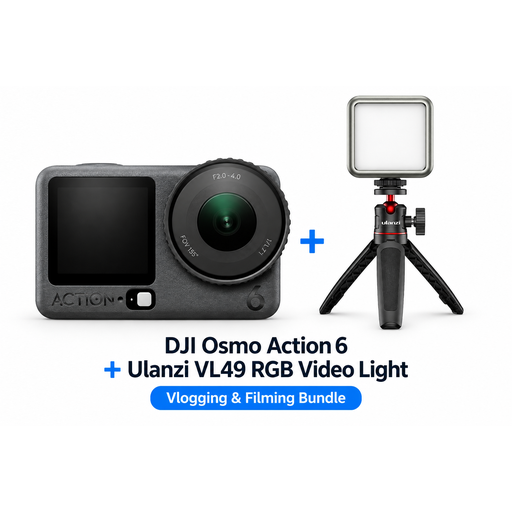
DJI Osmo Action 6 Adventure Combo + Ulanzi VL49 RGB LED Video Light
The bundle description mentions product photography with additional lighting. Check whether the camera offers the close focusing distance and framing you need for the embroidery.
According to the description, the bundle includes a Ulanzi VL49 RGB LED light.
View on Joybuy
 No image available
DJI Osmo Pocket 3 Creator Combo
The bundle description mentions product photography with additional lighting. Check whether the camera can focus at the distance you need to capture small stitches.
The description mentions a 1-inch CMOS sensor and a Ulanzi VL49 RGB LED light.
View on Joybuy
 No image available
DJI Osmo Pocket 3 Creator Combo
This compact camera is described in the product title as suitable for photography. Before choosing it, check whether it can focus close enough for the embroidery details you want to capture.
The product title mentions a 1-inch CMOS sensor and fast focusing for still images.
View on Joybuy
Frequently asked questions
Do you need the same magnification for the whole bag and an individual stitch?
No. For the whole bag, the framing you want from your setup is what matters; for small stitches, the maximum magnification of the exact lens is relevant. Canon describes close-up lenses that do not offer 1:1 magnification, while Nikon specifies 1:1 for the Z MC 50mm f/2.8.
How can you keep the framing consistent across several product photos?
Put the bag and camera in the same positions each time, and use a tripod if you like. Canon recommends a tripod to help achieve consistent framing and reduce camera shake, but that doesn’t mean one is essential for every setup.
Is the minimum focusing distance the free space you have for a lamp?
Not necessarily. Sony lists a focusing distance of 9,5 cm for the E 30mm F3.5 Macro, but a working distance of just 2,4 cm from the front of the lens. So check the working distance of your chosen lens and magnification setting.
What are your rights if a camera you bought in the Netherlands is faulty?
According to the Dutch government, you are entitled to a product that works properly, and you should contact the seller if it is faulty. The Netherlands does not have a fixed statutory guarantee period for all products; a manufacturer’s guarantee does not replace your statutory rights.
Do you have a cooling-off period for an online purchase?
According to the Dutch government, in many cases you have 14 days to change your mind when making a distance purchase online from a business. Check whether the rules apply to your purchase; the same government guidance says that buying online from a private individual is not covered by those distance-selling rules.


