If you’d rather not change lenses while walking through the dunes, consider a compact camera with a built-in zoom lens. If you want more freedom to choose lenses and adjust exposure, compare mirrorless cameras and the lenses they come with. If you regularly take photos in wind and blowing sand, protection for both the camera body and lens matters. However, a protection claim doesn’t guarantee that the complete setup can withstand every coastal condition. In high-contrast scenes, also check what the exact model offers for exposure compensation, RAW or exposure bracketing.
Who should consider these camera options?
Taking photos in changing light
If you take photos in a mix of sunshine, cloud and shade, you’ll want to adjust the exposure and may want to consider RAW or exposure bracketing. Nikon highlights light and exposure bracketing as things to consider in landscape photography.
Taking photos in wind and sand
If you regularly take photos on the coast, check the protection offered by both the camera body and lens, and try to limit lens changes in dirty conditions. OM SYSTEM provides specifications for the OM-5 Mark II body, while Sony recommends changing lenses in a clean environment wherever possible.
Travelling light
If you’re walking through the dunes for a long time, weigh the load of your complete setup against the angles of view you want. The Consumentenbond describes a compact camera as one with a fixed lens; Sony lists the RX100 VII as having a built-in zoom lens.
Which buying concerns matter most?
Mirrorless camera with interchangeable lens
A good fit if: you want to choose lenses to suit different angles of view and have the option of using other lenses later.
Trade-off: a camera body isn’t always a complete kit; check the kit lens and its protection separately.
Compact camera with built-in zoom lens
A good fit if: you don’t want to change lenses while walking and want to use different angles of view with a single built-in lens.
Trade-off: the lens can’t be replaced, so check that its angles of view suit the photos you plan to take.
| What to consider |
What should you check? |
Who is this important to? |
| Exposure in changing light |
Check for exposure compensation or manual exposure, and whether the model supports RAW or exposure bracketing. |
If I’m moving between a bright sky and dark dunes, I want to be able to adjust the exposure. Around 33% of consumers put exposure control at the top of their list. |
| Protection and changing lenses |
Check the protection offered by both the camera body and your chosen lens. Also consider whether you’ll need to change lenses while out and about. |
If you often take photos in wind and blowing sand, you’ll want to keep as much dirt and moisture as possible away from your setup. Around 27% of consumers prioritise this protection and limiting lens changes. |
| Portability |
Compare the weight of the complete setup, including the battery, memory card and lens. |
If I’m going for a long walk, I want to know how much the camera weighs with the lens I’ll be taking. Around 20% of consumers prioritise a lightweight setup they can take with them. |
| Angle of view and lens choice |
Check the focal length of the supplied lens and, for a mirrorless camera, the lens mount. |
If you want to frame both wide stretches of dunes and subjects further away, compare the available angles of view and lens options. Around 20% of consumers prioritise flexible framing. |
What should you look out for when comparing cameras?
-
Don’t compare a body-only model with a complete kit
The Fujifilm X-T5 may be sold as a body only, while the Nikon and Canon versions mentioned come with a kit lens. A body-only model isn’t a complete camera-and-lens setup.
Check the exact version and whether the supplied lens is suitable for the photos you want to take.
With a body-only model, you’ll also need to choose a suitable lens yourself.
-
Don’t confuse camera-body protection with protection for the whole setup
OM SYSTEM lists an IP53 rating for the OM-5 Mark II body, but the protection offered by your chosen lens needs to be assessed separately. Changing lenses can also let dirt or moisture into the camera.
Check the specifications for the body and lens separately, and change lenses in a clean place wherever possible.
-
Don’t choose a built-in zoom without comparing the angles of view
A built-in lens means you won’t need to change lenses while out and about, but it can’t be replaced. With a mirrorless camera, the framing options also depend on the lens you choose.
Decide what you want to photograph from accessible paths, then compare those needs with the angles of view offered by the built-in lens or supplied zoom.
Camera brands to consider
OM SYSTEM
The OM-5 Mark II is an option if you’re looking for a relatively lightweight mirrorless camera with weather protection specified by the manufacturer.
- OM SYSTEM lists a body weight of 418 g including battery and memory card, and an IP53 rating.
- Check your chosen lens separately. These body specifications don’t guarantee that the complete setup can withstand every exposure to sand, salt or water.
Fujifilm
The X-T5 is a mirrorless camera with an interchangeable X-mount, suited to anyone looking for RAW and direct control of exposure settings.
- Fujifilm lists 40.2 MP and in-body image stabilisation for the X-T5.
- These model specifications alone don’t prove that it will take better coastal photos. Choose and assess the lens separately.
Nikon
The Z50II is available, among other options, as a kit with an 18–140mm zoom lens if you want several focal lengths in one lens to take with you.
- Nikon lists the 18–140mm zoom lens and stabilisation in that lens for the relevant kit.
- The kit listing alone doesn’t say anything about protection from sand or moisture; check this separately.
Sony
Sony offers both the compact RX100 VII with a built-in zoom lens and mirrorless cameras with interchangeable lenses, such as the α6700.
- Sony lists a type 1.0 sensor and a 24–200 mm full-frame equivalent angle of view for the RX100 VII.
- The RX100 VII and α6700 are different types of camera, with different lens options. For a mirrorless camera, assess your chosen lens and the complete setup too.
Canon
The EOS R10 with an RF-S 18–45mm kit lens is a mirrorless camera option if you want a supplied lens and controls for changing light.
- Canon lists a 24.2MP APS-C body for the EOS R10 and confirms the kit lens is included in the relevant version.
- According to Canon’s specifications, the EOS R10 doesn’t have in-body image stabilisation. Check stabilisation based on the lens you use.
Joybuy cameras for dune landscapes
The Joybuy cameras shown range from mirrorless models with zoom lenses to compact and pocket cameras. Compare the lens or zoom that comes with each camera, and check whether the video features listed suit your photography.
 No image available
Sony ZV-E10 with 16–50mm zoom lens, black
Could suit you if you want to use different angles of view on a walk with the supplied zoom lens.
The product details list an E PZ 16–50mm OSS lens.
View at Joybuy
 No image available
Sony Alpha A6100 with 16–50mm f/3.5–5.6 OSS II
This mirrorless camera kit could suit you if you’re looking for an interchangeable lens and different angles of view.
The product name lists a 16–50mm f/3.5–5.6 OSS II zoom lens.
View at Joybuy
 No image available
KOMERY G7 5K camera, white
The product name presents the G7 as a portable point-and-shoot camera for anyone looking for a compact model.
The product name lists 80MP and 18X zoom; check which zoom function and specifications apply to still photos.
View at Joybuy
 No image available
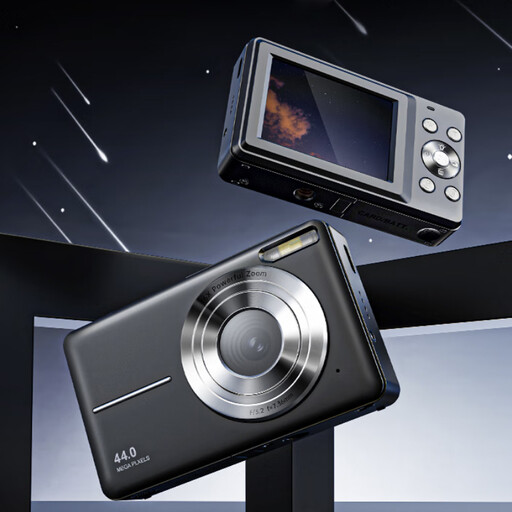
Songdian pocket camera, 4K, 44MP, 16X zoom, black
Could suit you if you’re looking for a pocket camera to take with you and want to frame subjects from different angles of view.
The product name lists 4K, 44MP and 16X zoom; check which zoom function is used for photography.
View at Joybuy
 No image available
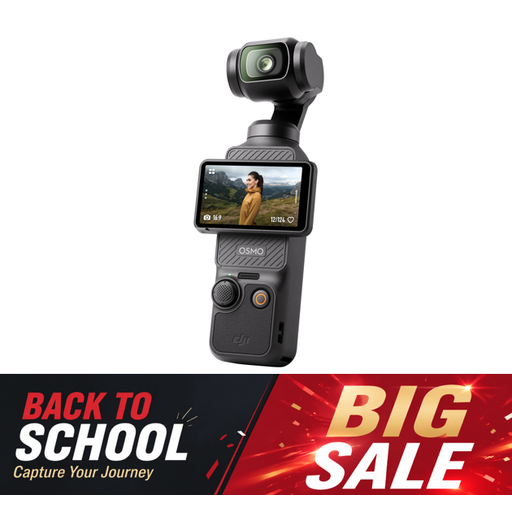
DJI Osmo Pocket 3
Could be worth considering if you’re looking for a compact camera for video as well as photography.
The product name lists a 1-inch CMOS sensor, 4K/120fps video and 3-axis stabilisation; check whether these video features suit how you plan to use it.
View at Joybuy
Frequently asked questions
How do I photograph a bright sky and dark dunes in the same shot?
Check the exposure as you take the photo and adjust it if needed. If one shot doesn’t capture the bright and dark areas you want, you can take multiple exposures with a camera that supports this. Combining them into an HDR image is a separate editing step. Nikon describes exposure bracketing as a way to take photos at different exposure levels.
Is it safe to change lenses on the coast?
Wherever possible, change lenses in a clean environment and keep the lens opening exposed for as little time as possible. Sony also recommends switching off the camera; following this maintenance advice doesn’t guarantee that sand or moisture will stay out.
Do I need to stay on the path when taking photos in the Dutch dunes?
Check the signs and access rules for the specific area. Staatsbosbeheer says that most areas it manages are open from sunrise to sunset and that visitors should stay on roads and paths, with some local exceptions. This isn’t a general rule for all Dutch dunes.
What do the cooling-off period and warranty mean when buying online in the Netherlands?
According to ACM ConsuWijzer, online purchases usually come with a statutory 14-day cooling-off period after delivery, subject to exceptions. If a product is faulty despite being used normally, the seller must put it right free of charge under the statutory guarantee, according to ACM ConsuWijzer. There is no fixed two-year time limit.


