
Teacher who wants to focus on the paper
Wants students to follow the drawing and hand movements from a fixed position, usually via a computer. A document camera such as the IPEVO V4K is designed to show paper through a computer.


For a computer-based lesson where the paper is the focus, an adjustable document camera is an obvious choice. A webcam is better if you also present from your computer. If you want to record independently or switch more often between yourself and the worksheet, compare a mirrorless camera, camcorder or compact camera by lens range, mounting options, sound and power. Always test whether the whole worksheet is clearly visible from the setup you’ll actually use.
Wants students to follow the drawing and hand movements from a fixed position, usually via a computer. A document camera such as the IPEVO V4K is designed to show paper through a computer.
Wants to switch between appearing on screen and sketching at the desk during an online lesson. Logitech describes a Show Mode for the MX Brio that lets you show your desk work.
May also want to film themselves or use other framing options, so they consider lens choice, zoom and the ability to set up the camera independently. Canon, Panasonic and DJI describe different camera setups for this type of footage.
Best for: teaching via a computer, with the worksheet and hand movements in focus.
Bear in mind: check that the arm can frame the whole sheet of paper and that your software recognises the camera. IPEVO specifies a maximum of 30 frames per second in Full HD and 15 at 3264 × 2448 for the V4K.
Best for: giving live explanations from your computer and occasionally showing sketches on your desk.
Bear in mind: tilting the camera down doesn’t guarantee a full overhead view. Logitech specifies 4K at 30 frames per second and 1080p at 60 frames per second for the MX Brio.
Best for: filming yourself too, and adjusting the framing with a suitable lens.
Bear in mind: the lens and camera configuration both affect whether the whole worksheet fits in the frame from your chosen mounting point. Canon lists interchangeable lenses and 4K 60p for the EOS R50 V.
Best for: adjusting the framing without changing lenses.
Bear in mind: Panasonic lists 24× optical zoom for the HC-VX3; the specified 25 mm wide-angle range is available only in certain recording modes.
Best for: making portable or moving footage as well as recording a fixed drawing lesson.
Bear in mind: stabilisation while moving is no substitute for a fixed mount above a drawing table. DJI describes the Osmo Pocket 3 as having mechanical gimbal stabilisation.
| What to consider | What to look for | Who it matters most to |
|---|---|---|
| Entire worksheet | Measure the paper and the available mounting height; test whether the edges and fine lines are visible. | I want to show the whole sheet and my hand movements from a fixed position. Around 36% of consumers put the worksheet first. |
| Live lessons via a computer | Check the connection, whether your teaching software recognises the camera, and the framing when the camera points downwards. | I want to teach live and occasionally show my sketches during the lesson. An estimated 29% of consumers prioritise teaching live via a computer. |
| Switching between frames | For a mirrorless camera, check which lens is included; for a camcorder, test the framing in your chosen video mode. | I want to film both myself and my work, or smaller details. Around 21% of consumers prioritise being able to switch between frames. |
| Recording independently | Compare your planned lesson length with the manual for the exact configuration, and test the power supply and storage in your setup. | I want to record a full lesson without relying on a computer. An estimated 14% of consumers prioritise recording independently and without interruption. |
For the IPEVO V4K, the manufacturer lists different maximum frame rates for Full HD and its highest specified resolution. A high resolution alone won’t tell you which setting is best for capturing moving hands.
Compare the resolution and frame rate together in the recording mode you plan to use, and assess a test recording of your own drawing.
Logitech’s Show Mode is designed to show desk work, but it doesn’t confirm that every paper size will fit fully in the frame.
Check the framing from the position where the webcam will actually sit before you decide.
You may need a different mount or camera position.
With the Canon EOS R50 V, the lens you choose also affects the framing. An unsuitable angle of view may mean the whole worksheet won’t fit from the distance available.
Check which lens is included with the camera configuration, and test the angle of view of the lens you want to use.
IPEVO makes document cameras for showing paper through a computer. According to the manufacturer, the V4K has an adjustable arm.
Logitech positions the MX Brio for computer-based video lessons and describes a Show Mode for showing sketches on your desk.
Canon positions the EOS R50 V as a video camera with interchangeable lenses for different framing options.
With the HC-VX3, Panasonic offers a camcorder with built-in zoom, so you can reframe without changing lenses.
DJI describes the Osmo Pocket 3 as a compact camera with mechanical gimbal stabilisation.
These product picks are suited to compact camera setups and webcams for computer-based lessons. Check in advance that the mounting option and framing work for your worksheet.
 No image available
A compact gimbal camera to consider if you want to make portable video recordings as well as use a fixed lesson setup.
The product information lists a 20 mm f/2.0 lens and 4K video; 4K/240 fps is available for slow motion only.
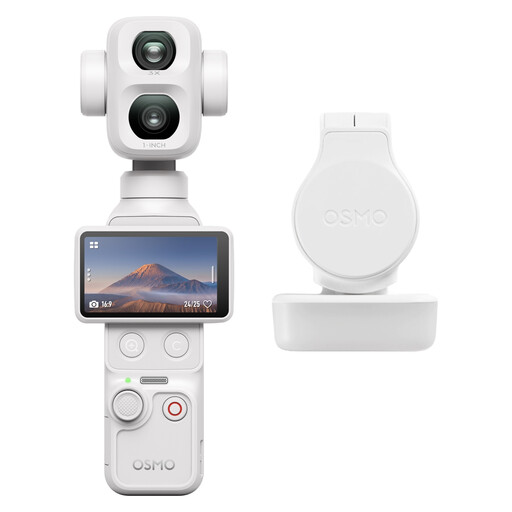 No image available
A compact camera to consider if you want to make portable recordings; check how you can safely mount it above your worksheet.
The product information lists a built-in 3-axis gimbal.
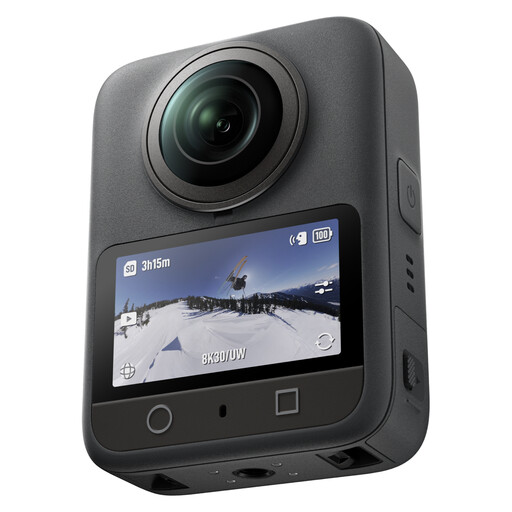 No image available
A 360 camera to consider if you want to adjust the composition afterwards; check whether this type of recording suits your drawing lesson.
The product information lists 360° video recording.
 No image available
A webcam to consider for computer-based lessons; test whether the downward-facing frame shows your entire worksheet.
The product name lists 4K UHD, autofocus, dual built-in microphones and a privacy cover.
 No image available
A webcam to consider for computer-based lessons; check the framing and whether the microphone picks up clear speech in your room.
The product name lists 2K QHD and a noise-cancelling microphone. According to the product name, the webcam can be mounted on a monitor, laptop screen or tripod.
Set up a test frame at the height you plan to mount the camera, using the actual paper size, and check both the edges and the finest lines. An adjustable arm, such as the one IPEVO describes for the V4K, helps you aim the camera but doesn’t in itself guarantee that your whole worksheet will fit in the frame.
For the V4K, IPEVO lists compatible software including OBS, Teams and Zoom, and describes the model as a USB video source. Before your lesson, check that your computer and chosen application recognise the camera.
According to ACM ConsuWijzer, products bought online generally come with a statutory 14-day cooling-off period from the date of delivery, although exceptions apply. You’re also entitled to a legal guarantee if a product used normally doesn’t meet what you could reasonably expect; in that case, contact the seller to arrange a solution.
If you film only yourself and your work, there’s no question of including footage of pupils. If other people are identifiable in the footage and you share it beyond a purely personal circle, the Dutch Data Protection Authority says the exception for personal or household use doesn’t apply, and you’ll need a lawful basis under the GDPR. For schools, the regulator says consent is required when recording and publishing identifiable footage of pupils; for pupils under 16, parental consent is required. Whether those school rules apply to your lesson depends on the organisation and the people shown.