
Photographing jumps
You want to capture brief moments of movement, so you need to balance shutter speed, focus and lighting. Canon Netherlands explains how shutter speed affects the way movement is captured.


Start by considering your shooting distance, the field of view you want and the light available. Then compare the camera’s autofocus, shutter and flash capabilities with a suitable lens. A high quoted burst rate alone is no guarantee of capturing a moving dancer in sharp focus, so check the conditions for that shooting mode and the total cost of the camera body and lens too.
You want to capture brief moments of movement, so you need to balance shutter speed, focus and lighting. Canon Netherlands explains how shutter speed affects the way movement is captured.
You can’t step back very far, so before choosing a camera body, you need to check what field of view you can achieve with a suitable lens. Consumentenbond discusses why zoom range matters when choosing a camera.
You need to decide whether available light or an existing flash setup will guide your choice, and check that the camera, trigger and flash units are compatible. Canon Netherlands describes using Speedlites for studio-style lighting.
First, measure your shooting distance and decide whether you’ll use available light or flash. Then compare shutter speed, autofocus and lens as parts of one complete setup.
| Consideration | What to look for when buying | Who should prioritise this? |
|---|---|---|
| Capturing a jump sharply | Check the available shutter speed settings and the conditions for the quoted burst rate. Canon Netherlands describes shutter speed as a key setting for capturing movement. | If I want to freeze a jump, I weigh up shutter speed and lighting together. Around 31% of consumers say capturing a brief moment of movement like this is their main concern. |
| Keeping the whole dancer in the frame | Measure your shooting distance and check the field of view and mount of the lens you want to use with the camera body. | If I can’t move further back in the studio, I want to know in advance whether the whole movement will fit in the frame. Around 25% of consumers prioritise limited shooting distance. |
| Tracking a moving dancer | Compare continuous autofocus, subject tracking and handling with the lens and composition you want to use. | If the dancer moves across the frame, I want to be able to focus on and track the subject. Around 25% of consumers name subject tracking as their main buying concern. |
| Matching the camera to your lighting | Check the aperture of a suitable lens or, if you’re using flash, the synchronisation and compatibility of the camera, trigger and flash units. | If I want to keep using my existing lighting setup, the new combination needs to work with it. Around 19% of consumers base their choice mainly on their lighting setup. |
Your shooting distance and the lens’s field of view together determine whether the whole movement will fit in the frame.
First, work out where you can stand and how you want to frame the shot. Then compare the camera body and lens as a combination.
Image stabilisation helps counter camera shake, but it doesn’t determine how the dancer’s movement is captured.
Assess stabilisation and the shutter speed needed to capture the dancer separately.
Nikon quotes 120 frames per second for the Z6III when shooting 10MP DX JPEGs; this figure doesn’t automatically apply to other resolutions or file formats.
Check the conditions for the specific shooting mode and compare like-for-like shots only.
The EOS R6 Mark III is a full-frame camera body worth comparing if subject tracking and continuous shooting are important to you.
The Z6III is a full-frame alternative to compare for tracking, handling and compatible Z lenses.
The α6700 is an APS-C camera body with an E-mount, worth comparing if lens choice and a manageable body size matter to you.
The OM-1 Mark II is another system camera worth comparing if continuous shooting and human subject detection are important to you.
This selection ranges from Sony interchangeable-lens cameras to compact video and action cameras. Check whether each model suits the way you want to shoot, and whether a suitable lens is included.
 No image available
This vlogging camera is a video option; its quoted video frame rate doesn’t tell you how many still images the camera captures per second.
1-inch CMOS sensor; 4K/120fps video; 3-axis stabilisation; rotating 2-inch touchscreen.
 No image available
This body may suit a setup where you choose a compatible lens yourself; a lens isn’t included with this version.
APS-C sensor; Sony E-mount; Real-time Eye AF for people and animals.
 No image available
This version includes a zoom lens, so you can assess the field of view you want using the supplied lens.
16–50mm f/3.5–5.6 OSS II lens; Real-time Eye AF; the product description quotes continuous shooting at 11 fps.
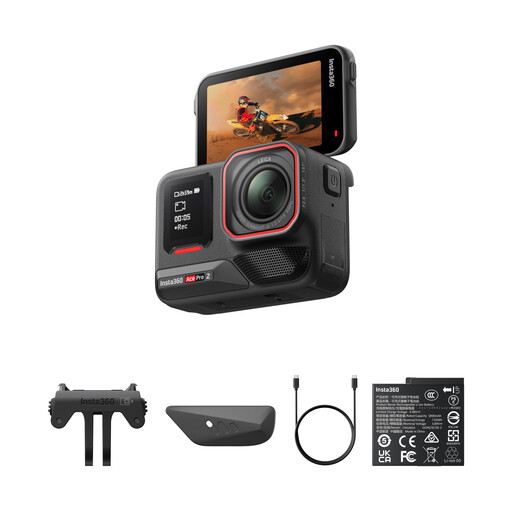 No image available
This is an action camera; don’t treat its quoted video specifications as a measure of how many still photos it can take per second.
8K video; 1/1.3-inch sensor; Dual Battery Bundle.
No. Check the conditions for the shooting mode, including resolution and file format, and consider shutter speed and focus too. For example, Nikon quotes 120 frames per second for the Z6III when shooting 10MP DX JPEGs.
First, work out where you can stand and how you need to frame the shot. Then compare the field of view and mount of both the camera body and the lens. A camera body on its own won’t tell you whether you can achieve the composition you want from your shooting position.
Before buying, check the connection and compatibility of the camera, trigger and flash units, as well as the specific camera’s synchronisation options. Test the shooting mode you plan to use, as an electronic burst mode won’t necessarily work in the same way as shooting with flash.
No. Canon Netherlands describes image stabilisation as a way to help counter camera shake. To capture the dancer’s movement, you also need to set the shutter speed to suit the shot and the available light.