
Photographing jumps
If you want to capture a brief moment of action sharply, consider the shutter speed, subject tracking and useful burst modes. Canon explains how a fast shutter speed can freeze movement.


To capture a jump sharply, start with an adjustable fast shutter speed and controls that let you track the movement. For a visible sense of motion, a longer exposure may be more suitable. Then compare the autofocus and lens for your shooting distance: a high burst rate won’t help if the dancer appears too small in the frame or isn’t tracked sharply. Canon also points out that an electronic shutter can cause rolling shutter distortion when capturing fast movement.
If you want to capture a brief moment of action sharply, consider the shutter speed, subject tracking and useful burst modes. Canon explains how a fast shutter speed can freeze movement.
If you can’t get closer, check which compatible lens will make the dancer large enough in the frame from your permitted position. The Consumers’ Association stresses that a lens must fit your camera.
If you move between shooting locations, weigh the combined load of the camera body and lens against the reach you need. Nikon and Fujifilm list features of the Z50II and X-S20 respectively; those specifications alone can’t predict the results you’ll get at a performance.
First decide which moment and shooting distance matter most to you. Then compare the focusing, shutter modes and lens as a complete setup.
| What to consider | What should you check? | Who should prioritise this? |
|---|---|---|
| Capturing a moment of action | Check whether you can set the shutter speed, which shutter mode the stated burst rate applies to, and how long the camera can shoot a sequence in your chosen file format. | If I want to capture a jump sharply, I’ll choose a shutter speed to suit the movement. Around 36% of consumers prioritise capturing a peak moment like this. |
| Keeping a dancer in focus | Check subject detection, continuous autofocus and whether you can control the focus easily for your composition. | If the dancer moves across the frame, I want the camera to keep tracking the subject in focus. Around 29% of consumers give subject tracking top priority. |
| Getting enough reach | Decide where you’re allowed to stand, then check the focal length range, lens mount and which lens is included in the kit. | If I can’t choose a spot closer to the performance, I still want the dancer to appear large enough in the frame. Around 21% of consumers prioritise the reach they need. |
| A manageable complete setup | Compare the camera body and lens together, check what’s included in the package and consider the weight of the equipment you’ll actually carry. | If I move around during an event, I want a setup that’s comfortable to carry without compromising on the lens I need. Around 14% of consumers prioritise portability and the complete setup. |
A high electronic burst rate can cause rolling shutter distortion when capturing fast movement. The buffer and chosen file format can also affect how long a sequence lasts.
Compare the mechanical and electronic shutter modes separately, and look at sample images of moving subjects. Also check the burst depth for the file format you use.
From further away, a typical standard zoom may make the dancer appear too small in the frame. You may need a different compatible lens, which will add to the weight of the complete setup.
First find out where you’re allowed to take photos. Then check the lens included in the kit, its range and the lens mount.
Stabilisation and a fast shutter speed don’t do the same thing. Canon recommends a fast shutter speed to freeze movement; in-body stabilisation doesn’t replace that choice when you need to capture the dancer sharply.
Choose a shutter speed to suit the image you want, and consider stabilisation as a separate feature of the camera or lens.
The EOS R7 is one option for photographers who want to compare consecutive moments of action and different burst modes.
The α6700 is an APS-C camera with interchangeable E-mount lenses and subject-tracking features, according to Sony.
The Z50II is a DX camera worth comparing if human detection and different tracking areas are important to you.
The X-S20 is an X-mount option with face and eye detection, as described by Fujifilm.
This selection includes a 360° camera for capturing the entire surroundings and a compact camera with features for recording video of dancers in motion. If you want to freeze a single jump as a still image, assess separately whether these cameras are suitable for that shot.
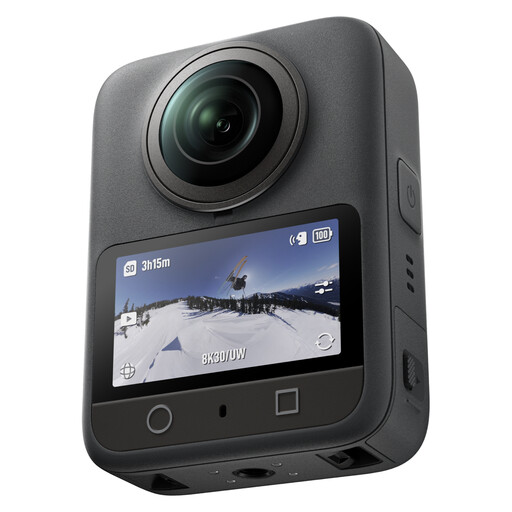 No image available
The listed 360° photo mode may suit you if you want to capture the entire dance scene in one shot.
The product description lists 120MP 360° photos, 8K/30fps 360° video and 4K/120fps video.
 No image available
The product description mentions dancing, ActiveTrack 6.0 and fast focusing for tracking moving subjects.
Listed features include 4K/120fps video, 3-axis stabilisation, a rotating touchscreen and a weight of 179 g.
No. Choose a fast shutter speed if you want to capture a jump sharply, for example; use a slower shutter speed if you deliberately want to show movement in the image. The right setting depends on the image you want and the movement.
Not necessarily. First consider your shooting distance, then check the lens mount and the lens included in your chosen kit. The Consumers’ Association notes that a typical standard zoom is less suitable for sports photography.
This depends, among other things, on who uses the images and for what purpose. The Dutch Data Protection Authority distinguishes between personal use only and use by a business or organisation. For identifiable people at events, an organisation must have a lawful basis under the GDPR when taking and publishing photos. So, before you publish, decide who will use the photos and for what purpose.
A faulty product and a purchase you change your mind about are covered by different rules. According to the Dutch Government, statutory warranty entitles you to a product that works properly; in the Netherlands, there’s no fixed statutory warranty period. For online purchases, the ACM ConsuWijzer generally says you have a cooling-off period that ends 14 days after delivery. Check the applicable terms and exceptions.
Check that the lens fits the camera body, which lens you’ll take and whether your memory card is suitable for the type of shooting you want to do. Canon notes that the EOS R7’s burst depth depends in part on the file format and memory card.