First, choose a camera setup that keeps your hands, crochet hook and stitches in view and in focus from the mounting height available to you. An overhead or document camera works well for lessons recorded via a computer, while a mirrorless camera offers more framing options. A camcorder may suit standalone recording, and a compact gimbal camera is useful for moving close-up shots. Also test whether your voice is clear above the workshop noise, and keep other people recognisable out of shot unless you can lawfully manage the use of their image.
Which setup is right for you?
Teacher at a fixed worktable
You want to show your hands and stitches from above as you teach, and you’re happy to use a computer. Logitech describes USB-C use with most computers and video conferencing or streaming platforms; ELMO lists USB among the MX-P3’s connections.
Maker who switches between angles
You want to frame the full crochet project as well as close-ups or another presentation angle, and can choose a lens and mounting solution to suit your workspace. Sony describes E-mount compatibility for the ZV-E10 II; Canon lists interchangeable RF lenses for the EOS R50 V.
Teacher who moves around
You want to make short moving clips as well as record fixed-position lessons. DJI specifies three-axis stabilisation for the Osmo Pocket 3, but check separately whether the camera is suitable for a fixed overhead view.
What should you look for?
Overhead or document camera
Choose this option if: you teach live from a fixed table or record via a computer and want to position the camera above your hands.
Things to consider: check the view from your working height and make sure your computer and software are suitable for your recording setup.
Mirrorless camera with interchangeable lens
Choose this option if: you want to create other shots as well as an overhead view, and can choose a suitable lens.
Things to consider: assess the camera body and included lens together; you may need to choose a mount and audio equipment separately.
Camcorder
Choose this option if: you want to record without a computer and can operate the camera from a fixed position during the lesson.
Things to consider: for the Dutch version, check the field of view at close range, power supply, storage and audio.
Compact gimbal camera
Choose this option if: you also want to capture short close-ups as you move around the workshop.
Things to consider: stabilisation while walking is no substitute for a stable mount when recording a full lesson from above.
Start by choosing a camera that gives you the right framing from your working height. Then test the audio, recording continuity and practical placement in your shared space.
| What to consider |
What to check before buying |
Who it matters most to |
| Framing and focus |
Test the work surface and a moving demonstration at the planned height; check focus and make sure there’s room in shot for your hands and crochet hook. |
If I want to show stitches and hand movements clearly, the whole work surface needs to stay in shot. Around 36% of consumers give clear, legible stitches top priority. |
| Clear audio |
Record a short voice test in the workshop during normal use; check which audio connection or other audio setup is available. |
When other people are working in the same space, I want my students to be able to follow what I’m saying. Around 29% of consumers prioritise clear speech. |
| Uninterrupted recording |
Check the power supply and storage for your chosen recording mode and lesson length; make a test recording of a similar duration. |
If I’d rather not record a demonstration again, I check that the setup suits the lesson length. Around 21% of consumers give uninterrupted recording top priority. |
| Practical setup |
Check that there’s room for a stable stand or clamp, and that you can put the camera away easily after use. |
At a shared worktable, I want to be able to set up and pack away the camera quickly. Around 14% of consumers give easy setup top priority. |
Common buying mistakes
-
Assuming high resolution guarantees clear stitches
Resolution alone doesn’t tell you whether the whole work surface will be in shot and in focus from the distance available to you.
Take a test shot from the actual working height, with your hands and crochet project moving.
You may still need a different mounting setup or a suitable lens.
-
Testing the built-in microphone only in a quiet room
The acoustics in a shared workshop may be different; a microphone specification doesn’t prove that your voice will be clear there.
Listen back to a test recording while the workshop is in normal use.
If your instructions are hard to follow, you may need extra audio equipment or have to record again.
-
Using a computer-connected camera as if it were a standalone recorder
Logitech describes Reach as a USB-C camera for use with a computer. ELMO also lists SD recording for the MX-P3.
Compare the complete recording setup, including the computer or card and the software you’ll need.
With a computer-connected setup, you’ll also need access to a suitable computer and software.
-
Recording a wide workshop shot without considering publication first
Recognisable people in footage count as personal data. The Dutch Data Protection Authority says a legal basis is required to film and publish footage of others in which they can be recognised.
Decide on your framing and publication plans in advance; arrange an appropriate legal basis if other people will be recognisable in the footage.
You may need to record again or keep recognisable people out of shot before publishing.
Camera brands to consider
Logitech
Reach is an overhead and content camera for computer-connected teaching setups.
- Logitech lists adjustable positioning and USB-C use with most computers and video conferencing or streaming platforms.
- Check which stand or clamp is included with your version, and whether 1080p/60fps will show the stitches clearly from your distance.
ELMO
The MX-P3 is a document camera for showing work on a table, with several connection and recording options.
- ELMO lists HDMI, USB, a built-in microphone and SD recording.
- Check the view above your crochet project and how clearly your voice comes through above workshop noise by making a test recording.
Sony
The ZV-E10 II is a mirrorless camera for makers who want to choose a lens to suit different shots.
- Sony specifies compatibility with E-mount lenses and lists a kit with the E PZ 16–50 mm F3.5–5.6 OSS II.
- Check the kit on offer, the focusing distance and the full setup with mount and audio equipment; the specifications don’t prove that an overhead shot will work.
Canon
The EOS R50 V is a video-focused mirrorless camera for filming both your work surface and other angles.
- Canon lists interchangeable RF lenses, a vari-angle screen and an accessory shoe, including for microphones.
- Check which lens and audio accessories are included with the specific version; these are manufacturer specifications, not the results of a comparison test.
Panasonic
The HC-VX3 is a camcorder option for recording without a computer.
- Panasonic has a Dutch product page for the HC-VX3.
- Detailed specifications for the HC-VX3 are from the UK version, so check the Dutch version’s box contents and connections separately.
DJI
The Osmo Pocket 3 is best suited to moving footage and short close-ups alongside a fixed teaching setup.
- DJI specifies a three-axis gimbal, three microphones and focusing from 0.2 m.
- These specifications don’t show whether a full crochet project will fit in shot from your fixed mounting height, or whether speech will remain clear in a noisy space.
Joybuy product picks
This selection includes computer-connected webcams, compact gimbal cameras and a mirrorless camera kit. For each model, check whether it suits your working height and whether its audio recording is suitable for the workshop.
 No image available
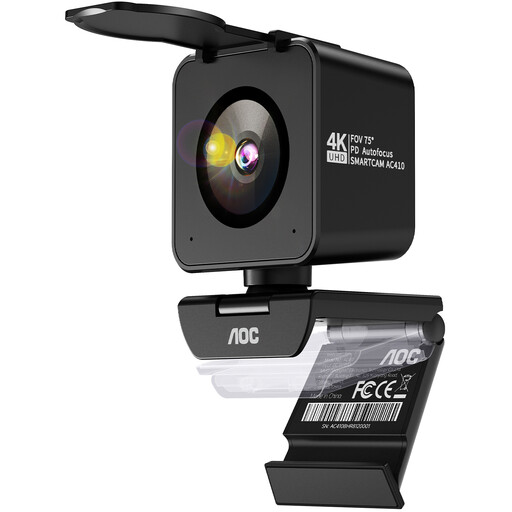
AOC 4K Pro webcam with Sony IMX363 sensor
A computer-connected option with a tabletop tripod for a teaching setup; check that the tripod fits the position and height you need.
The product description lists PDAF autofocus, two microphones, a 75° field of view and USB-A/USB-C connections.
View at Joybuy
 No image available
DJI Osmo Pocket 3 Creator Combo
This compact gimbal camera may suit short moving close-ups alongside a fixed teaching setup; check separately how to mount it for a full overhead view.
The product name lists 4K/120fps video and an included microphone; the description mentions mechanical three-axis stabilisation.
View at Joybuy
 No image available
DJI Osmo Pocket 3
This compact camera is designed for moving footage; stabilisation doesn’t automatically remove the need for a fixed mount when recording a full crochet lesson.
The product name lists 4K/120fps video; the description mentions mechanical three-axis stabilisation, fast focusing and a 2-inch rotating screen.
View at Joybuy
 No image available
Sony ZV-E10 with 16–50mm zoom lens, black
A mirrorless camera kit for anyone who wants to adjust the framing; check that the lens can focus from your planned mounting distance.
The description lists a 16–50mm zoom lens, 4K video, a vari-angle screen and Product Showcase Setting. A compatible SD memory card isn’t included and, according to the description, is needed for recording.
View at Joybuy
 No image available
Insta360 Link 2C Standard Bundle, Graphite Black
A computer-connected webcam option with DeskView mode; check that your chosen working angle is in shot from the planned camera position.
The product description lists 4K, PDAF autofocus and a microphone with AI noise reduction.
View at Joybuy
Frequently asked questions
Do I need permission from people who can be recognised in a shared workshop?
According to the Dutch Data Protection Authority, a legal basis is required to film and publish footage of visitors, colleagues or students in which they can be recognised; consent isn’t the only possible legal basis. Where possible, point the camera at your hands and work surface, and review the footage before publishing.
Can I record a crochet lesson without a computer?
Yes, if the camera and recording mode you choose support standalone recording. ELMO lists SD recording for the MX-P3; check the card, power supply and audio recording in advance. Logitech describes Reach as a USB-C setup for use with a computer.
How can I stop small stitches from looking blurry?
Test the whole work surface and a moving demonstration at the intended mounting height. Resolution or autofocus alone doesn’t prove that the stitches will be clear in your shot; check the distance and adjust the camera position or lens if necessary.
Who can help if the camera breaks down soon after I buy it?
For a consumer purchase in the Netherlands, the seller is responsible for providing a solution if a product doesn’t do what you could reasonably expect under normal use, according to ACM ConsuWijzer. A manufacturer’s warranty is in addition to your statutory rights; a stated warranty period isn’t automatically the end date of those rights.


