
Vandaag of morgen in huis

Kwaliteit gegarandeerd

Welkomstaanbiedingen ontgrendelen: GRATIS bezorging | Tot 80% korting | Gratis 30 dagen JoyPlus-proefperiode
Download de app
It always happens at the worst possible moment: right in the middle of a crucial take, the overheating warning appears on your screen, and your camera shuts down. For videographers, filmmakers, and content creators who engage in long-duration 4K recording or livestreaming, this is a familiar and frustrating problem. An overheated camera not only disrupts your workflow but can also shorten the lifespan of your equipment.
This article is designed to help you find a practical solution. We'll discuss what to look for when choosing a camera cooler and highlight several popular choices. This will enable you to make an informed decision and focus on what truly matters: creating great content.
Before making a choice, it's helpful to consider a few technical aspects. This will help you find the right external camera cooling solution for your specific needs.
There are primarily two types of cooling systems on the market:
camera fan mounts to the back of your camera and blows air across the body to dissipate heat. It's an effective and often affordable way to prevent camera overheating.filming in 4K without overheating in a warm environment.Not every cooler fits every camera. Always check how the cooler is attached. Most models use a spring clamp that secures around the body or the screen. Pay close attention to whether the cooler blocks your camera's articulating screen. Manufacturers often specify which brands the cooler is suitable for, such as cooling for Sony camera (A7 series) or a Canon camera cooler (R series).
How is the cooler powered? Some models operate via a USB-C cable connected to a power bank or AC adapter. This is ideal for a livestream camera fan in a studio setup. Other models have a built-in, rechargeable battery, giving you much more freedom of movement during on-location shoots.
Based on specifications and functionality, we have selected a few options from Ulanzi that offer solutions for different users.
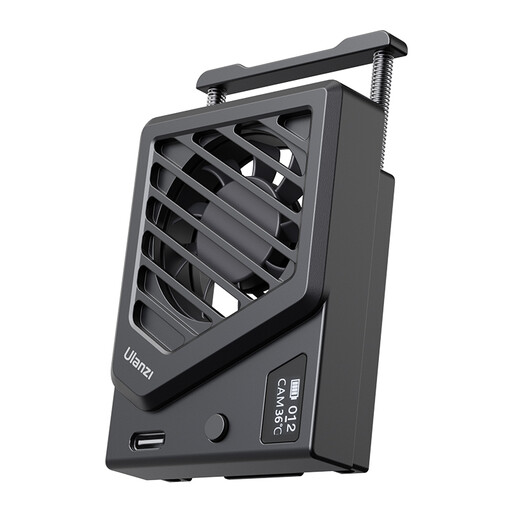
Why this stands out: This is a straightforward and effective camera fan that does what it's supposed to do: cool your camera. Thanks to its simple spring clamp, it's quick to mount and widely compatible.
Advantages:
Who is this for? For the videographer or streamer looking for a reliable, affordable, and easy-to-use cooling solution that fits multiple camera bodies.
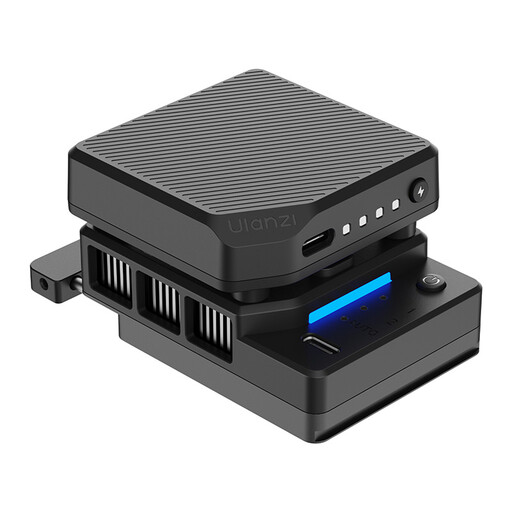
Why this stands out: This cooler combines a fan with semiconductor technology for maximum cooling performance. The built-in battery and smart features make this a powerful tool for professionals.
Advantages:
Who is this for? For the serious filmmaker or content creator who needs the most effective solution for filming in 4K without overheating, even under demanding conditions, and who values wireless freedom.
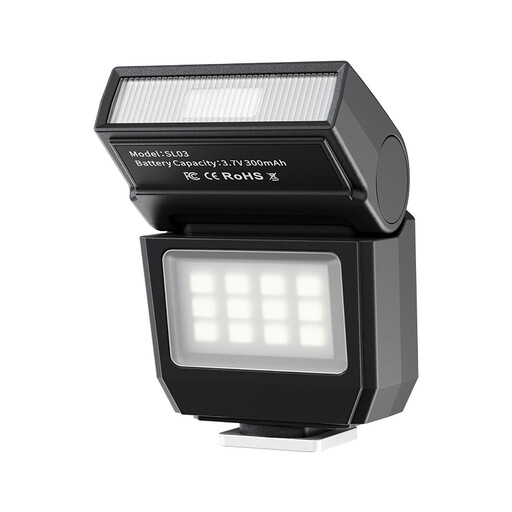
Why this stands out: While you're optimising your setup against overheating, good lighting is just as important. This Ulanzi accessory is a compact 2-in-1 solution for both photo and video.
Advantages:
Who is this for? For the hybrid creator who regularly switches between photography and videography and seeks a lightweight, versatile, and portable light source to enhance the quality of their work.
Are these specific models not quite what you're looking for, or do you want to expand your kit further? There are more accessories that can help you professionalise your workflow.
Check out our broader range of camera and film accessories to discover other tools that match your camera and style.
1. Does a camera cooler make a lot of noise? The noise level varies by model and setting. Most coolers are designed to be relatively quiet to avoid interfering with audio recording. Models like the ULANZI CU01 often offer a "silent mode" for situations where audio is critical. On its highest setting, a fan may be audible.
2. Does an external camera cooler work for every camera? No, not always. Compatibility depends on the shape of the camera body and the cooler's mounting method. Most models with a spring clamp are designed for popular mirrorless cameras from brands like Sony, Canon, and Fujifilm. Always check the product page to see if your specific camera model is supported and to ensure the cooler doesn't block any important ports or buttons.
3. Can I still use my camera on a tripod with a cooler attached? Yes, in almost all cases. External coolers attach to the back of the camera, leaving the tripod mount on the bottom of the camera completely free. You can mount your setup on a tripod, gimbal, or slider without any issues.
