
Vandaag of morgen in huis

Kwaliteit gegarandeerd

Welkomstaanbiedingen ontgrendelen: GRATIS bezorging | Tot 80% korting | Gratis 30 dagen JoyPlus-proefperiode
Download de app
The red overheating light is flashing. Your camera stops recording, right at the most crucial moment of an interview, livestream, or 4K shoot. Sound familiar? Camera overheating is a common problem for videographers and content creators who push their equipment to the limits. A compact, modern camera shooting in high resolution generates a lot of heat. If that heat can't dissipate, the camera will shut down to prevent damage.
This guide is designed to help you find a practical solution. We'll cover what to look for when buying a camera cooler and highlight some popular choices that will help you keep filming without interruption.
Before making a choice, it's helpful to consider a few key specifications. The right cooling system for your camera should fit your specific workflow.
The most common solutions are a camera fan or a cooler with semiconductor technology.
external camera fan blows air across your camera's body to dissipate heat. It's a simple and often budget-friendly method that is effective for lighter tasks or in a cool environment.How is the cooler powered, and how does it attach?
Sony camera cooling and Canon camera cooler models with vari-angle screens.A livestreaming accessory needs to be practical. A large, heavy cooler is cumbersome for mobile use. Pay attention to the weight and dimensions, especially if you often shoot handheld. Additionally, fans produce noise. If you use the camera's internal microphone, this can be disruptive. Models with multiple speeds or a silent mode offer a solution here.
Based on functionality and specifications, we've rounded up a few top options for you.
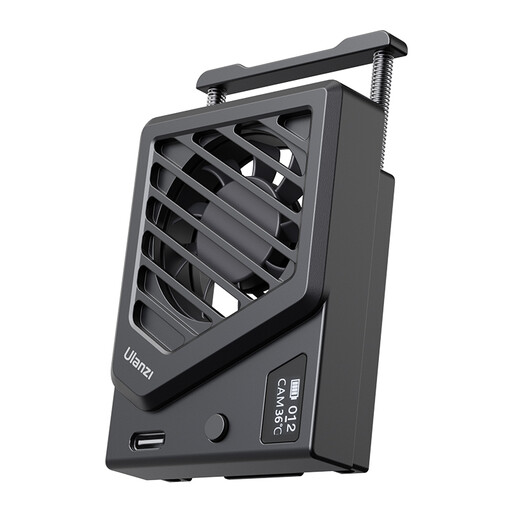
Why It Stands Out This Ulanzi cooler is the definition of a no-nonsense solution. It does exactly what it's supposed to do: move air to keep your camera cooler. Installation is simple thanks to the spring clamp, and its USB power source means it's ready to go with a power bank or USB charger.
Pros
Who Is It For? For the content creator or livestreamer who primarily works from a fixed setup (like a studio or home office) and needs an affordable, straightforward solution to prevent camera overheating during longer sessions.
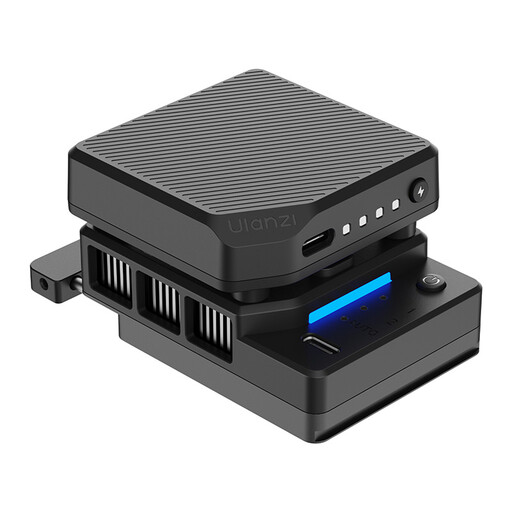
Why It Stands Out The CU01 is a more powerful camera cooling system thanks to its semiconductor cooling technology. This system actively pulls heat away from the camera, which is significantly more effective than a fan alone. The built-in 3000 mAh battery gives you the freedom to work cord-free, while automatic temperature control adjusts the cooling as needed.
Pros
Who Is It For? For the serious videographer who often shoots on location or outdoors and needs a reliable solution for filming without overheating. Ideal for long 4K recordings, events, or any situation where the camera is pushed to its limits and a power source isn't always available.
Is the perfect solution for your specific camera or workflow not listed here? There are many other accessories that can help elevate your production quality. Explore our wider range for more options.
? Discover more accessories in the Video & Camcorders category
1. Is a camera cooler really necessary for my camera? This depends on your camera and how you use it. Compact mirrorless cameras, especially models from Sony, Canon, and Fujifilm, are more prone to overheating when filming in high resolutions (4K/8K), at high frame rates, or in high ambient temperatures. If your camera regularly shuts down due to heat, a cooler is a worthwhile investment.
2. Does an external camera fan make a lot of noise? Every fan produces some noise. The amount depends on its speed and design. For the best audio quality, it's always recommended to use an external microphone, which you can position slightly away from the camera and the cooler. Models with a 'silent mode', like the ULANZI CU01, are specifically designed to minimize noise disruption.
3. How exactly does a camera cooling system work? There are two main types. A simple camera fan works by blowing air across the camera body, which helps dissipate built-up heat more quickly. A more advanced system with a semiconductor (also called a Peltier element) acts like a small heat pump: it actively draws heat from the back of the camera and transfers it to the surrounding environment via a heat sink and fan. This method is generally more effective.
