
Creator of colour-accurate demonstrations
You want to assess changes in shade accurately under comparable lighting. Nikon Nederland and Sony Nederland point out that white balance and consistent lighting need careful attention.


For a colour-mixing lesson, stable lighting, a suitable camera-to-subject distance and a consistent white balance throughout the lesson matter more than simply choosing a higher video resolution. Then choose a camera to suit the lens, focusing, audio and recording time your setup requires. 10-bit video is mainly relevant if you want to make extensive adjustments to your footage afterwards.
You want to assess changes in shade accurately under comparable lighting. Nikon Nederland and Sony Nederland point out that white balance and consistent lighting need careful attention.
You film your hands and mixing area yourself, so you need to match the lens, working distance and focus. Canon Nederland and Sony Nederland describe cameras with interchangeable lenses for setups like these.
You narrate the steps or record a lesson in one session, so microphone connections and recording time may matter. Nikon Nederland and Panasonic Nederland list external audio options or longer recording times for specific models and settings.
Start with colour consistency and the framing of your work surface. Then choose recording features to suit your explanations and post-production needs.
A good fit if: you mainly want to record the mixing area and your explanations without extensive post-production.
Consider: the lens you need, framing and microphone connection. Canon lists subject tracking for the EOS R50 V, while Nikon specifies 4K/30p for the Z 30.
A good fit if: you deliberately adjust footage afterwards or want to match several recordings.
Consider: Sony and Panasonic specify 10-bit recording options for certain models and modes. These do not replace stable lighting or a fixed white balance.
| What to consider | What should you check? | Who should prioritise this? |
|---|---|---|
| Colour consistency | Try your intended lighting and white balance with the actual materials you use for mixing. Check recording formats only if you plan to colour-correct your footage. | I want the same paint to look the same under identical lighting throughout each lesson. Around 36% of consumers prioritise consistent colour reproduction. |
| View of the work surface | With your chosen lens, check that your hands, pots and mixing area all fit in the frame from the available camera distance. | I want viewers to follow both what I’m doing and the small details of the mix. Around 29% of consumers give framing for hands and mixing details top priority. |
| Clear spoken explanations | Check whether the exact camera has a microphone connection, then make a test recording from your usual speaking distance. | I want to talk through the mixing steps while the camera is positioned by the work surface. Around 21% of consumers put clear spoken explanations first. |
| Recording time and complete kit | Check the recording time for your chosen settings and see whether the version includes a lens. A body may require a separate lens. | I want to record a planned lesson with a complete kit. Around 14% of consumers prioritise recording time and a suitable complete kit. |
Resolution and 10-bit recording alone do not tell you whether mixing colours will be reproduced faithfully. Changing light or white balance can affect how shades look.
First, test your lighting setup and white balance with the actual materials you use. Choose a more advanced recording format only if you genuinely need the post-production work it involves.
Changing light can mean having to reshoot or correct your footage afterwards.
A version without a lens will not automatically give you the framing you need for a work surface. What’s included varies by model and version.
Check what’s in the box and test whether the lens suits your working distance. Also allow for a separate microphone or power supply if your setup requires one.
You may need a suitable lens or additional recording equipment to complete the kit.
Dutch government guidance distinguishes between consumer purchases and sales to businesses. Consumer rules do not automatically apply to a business purchase.
Before ordering, check whose name you are buying in and which warranty and returns terms apply to the purchase.
Canon positions the EOS R50 V as a video-focused camera with interchangeable RF and RF-S lenses.
According to Sony, the ZV-E10 II offers a choice of E-mount lenses and 10-bit video options for creators considering colour correction.
The LUMIX S5II is a full-frame camera for those considering longer sessions and more advanced video workflows.
Nikon positions the Z 30 as a camera for video creators who want to combine a compact setup with spoken explanations.
The X-H2 may be worth considering if you also want to record and edit high-resolution footage.
This Joybuy selection includes compact vlog, 360° and action cameras for video lessons. For each model, consider whether the field of view, controls and audio suit a fixed recording of the mixing area.
 No image available
The product title presents this model as a vlog camera. Check whether its field of view suits your recording of the work surface.
The product information lists 4K/240fps and 3-axis stabilisation. According to that information, 4K/240fps is only available in slow-motion mode.
The description also mentions a 20 mm lens and 4K video.
 No image available
The product title describes a vlog combo. Check whether the recording angle suits the distance to your mixing area.
The product description lists a 20 mm wide-angle lens and 4K video.
According to the product description, 4K/240fps is only available in slow-motion mode.
 No image available
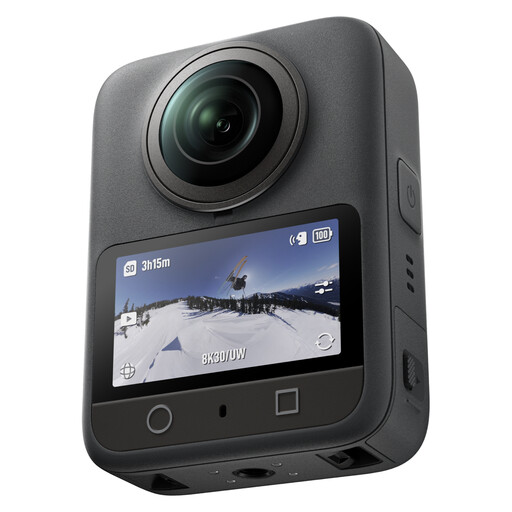
The description mentions a vlog mode. Check whether the controls and image layout suit an overhead demonstration.
The product description lists 8K/30fps 360° video, 105 GB of internal storage and up to 190 minutes of continuous recording.
According to the description, you can adjust the composition of 360° recordings afterwards in the app.
 No image available
The product title describes a pocket gimbal vlog camera. Check whether your chosen framing shows the whole mixing area.
The product title lists 4K/240fps, 3-axis stabilisation, 107 GB of internal storage and a 2-inch rotating screen.
The title also mentions 2× lossless zoom.
 No image available
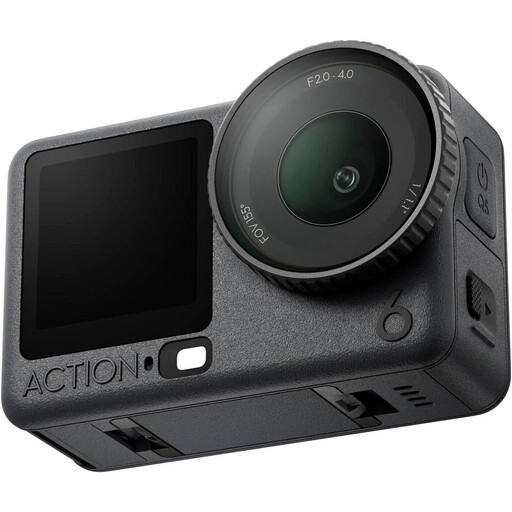
The product description lists vlogging and content creation as use cases. Check whether an action camera setup is suitable for your fixed tabletop shot.
The description mentions video up to 8K and connection to two DJI microphone transmitters.
According to the description, the stated recording time of up to four hours applies under normal conditions.
Keep the lighting as consistent as possible and choose a suitable white balance before recording. Check it again if the lighting changes, and make a test recording with your actual materials. This does not guarantee exact colour reproduction.
It depends on the size of your work surface and the available camera distance. Test the framing with the lens you actually plan to use, and check whether you are buying a camera body or a version that includes a lens.
Check whether you are buying as a consumer or on behalf of a business. According to Ondernemersplein, the statutory 14-day cooling-off period for the specified distance purchases does not apply to a business purchase; nor does the statutory consumer guarantee apply to sales between businesses. So check which warranty and returns terms have been agreed for your business order.
According to the Dutch Data Protection Authority, if a business films identifiable people for commercial purposes and publishes the footage, the GDPR applies and a valid legal basis is required. Do not assume that buying a camera in itself gives you permission to publish.