For a fixed mixing table, choose a camera setup that frames the whole work surface and lets you check the white balance and exposure under your lesson lighting. A mirrorless camera gives you a choice of lenses, a camcorder has built-in optical zoom, and a compact gimbal camera may suit you if you move around during the lesson. None of these features alone guarantees that paint colours will look true to life.
Which setup is right for you?
Teacher with a fixed mixing table
You want the paint, mixing stages and white surface to remain clearly visible throughout the demonstration. Lighting, white balance and framing are key considerations. Canon Europe explains how lighting and exposure can affect how white appears.
Creator making long narrated lessons
You want to record a demonstration without your explanation becoming hard to hear or the recording stopping unexpectedly. Check the recording time, power supply and microphone options for your chosen model, as Nikon Netherlands and the Consumers’ Association also highlight.
Presenter who moves around
You want to film both the work surface and yourself explaining things handheld, and need to weigh ease of movement against the field of view of a fixed lens. DJI describes the Osmo Pocket 3 as a camera with a fixed lens and gimbal stabilisation.
What should you look for when choosing?
Canon Europe explains that lighting can affect how white appears, while a bright scene can also affect exposure. Test the camera under the lighting you use for your lesson, and check both the white background and the details in the paint.
| What to consider |
What should you check? |
Who is this important for? |
| Colour and exposure |
Check whether you can adjust the white balance and exposure, and test white and paint under your lesson lighting. |
If I want to show differences in colour between mixing stages, I first check how the camera renders white and paint. Around 36% of consumers make colour consistency their top buying priority. |
| Work surface and detail |
Test the field of view and focus at the planned distance, and check which lens or zoom suits your setup. |
If I want to film both the whole mixing area and a small detail, the framing needs to work at the actual mounting height. Around 29% of consumers prioritise framing and detail. |
| Uninterrupted explanation |
Check the recording time for your chosen mode, the power supply and whether you can connect a microphone. |
For a long lesson with a spoken explanation, I want to know whether the recording and audio will work with my setup. Around 21% of consumers say an uninterrupted, easy-to-follow demonstration is their top priority. |
| Moving around during the lesson |
Weigh portability and stabilisation against the field of view of a fixed lens, and check what storage you need. |
If I switch between the table and a handheld presentation during one lesson, ease of movement matters, but the work surface still needs to fit in the frame. Around 14% of consumers prioritise mobile filming. |
Things to watch out for when buying
-
Choosing 4K alone for true-to-life paint colours
Resolution is no substitute for checking white balance and exposure. A test recording under your lesson lighting will show whether the white background and paint details are clearly visible in your setup.
Make a short test clip before the lesson and review it. Otherwise, an unsuitable recording could mean you have to film the lesson again.
Allow extra recording time to test the lighting and settings in advance.
-
Assuming a camera body or zoom figure guarantees the right framing
With a mirrorless camera, the lens also determines the framing. According to Panasonic, the stated wide-angle view of the Panasonic HC-VX3 applies only in certain recording modes.
Check the exact lens or mode, and test whether the whole mixing area fits in the frame at your intended distance.
If the work surface does not fit, you may need a different lens or to adjust your camera setup.
-
Assuming a long recording needs no preparation
Recording time, power supply, storage and audio setup vary by model. Nikon states that the Z 30 can record continuously for up to 125 minutes; this is a manufacturer’s figure, not a guarantee for every setup.
Before recording, check the capacity and power requirements of your chosen model, as well as the storage and microphone you need.
Your chosen setup may require additional storage, a power supply or a separate microphone.
Camera brands to consider
Canon
The EOS R50 is a mirrorless camera worth considering for a fixed table setup with an interchangeable lens.
- Canon says the EOS R50 supports RF and RF-S lenses.
- EF and EF-S lenses require an adapter; EF-M lenses are not compatible. Also check that the lens and distance frame the mixing area properly.
Sony
The original ZV-E10 has an interchangeable E-mount lens, making it an option for a fixed lesson setup.
- Sony specifies custom white balance and 4K video at up to 25p in PAL mode for the ZV-E10.
- Don’t confuse the ZV-E10 with the ZV-E10 II. The camera body alone won’t tell you whether the lens suits the distance to your table.
Panasonic
The HC-VX3 is a camcorder option if you want to reframe using built-in zoom as you explain.
- Panasonic lists 24× optical zoom and a white balance setting for this model.
- The stated wide-angle view depends on the recording mode. Check the field of view for the mode you plan to use.
Nikon
The Z 30 is a mirrorless camera worth looking into for longer lessons with spoken explanations.
- Nikon states that it supports up to 125 minutes of continuous filming and an external microphone.
- The maximum recording time is a manufacturer’s figure. Also check the lens, power supply and conditions of your own lesson.
DJI
The Osmo Pocket 3 is a compact option worth considering if you move around while filming.
- DJI specifies a 3-axis gimbal, a fixed 20 mm-equivalent lens and a minimum focusing distance of 0.2 m.
- A fixed lens gives you less choice; check that the mixing area fits in the frame at your planned distance. A microSD card is required for storage.
Cameras for this lesson setup
This Joybuy selection includes cameras for a fixed table or computer setup, as well as a portable gimbal camera. Check that each model’s field of view, lens and recording settings suit your mixing table and lesson lighting.
 No image available
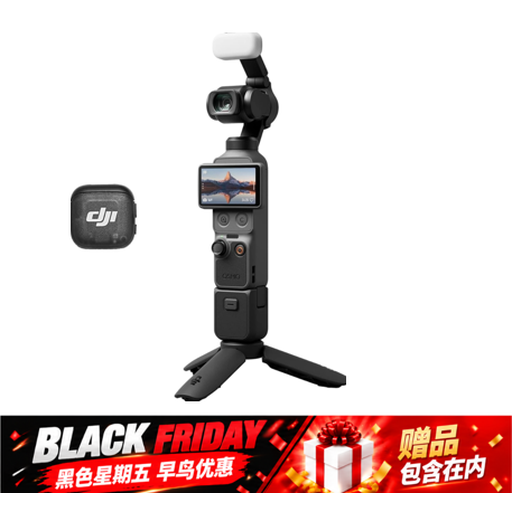
Osmo Pocket 4 Creator Combo
Suited to anyone who wants to switch between filming the work surface and shooting handheld, or mount the camera.
The product title lists 3-axis stabilisation, 2× lossless zoom, 107 GB of built-in storage and a handle with a 1/4″ thread.
View at Joybuy
 No image available
Philips 4000 Series SPL6408BT/00
A webcam to consider if you want to film your lesson from a computer setup.
The product title lists 4K UHD, 8MP, autofocus, built-in dual microphones and a privacy shutter.
View at Joybuy
 No image available
Sony ZV-E10 with 16–50mm zoom lens, black
The interchangeable lens may suit a fixed setup where you want to frame both wide shots and details.
The product name lists a 16–50mm zoom lens. Sony Netherlands specifies custom white balance for the original ZV-E10. This version does not include a compatible SD card, adapter or charger.
View at Joybuy
 No image available
Insta360 Link 2C Standard Bundle, Graphite Black
A webcam option for a fixed computer or table setup.
The product title lists 4K, a 1/2-inch sensor, Auto-Framing, HDR and a microphone with AI noise reduction.
View at Joybuy
 No image available
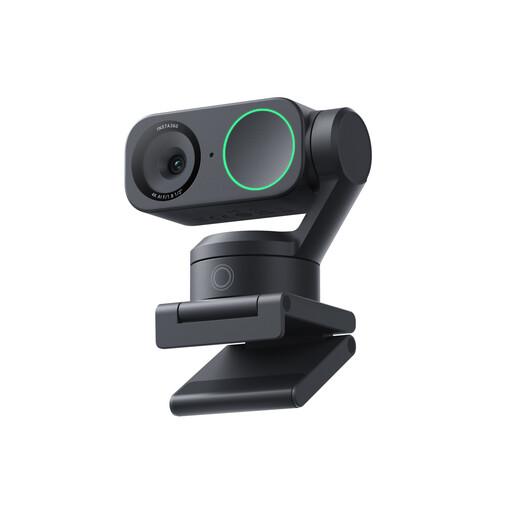
Insta360 Link 2 Standard Bundle
A webcam option for a lesson recorded from a computer.
The product title lists 4K, a 1/2-inch sensor, AI tracking, HDR and a microphone with AI noise reduction.
View at Joybuy
Frequently asked questions
Why can a white background look grey or tinted?
White balance corrects colour casts caused by the light, while exposure affects how bright the background appears. Canon Europe recommends adjusting both settings to suit the lighting conditions. Test them under your lesson lighting and check that details in light-coloured paint remain visible.
How do you prepare your camera for an uninterrupted mixing demonstration?
First, check at the planned mounting height that the work surface and your hands fit in the frame. Then set the white balance under the available lighting and make a short test clip with spoken commentary. Before recording for a long time, check the recording time, power supply and storage required for your chosen model.
Do you need a separate lens or microphone?
It depends on the camera and the version you choose. With a mirrorless camera, the lens needs to provide the field of view you want, while a camcorder or compact gimbal camera has a built-in lens. Check the bundle and microphone connection separately; the Consumers’ Association highlights an external microphone as something to consider for video audio.
Can a school publish a lesson video showing identifiable pupils?
When a school records and publishes footage in which pupils are identifiable, the Dutch Data Protection Authority says consent is required: from the pupil themselves if they are aged 16 or over, and from their parents if they are under 16. This is not a general conclusion for recordings without identifiable people or for every other way of filming or sharing footage.


