
Teacher demonstrating at a table
Wants to show hands and the mixing area from above on a computer, and record lessons easily. The connection and recording software are important considerations; IPEVO lists USB-A/UVC for the V4K PRO 120.


Start with the camera angle: check that both your hands and the mixing area fit in the frame while the camera remains stable. Keep the lighting as consistent as possible and pay attention to the white balance. Extra video resolution or stabilisation only matters if the camera, software and setup can make use of it. A USB document camera is designed to show images via a computer, while a mirrorless camera offers more choice of lenses and a pocket camera can be useful if you also shoot moving footage.
Wants to show hands and the mixing area from above on a computer, and record lessons easily. The connection and recording software are important considerations; IPEVO lists USB-A/UVC for the V4K PRO 120.
Wants a fixed frame and consistent colours for lessons that can be reused. Lighting, white balance and the camera-and-lens combination all deserve consideration; Canon UK recommends adjusting the white balance to suit challenging lighting conditions.
Wants to combine table demonstrations with other camera angles or moving footage, and is prepared to put in extra work to set up the camera for a top-down view.
A good fit if: you want to display or record the view of the table directly via a computer.
Bear in mind: check that the software and camera support the recording you want. IPEVO lists a maximum of 1920 × 1080 for recordings made with Visualizer.
A good fit if: you want to control the framing with an interchangeable lens or use the camera for other types of recording too.
Bear in mind: the lens and available camera height both affect whether the whole table or small details are in sharp focus. Canon lists RF and RF-S lens compatibility and 4K 30p for the EOS R50; Sony lists 4K 60p for the ZV-E10 II.
A good fit if: you want to film moving footage or shoot handheld as well as record a fixed demonstration.
Bear in mind: stabilisation is no substitute for a suitable mount for a fixed top-down view. DJI lists a minimum focusing distance of 0.2 m for the Osmo Pocket 3.
| What to consider | What to look for | Who is this important for? |
|---|---|---|
| Colour consistency | Keep the lighting consistent and check whether white balance settings are available for your camera and software. | If you want to compare differences between mixing stages accurately, focus on colour consistency; around 36% of consumers put it first. |
| Table framing | Test the field of view, focusing distance and camera height with your own table and materials. | If you want to keep your hands and the mixing area in frame at the same time, adjust the framing to suit the available space; around 29% of consumers put this first. |
| Recording via a computer | Check the connection, whether the camera is recognised by your lesson app, and the recording settings in the software you use. | If you want to show or record the demonstration directly on a computer during the lesson, check the entire recording setup; around 21% of consumers start with this option. |
| Spoken instructions | Make a test recording to check that your voice is clearly audible in the room. | If pupils need to see what you are doing and hear your instructions at the same time, clear audio is an important priority; around 14% of consumers put it first. |
The camera’s resolution and the resolution of the saved video can differ. IPEVO lists a maximum of 1920 × 1080 for video recordings made with Visualizer, even though the V4K PRO 120 has its own camera specifications.
Check both the camera specifications and the recording settings in the software you use to save the lesson.
Getting the right framing depends in part on the lens, focusing distance and available height. A 4K specification alone does not tell you whether the mixing area will fit in the frame.
Test the camera with the lens, materials and mount you intend to use, and check that the mount can support the complete setup.
A gimbal helps with moving footage, but it will not automatically position the camera for a fixed shot directly above the table.
Check whether the Osmo Pocket 3 can be fitted to a suitable mount, and bear in mind the minimum focusing distance of 0.2 m specified by DJI.
Document cameras for anyone who wants to show a view of the table via a computer; the V4K PRO 120 is one model to consider.
Mirrorless cameras for anyone who wants to create a fixed overhead setup with a lens of their choice; the EOS R50 is one example.
A mirrorless camera option for anyone who wants to record other video angles as well as a lesson at the table.
Compact gimbal cameras for anyone who wants to combine a table demonstration with moving footage.
This selection includes compact video cameras, webcams and a pocket camera for recording video. Check for each model that you can position it safely and frame the mixing area appropriately.
 No image available
Could suit anyone looking for a compact camera for recording video. The product information lists autofocus and a USB webcam mode; check that the desired camera angle and connection are compatible with your computer and table setup.
 No image available
The product title lists 4K video, a clip, a 140° field of view and app control. Test whether the field of view frames the mixing area properly and whether the clip allows you to position the camera safely and securely above the table.
 No image available
The product information lists autofocus, a rotating lens and a mini tripod. Check whether the tripod and lens position will give you the view of the table you need; the portable uses listed do not automatically mean it is suitable for an overhead setup.
The title lists 64 MP and a 1.72-inch touchscreen.
 No image available
Could suit a lesson shown via a computer. The product description lists HD video, autofocus, USB and two built-in microphones. The fixed field of view is 78°; check that you can position the webcam securely above the table and capture the entire mixing area.
 No image available
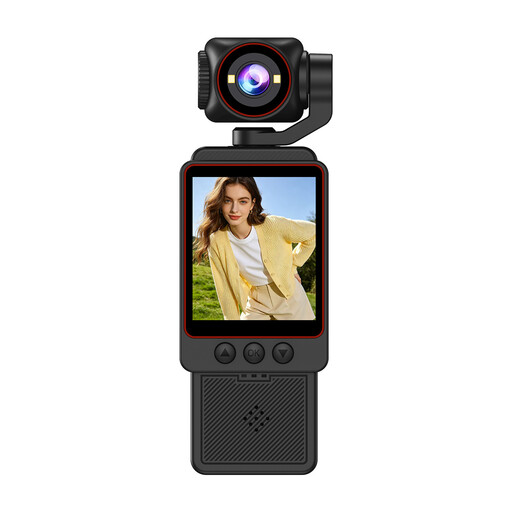
The product title lists 3-axis stabilisation, video up to 4K/240fps, 107 GB of built-in storage and a 2-inch rotating screen. Check separately what mount you need for a fixed shot directly above the table.
Not by itself: the entire recording setup, lighting, focus and framing all need to be right. IPEVO lists a maximum of 1920 × 1080 for video recordings made with Visualizer, despite the V4K PRO 120’s higher camera specifications.
Keep the lighting as consistent as possible, make a test recording and adjust the white balance to suit those lighting conditions. If you want to use IPEVO Visualizer to lock the white balance, check that the feature works with your chosen camera model.
Check that the connection and your lesson or recording app support the camera. IPEVO lists USB-A/UVC for the V4K PRO 120; compatibility can vary between apps.
For a consumer purchase, the Dutch Government says you are entitled to expect a product that is fit for purpose; there is no fixed statutory warranty period in the Netherlands. If a product is faulty, contact the seller. Online distance purchases from a business usually also come with a 14-day cooling-off period.
Not without following the relevant privacy rules. The Dutch Data Protection Authority states that consent is needed for images of recognisable pupils or staff, and that the school must keep the material secure. This is mainly relevant when people appear in the footage, rather than when only the table is filmed.