Choose your camera based on the shooting angle: a document camera is designed for paper and activities beneath the lens, a webcam is suited to teaching through a computer, and a compact video camera gives you the flexibility to film yourself too. With any set-up, check that both the collage and your hands stay in frame. Focus, stable mounting, connectivity and clear audio will then determine what works for you.
Which camera is right for you?
For makers filming their hands and paper
You want your collage and your movements to stay visible from above. IPEVO describes the V4K as a document camera with an adjustable set-up. Check that its capture area is large enough and that the base will fit on your small table.
For teachers teaching through a computer
You want to be able to show your work during a lesson too. Logitech describes Show Mode for the MX Brio, while Insta360 offers DeskView for the Link 2. Also check that the camera works with your computer and teaching app.
For makers who want to film themselves too
You switch between talking to camera and close-ups of your collage. Sony lists an 18–50 mm zoom lens for the ZV-1 II, while Canon lists 4K video and a tripod mount for the PowerShot V10. For each model, consider separately what mounting and audio set-up you’ll need.
What should you look for in a camera for a collage class?
Document camera above your work
Best for: showing paper and your movements, mainly through a compatible computer or teaching app.
Bear in mind: the base takes up space, and the stated capture area needs to be large enough for your collage.
Webcam aimed at your desk
Best for: teaching through a computer and switching between yourself and your work surface.
Bear in mind: a desk mode or downward-tilted webcam won’t necessarily give you a straight overhead view or the right framing.
Standalone compact camera
Best for: filming without a computer set-up or including yourself in the shot.
Bear in mind: check whether you’ll need a suitable, stable mount to film directly above your work.
For consumers looking to film a collage class at a small table, the main choices depend on the shooting angle, how clearly small details appear, the teaching set-up and whether you want to film without a computer.
| What to consider |
What to look for when buying |
Who it matters to |
| Stable overhead view |
Measure the work area, including space for your hands. Compare this with the stated capture area and check how much table space the base or mount takes up. |
I want to keep the collage and my hands in shot without the camera base taking up too much room; around 36% of consumers prioritise an overhead view. |
| Clear details and movement |
Compare focus, shooting distance, resolution and frame rate using the same video mode. IPEVO lists autofocus from 10 cm for the V4K PRO 120. |
Small cut-outs and hand movements need to be clear, so image detail is my main priority; around 29% of consumers prioritise detail. |
| Teaching connection and voice audio |
Check compatibility with your computer and teaching app. Make a test recording to see whether your explanation sounds clear. |
I want to teach through my computer while showing the work surface; around 21% of consumers prioritise a working teaching set-up and clear audio. |
| Filming without a computer |
Decide whether you want to record without a computer and check what mounting, storage and audio you’ll need for the way you work. |
I want to film away from my computer set-up or include myself in the shot; around 14% of consumers prioritise being able to film independently. |
Buying pitfalls to watch out for
-
Assuming the maximum pixel count is the video mode you’ll use for teaching
For the IPEVO V4K, the stated maximum resolution of 3264 × 2448 pixels is not the same as the maximum 30 fps listed for Full HD live video.
Before deciding whether it meets your teaching needs, compare resolution and frame rate within the same video mode.
-
Confusing desk mode with a straight-down view
Insta360 distinguishes DeskView, for occasional desk use, from a set-up with a dedicated overhead mount. So the angle and framing you want aren’t guaranteed.
Test the framing with your largest sheet of paper and the hand movements you want to show. You may need a separate, suitable mount.
-
Comparing the camera alone
When filming above a small table, you also need a suitable place to position the camera. An external microphone input may be useful for recording audio; the Consumers’ Association highlights this as a consideration for cameras used by video creators.
Before you buy, work out which camera, mount, connection, storage and audio will suit the way you work.
Depending on your set-up, you may need a suitable mount or extra storage or audio accessories.
Camera brands to consider
IPEVO
Document cameras for paper and demonstrations beneath an adjustable camera.
- IPEVO lists a maximum capture area of 342 × 255 mm and up to 30 fps for Full HD live video on the V4K.
- The V4K PRO 120 is a separate model, for which the manufacturer lists autofocus from 10 cm. Don’t assume this specification applies to the standard V4K.
- The USB set-up described requires compatible equipment and software.
Logitech
The MX Brio is a webcam option for computer-based lessons where you also want to show sketches on your desk.
- Logitech describes Show Mode and recording options of 4K at 30 fps or 1080p at 60 fps for the MX Brio.
- Show Mode alone doesn’t guarantee that a whole collage will stay in frame when viewed from directly above.
Insta360
The Link 2 is a webcam option for occasional desk views alongside a standard webcam set-up.
- Insta360 describes DeskView for the Link 2.
- The manufacturer distinguishes DeskView from a true overhead mount. The standard bundle lists a magnetic mount, not a dedicated overhead arm.
Sony
The ZV-1 II is a compact standalone camera for creators who want to film themselves as well as their work.
- Sony lists an 18–50 mm zoom lens and a built-in three-capsule microphone.
- For a fixed overhead shot at a small table, consider the mount and framing separately.
Canon
The PowerShot V10 is a compact vlogging camera with a tripod socket.
- Canon lists 4K video and a built-in stand.
- The stand’s stated tilt angles don’t necessarily mean you can film directly above your collage without an additional mount.
Cameras at Joybuy
This selection includes compact vlog and action cameras, as well as webcams for different filming set-ups. For each model, check that the mount and framing will keep the whole work area and your hands in shot without wobbling. A desk mode or compact body won’t necessarily give you a straight overhead view.
 Image unavailable
Osmo Pocket 4P Vlog Combo, black
If you want to use a compact vlog camera with a mount, check that it stays stable above your small table and covers the entire work area.
View at Joybuy
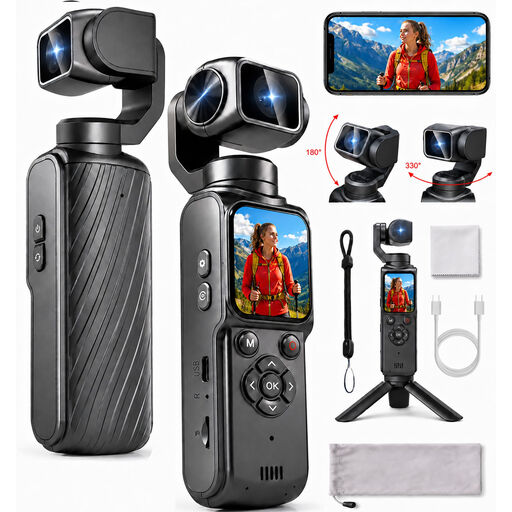 Image unavailable
Compact 4K action camera with rotating lens
If you want to adjust the camera angle, check that the lens movement and mount work together to frame your collage and hands as you want.
The product name lists a lens that rotates 330° and a 1.72-inch touchscreen.
View at Joybuy
 Image unavailable
Osmo Pocket 4 Creator Combo
If you want to film without a computer, check what mount you’ll need to position the camera steadily above your collage.
The product name lists 3-axis stabilisation, 1″ CMOS and 107 GB of built-in storage. According to the product description, 4K/240fps is available only in slow-motion mode.
View at Joybuy
 Image unavailable
Philips 4000 Series 4K UHD webcam, SPL6408BT/00
If you teach through a computer, check that the webcam works with your equipment and chosen teaching app.
The product name lists 4K UHD, autofocus, dual built-in microphones and a privacy shutter.
View at Joybuy
 Image unavailable
Philips 2K QHD PC webcam, SPL6308S/00
If you want to record your explanations and a view of your desk through a computer, check the connection and test how your voice sounds in your own teaching set-up.
The product name lists 2K QHD, autofocus and a noise-cancelling microphone.
View at Joybuy
Frequently asked questions
Is the highest stated resolution also the video resolution you’ll use during a lesson?
Not necessarily. IPEVO lists a maximum of 3264 × 2448 pixels for the V4K, but specifies up to 30 fps for Full HD live video. Compare the resolution and frame rate for the same recording mode.
Will a document camera work with any tablet or teaching app?
You’ll need to check that the combination you choose is compatible. For the V4K, IPEVO describes computer compatibility and iPad use with a USB-C iPad running iPadOS 17 or later and its own Visualizer app. Other apps need to support external cameras.
How can you stop a webcam cutting off your collage steps?
Set up the camera with your largest sheet of paper and all the hand movements you want to show, then check the entire frame before recording. DeskView and Show Mode let you view your desk, but don’t guarantee the right framing for your table.
Who is responsible if a camera breaks too soon during normal use?
According to ACM ConsuWijzer, the retailer is responsible for the statutory guarantee in the Netherlands. What you could reasonably expect from the product is what matters; a manufacturer’s guarantee doesn’t replace this right.
Can a school publish a collage lesson if pupils are recognisable in the footage?
The required consent must be obtained. The Dutch Data Protection Authority says that when a school creates and publishes footage in which pupils are recognisable, pupils aged 16 or over must give their own consent, while younger pupils need parental consent. This doesn’t automatically apply to a recording showing only your own hands and work.


