Who is this for?

Teacher with a fixed worktable

You want to keep the clay and your moving hands in shot from a single setup. Canon and Sony offer reviewed camera kits with interchangeable lenses. Check the exact kit and test whether the framing works from your camera position.

Teacher who prioritises clear audio

You give instructions while other activities are taking place in the shared space, and want to check in advance which microphone setup works with the camera. Canon, DJI and GoPro describe different connection or compatibility options for specific models.

Maker who films around the table

You move to different positions during the class to show techniques from another angle. DJI specifies three-axis mechanical stabilisation for the Osmo Pocket 3; also check that the fixed framing and audio setup suit your route.

What should you look for?

Mirrorless camera with interchangeable lens

Best for: mainly filming from a fixed position, when you want to match the lens to the distance and framing you need.

Bear in mind: the Canon EOS R50 V kit has been reviewed with an RF-S 14-30 mm lens; Sony lists an E PZ 16-50 mm F3.5-5.6 OSS II lens for the ZV-E10 II kit. A test recording will show whether the work surface fits in shot.

Camcorder with optical zoom

Best for: switching between a wide shot and a close-up from the same position.

Bear in mind: Canon specifies 20× optical zoom for the LEGRIA HF G70, while Panasonic specifies 24× for the HC-X1500. Check that the widest setting shows the whole table from where you plan to film.

Compact gimbal camera

Best for: regularly moving around the workspace and filming techniques from different positions.

Bear in mind: DJI specifies three-axis stabilisation and a fixed 20 mm equivalent lens for the Osmo Pocket 3. Test the framing and your preferred audio setup separately.

Action camera

Best for: a compact camera as an additional angle, when how you position it matters more than having a flexible main shot.

Bear in mind: GoPro says you need a Media Mod or Pro Mic Adapter to use an external microphone with the HERO13 Black. Also test whether your chosen angle captures the work surface clearly.

What to consider What to look for when buying Who is this important for?
Work surface and detail Measure the distance to the table and test the framing with clay and moving hands using the exact lens or zoom range. I want to show both the clay and small hand movements from my fixed camera position; around 31% of consumers prioritise a complete, usable frame.
Clear instructions Check the microphone connection or compatibility, and test the audio while the workshop is in use. I want my instructions to remain audible while other people are using the space; around 31% of consumers give speech clarity top priority.
Recording without interruption Check the memory card, power supply, recording mode and expected class length. Make a test recording of a similar duration. I want to capture a demonstration in one take without missing a step while changing a card or power supply; around 23% of consumers prioritise uninterrupted recording.
Moving around during the class Try out your route and filming angles, and make sure other participants or their work are not unintentionally recognisable in shot. I want to change position during the class to show a technique from another angle; around 15% of consumers say mobility is their main consideration.

Common pitfalls

  • Choosing based only on 4K or the zoom level

    A resolution or zoom claim does not tell you whether the clay and your hands will both fit in shot from the position available to you.

    Before finalising your setup, test the framing from the actual filming distance.

  • Assuming a camera or kit is a complete class setup

    The contents of a kit do not necessarily tell you whether it includes everything you need for your class, such as storage, mounting equipment or suitable audio gear.

    Compare the contents of the exact kit with what you need for a full class, and check microphone connections separately.

  • Assuming a compact camera will automatically capture the whole work surface

    With a camera that has a fixed lens, framing depends heavily on the distance available between the camera and the table.

    Make a test recording of the whole worktable, then decide whether the camera is suitable as your main camera or would work better as an additional angle.

Camera brands to consider

Canon

Worth considering for a fixed mirrorless camera setup or for filming from one position with a camcorder.

  • Canon lists 20× optical zoom, a 3,5 mm microphone input and two SD card slots for the LEGRIA HF G70.
  • The reviewed EOS R50 V kit includes an RF-S 14-30 mm lens; other versions may not include this lens.

Sony

The ZV-E10 II is an option if you want to choose an interchangeable lens for wide shots and close-ups.

  • Sony lists an E PZ 16-50 mm F3.5-5.6 OSS II lens for the lens kit reviewed.
  • Check the exact version and test the framing; the model specifications alone cannot tell you whether your worktable will fit from your chosen position.

Panasonic

The HC-X1500 is a camcorder option for filming from one position with built-in zoom.

  • Panasonic specifies 24× optical zoom for this model.
  • Test whether the widest setting captures the whole worktable from your camera position.

DJI

The Osmo Pocket 3 is worth considering if you move between filming positions during the class.

  • DJI specifies three-axis mechanical stabilisation and compatibility with DJI Mic 2 and Mic Mini.
  • The lens has a fixed 20 mm equivalent field of view; check the framing, the microphone version you need and the recording time separately.

GoPro

The HERO13 Black may be worth considering as a compact camera for an additional angle.

  • Its compact size may be useful if having an additional filming position is important.
  • GoPro says you need a Media Mod or Pro Mic Adapter to connect an external microphone to this model.

Joybuy product picks

This selection from Joybuy includes compact cameras for video recording. Before settling on a fixed setup for a clay class, test the framing, audio setup and recording time you need in your space.

Osmo Pocket 4P Vlog Combo, black

Osmo Pocket 4P Vlog Combo, black

For a tabletop setup, make a test recording from the planned distance to check that the clay and your moving hands stay in shot.

For a full class, check separately whether the version you choose suits your audio setup and recording time.

View at Joybuy

DJI Osmo Pocket 4 Standard Combo

DJI Osmo Pocket 4 Standard Combo

The product title describes this as a pocket gimbal camera; test whether the framing works from your distance to the worktable.

The product name lists three-axis stabilisation, 2× zoom, 107 GB of built-in storage and a 2-inch rotatable screen. Check that these features suit your setup.

View at Joybuy

Osmo Pocket 4 Creator Combo

Osmo Pocket 4 Creator Combo

If you film while moving between positions, test whether the framing shows the work clearly along your planned route.

The product name lists three-axis stabilisation, 2× zoom, 107 GB of built-in storage and a handle with a 1/4-inch thread. Check that the handle works with the mounting equipment you plan to use.

View at Joybuy
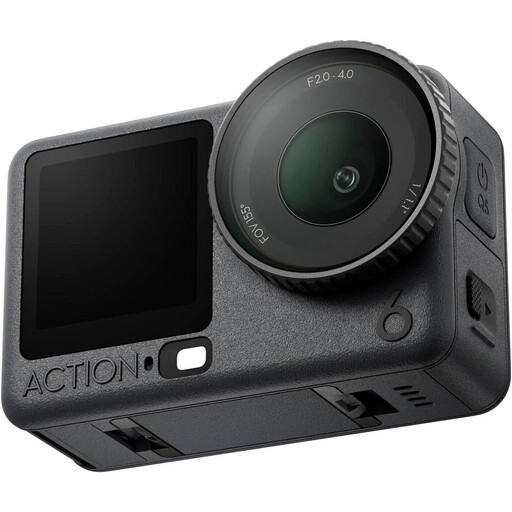
DJI Osmo Action 6 Adventure Combo

DJI Osmo Action 6 Adventure Combo

This model could be considered as a compact action camera for an additional filming position; first, make a test recording of the whole work surface.

For the exact version, check that the microphone setup and recording time you need suit your class.

View at Joybuy

DJI Osmo Pocket 3 Creator Combo

DJI Osmo Pocket 3 Creator Combo

For moving shots, the product name lists three-axis stabilisation and an included microphone; test the audio in the shared workshop.

DJI specifies a fixed 20 mm equivalent lens for the Osmo Pocket 3. The product name lists 4K/120 fps; check that the recording setting you choose suits your class and test the framing from the planned distance.

View at Joybuy

Frequently asked questions

How can I check whether the whole worktable fits in shot?

Set the camera at the planned height and distance, using the exact lens supplied or chosen. Film a short demonstration in which you move both hands to the edges of the work surface. A stated focal length or zoom level alone cannot tell you what the framing will be like in your space.

Is the built-in microphone good enough for spoken instructions?

The best way to find out is to make a test recording while the shared workshop is being used as normal. If you need a separate microphone, check the connections or compatibility for the exact version. Canon lists a 3,5 mm input for the HF G70; GoPro says an external microphone for the HERO13 Black requires a Media Mod or Pro Mic Adapter.

What should I arrange for a long class?

Test a recording of a similar length using your chosen settings, memory card and power supply. Canon lists two card slots with simultaneous or relay recording for the HF G70; also check the complete setup and the recording settings you need.

What extra equipment should I check for my camera setup?

Compare the contents of the exact version with what you need for the class, such as a suitable lens, memory card, mounting equipment, power supply and microphone. Also check that your chosen microphone works with the camera. For an external microphone with the HERO13 Black, GoPro lists a Media Mod or Pro Mic Adapter.

Can I film other participants recognisably and publish the class?

First, check which privacy rules apply to your situation. If you are filming on behalf of a business or organisation and visitors, colleagues or pupils are recognisable, the Dutch Data Protection Authority says you need a lawful basis under the GDPR to make and publish such footage. The authority says consent may be appropriate in many cases, but the right answer depends, among other things, on who is filming, who is recognisable and what happens to the recording.
