You don’t need to rush out and buy a new camera to take overview shots of bowls in a shared studio. Try your phone first, using soft light and a plain background. A mirrorless camera with a suitable close-up lens could be useful for capturing fine glaze details, but check the working distance and whether the lens is actually included in the kit. A standard zoom isn’t automatically a macro lens.
Who is this choice relevant to?
Maker working in changing studio light
You photograph bowls in different places and want their colour and sheen to come across clearly. Orbitvu discusses using soft light for ceramics; Nikon recommends checking the white balance again when the lighting conditions change.
Maker who takes close-up photos
You want to show small glaze patterns, maker’s marks or signs of use. So look beyond the camera itself: check the lens magnification and how much room there is in front of the lens.
Maker with limited storage space
You want a set-up for photographing whole bowls that’s quick to assemble and put away. Canon describes using a tripod for consistent product composition; remember to allow for the space your lighting takes up, too.
What should you look for when choosing?
Your current phone
Choose this if: you mostly photograph whole bowls and want to see whether your phone gives you the framing you need.
Bear in mind: your phone’s own close-up capabilities, and the effect of the light and background.
Compact camera with a fixed lens
Choose this if: you want one camera that’s easy to store and carry, and a test shot shows that its fixed lens frames your subject well.
Bear in mind: you can’t replace the fixed lens with a separate macro lens.
Mirrorless camera with a standard zoom
Choose this if: you regularly take overview shots and might want to use different lenses later.
Bear in mind: the Canon EOS R50, Nikon Z50II and Sony ZV-E10 II kits discussed here include a standard zoom, not a separate macro lens.
Mirrorless camera with a close-up lens
Choose this if: you need small maker’s marks or glaze details to appear large in the frame.
Bear in mind: the working distance at the magnification you use. Little room in front of the lens can make it harder to position lights around the bowl.
| What to consider |
What should you check? |
Who is this important for? |
| Colour and reflections |
Compare shots taken against the same background and with the same lighting set-up; check the white balance again when the light changes. |
If I’m photographing bowls in changing studio light, I want to compare their colour and sheen more easily. Around 33% of consumers say colour and lighting are their top priority. |
| Details and working distance |
Check the magnification of the exact lens, as well as the distance between the front of the lens and the bowl. |
For maker’s marks or fine glaze textures, I want to know whether the detail will appear large enough without leaving too little room for lighting. Around 27% of consumers put small details first. |
| Setting up and storage |
See how many separate parts you’ll need to store and whether you have a safe space for a tripod and lighting. |
In a shared studio, I want to be able to set up quickly and pack everything away again. Around 20% of consumers prioritise a compact, repeatable set-up. |
| Complete set-up for overview shots |
Check what the camera kit includes and what else you’ll need for your photos. |
If I mostly photograph whole bowls, I want to find out whether my phone is good enough before buying extra equipment. Around 20% of consumers focus mainly on the cost of a complete set-up. |
Common buying mistakes
-
Buying a new camera body to fix bright reflections
Reflections from lamps or windows can dominate photos of shiny ceramics, whatever camera body you use. Orbitvu discusses soft light as a way to reduce harsh shadows and visible reflections.
First, try the camera you already have, using a soft lighting set-up and a plain background.
A repeatable set-up may also require a suitable background, lighting and time to get the shooting area ready.
-
Assuming a standard zoom is a macro lens
The Canon, Nikon and Sony zoom kits discussed here aren’t the same as the separate macro lenses with specified magnification figures.
Read the full kit name and check the close-up capabilities of the lens actually included in the set.
If the supplied lens can’t capture your details large enough, you may need a separate lens.
-
Choosing based on maximum magnification alone
Magnification doesn’t tell you how much room there’ll be in front of the lens for lighting and the bowl. For its separate E 30 mm F3.5 Macro lens, Sony gives a working distance of 2,4 cm at the relevant close-up setting.
Measure the space available around the bowl and compare the working distance at the magnification you actually want to use.
A short working distance can make it harder to position soft lighting or keep enough distance from fragile ceramics.
Camera brands to consider
Canon
Canon offers a few different options here: an EOS R50 zoom kit, a compact camera with a fixed lens and separate RF lenses for close-up photography.
- Canon specifies a 24,2 MP APS-C sensor and an RF-S 18–45mm zoom lens for the EOS R50 kit.
- Canon gives a maximum magnification of 0,5× for its separate RF 35mm F1.8 MACRO IS STM lens.
- The PowerShot V1 has a fixed lens; the magnification figure for the separate macro lens doesn’t apply to the EOS R50 zoom kit.
Nikon
The Z50II zoom kit is an option if you want to build a Z system; choosing a separate Z macro lens is a different route for close-up photography.
- Nikon lists 20,9 million effective pixels and a vari-angle screen for the Z50II; the kit discussed here includes a Z DX 16–50mm zoom lens.
- Nikon specifies 1:1 magnification for its separate Z MC 50mm f/2.8 lens.
- At the minimum focusing distance, Nikon gives around 5 cm of space in front of the lens. Bear this in mind when positioning lights around the bowl.
Sony
The ZV-E10 II zoom kit could be worth considering if you’re also interested in video; separate E lenses offer another option for close-up photography.
- Sony specifies around 26,0 effective megapixels for the ZV-E10 II and lists the E PZ 16–50mm OSS II in the zoom kit.
- Sony gives 1:1 magnification for its separate E 30 mm F3.5 Macro lens.
- Sony gives a working distance of 2,4 cm at the relevant close-up setting. The camera’s video features alone don’t tell you whether it’s better suited to still photos of ceramics.
Fujifilm
The X-S20 is an option if you’re considering an X system with RAW shooting and a lens of your choice.
- Fujifilm specifies 26,1 million effective pixels, RAW shooting and in-body image stabilisation for the X-S20.
- The stabilisation figure applies under specific test conditions and doesn’t predict the results you’ll get in this studio. Check what’s included in any specific offer.
Cameras at Joybuy
These cameras range from compact models to a Sony ZV-E10 with a 16–50mm zoom. Compare the set-up with how you plan to use it, and check in particular whether the close-up capabilities and working distance are right for your bowls.
 No image available
KINSI Mini Vlog Camera 4K, 64 MP
The description gives a weight of 84 g and says a mini tripod is included, which may be useful if you want to take a compact set-up with you.
The product name lists Wi-Fi, a 330° rotating lens, a 1,72-inch touchscreen and 18× digital zoom.
View at Joybuy
 No image available
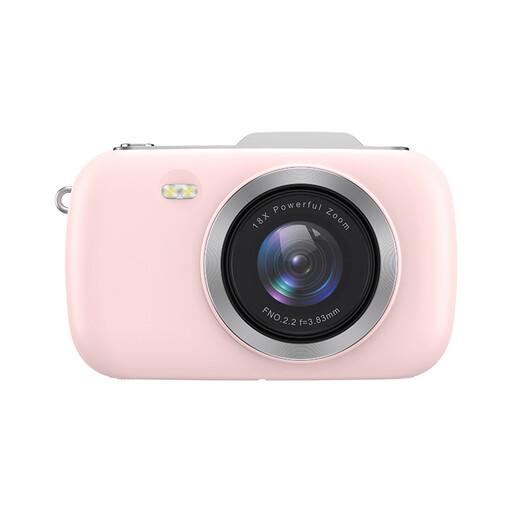
KOMERY G7-A 4K Digital Camera, 80 MP, pink
The product name describes this as a portable point-and-shoot camera. Compare its close-up capabilities with the details you want to capture on your bowls.
The name lists 4K video, 80 MP and 18× zoom. The colour option named is pink.
View at Joybuy
 No image available
KOMERY G7 5K Digital Camera, 80 MP, white
The product name describes this as a portable point-and-shoot camera. Check whether its close-up capabilities suit the detail shots you want to take.
The name lists 5K video, 80 MP and 18× zoom. The colour option named is white.
View at Joybuy
 No image available
Sony ZV-E10 with 16–50mm zoom lens, black
The 16–50mm zoom in the product name makes this an option to compare for overview shots with different framing.
The title lists a Sony ZV-E10 with a 16–50mm zoom lens. Check separately whether its close-up capabilities are good enough for small glaze details.
View at Joybuy
Frequently asked questions
How can you keep the colour of different bowls consistent?
Where possible, use the same lighting set-up and background, and check the white balance again when the light changes. This helps you compare shots, but it can’t guarantee that every glaze will look identical on every screen.
Do you need a macro lens to photograph a maker’s mark on the base?
Not before a test shot shows that your current set-up isn’t up to the job. Then compare the magnification of the exact lens with the space you need for lighting. The specifications for a separate macro lens don’t automatically apply to a standard zoom included in a camera kit.
What can you do if the shared workspace keeps changing?
Note or mark the position of your camera, background and lighting, and use a tripod where possible. Check the white balance again when the lighting conditions change.
What are the rules on warranties and online returns in the Netherlands?
When you buy as a consumer, you’re entitled to a legal guarantee if a product doesn’t do what you could reasonably expect under normal use; the seller must offer an appropriate solution. Many online purchases from a business come with a 14-day cooling-off period, subject to legal exceptions. The ACM and the Dutch government explain these rules. Check what applies to your specific purchase, as consumer rules don’t necessarily apply to business purchases.
Can you photograph identifiable people in a shared workspace and publish the images?
For product photos, it’s best to avoid including other identifiable people. The Dutch Data Protection Authority says that a legal basis under the GDPR may be needed when taking and publishing images of identifiable people. Consent is one possible legal basis, but not the only one. What applies to a particular photo depends on how it’s used and shared.


