
Detail video creator
You want to capture small decorations and the work involved clearly, up close. The recording distance, framing and focus all affect whether details are visible. Sony Netherlands and DJI publish model-specific focusing distances.


Choose a camera based on your filming distance and angle. For small details, focusing at your working distance matters more than a 4K label alone. A webcam is a good fit for filming via a computer, while a compact or mirrorless camera offers more independent or adjustable recording. A gimbal camera is best suited to moving shots. Check the lighting, sound and mounting options too. If you’re using a real flame, set up a fire-safe workspace.
You want to capture small decorations and the work involved clearly, up close. The recording distance, framing and focus all affect whether details are visible. Sony Netherlands and DJI publish model-specific focusing distances.
You film in changing desk or candlelight and want to assess the exposure and colour. If you’re using a real flame, set up a safe workspace first. The Netherlands Fire Service advises keeping flammable materials away from candles.
You talk while you work and want to record both your desk and your explanation from a fixed computer setup. Check that the camera angle shows your work surface and that your voice is recorded clearly enough.
Start with the distance and angle you’ll be filming from, then decide how much control you need over lighting, sound and movement.
Good for: filming at the same desk or giving live demonstrations. Logitech describes Show Mode as a way to point the camera down at desk work.
Keep in mind: you’ll need a computer and recording app, and you’ll need to check that the decorations look large and sharp enough from the mounting position.
Good for: recording without a computer. Canon says the PowerShot V10 has a built-in stand.
Keep in mind: check that your setup gives you the detail framing and camera angle you want. Sony Netherlands lists different focusing distances for the ZV-1 in wide-angle and telephoto modes.
Good for: anyone who wants to match the lens to their preferred recording distance and framing. Canon describes the EOS R50 V as having interchangeable lenses and audio connections.
Keep in mind: the focusing distance depends in part on the lens you choose, so assess the camera body and lens together.
Good for: moving shots around your decorations. DJI describes the Osmo Pocket 3 as a camera with a mechanical gimbal.
Keep in mind: DJI lists the Osmo Pocket 3’s focusing range as starting at 0.2 m. For a fixed desk recording, a stable mount and a suitable angle may matter more than camera movement.
| What to consider | What to look for | Who it matters to |
|---|---|---|
| Sharp close-ups | Measure your working distance and check the focusing range and framing at the zoom setting or with the lens you’ve chosen. | If I film small decorations up close, I want to keep the details sharp at my working distance. Around 31% of consumers put close-ups first. |
| Light and colour | Check whether you can adjust the exposure and white balance, then record a test in the lighting you’ll be using. | When I film in changing desk or candlelight, I want to assess the exposure and colour. Around 25% of consumers give lighting and colour top priority. |
| Fixed camera angle | Check the mount, available workspace and framing. A tilting webcam or stand doesn’t guarantee a top-down view. | If I work from a fixed position, I want to film my hands and decorations from a useful angle without blocking my workspace. Around 19% of consumers start with their desk setup. |
| Spoken commentary | Check the microphone options and listen to a test recording from your usual speaking distance. | When I explain what I’m doing, I want to check that my voice is clear as well as seeing my hands. Around 13% of consumers prioritise spoken commentary. |
| Moving shots | Decide whether you’ll be moving around the decorations, then check the stabilisation and minimum focusing distance along your planned route. | If I move the camera around the decorations, I want to know whether the footage will stay steady and focus at the planned distance. Around 12% of consumers prioritise moving shots. |
Video resolution on its own doesn’t tell you whether the camera can focus at your working distance. For example, Sony Netherlands lists different minimum focusing distances for the ZV-1 in wide-angle and telephoto modes.
Measure your working distance and check the focus and framing in the mode you’ll actually use.
If the decorations don’t look large and sharp enough in the frame, you may need a different lens or a different setup.
Logitech describes Show Mode as a way to tilt the webcam down and share your desk work. It doesn’t automatically determine the recording angle or how large the details look on screen.
Check the mounting height, available workspace and a test shot of the full decoration.
The Netherlands Fire Service advises keeping flammable materials away from candles and tea lights.
If you’re using a real flame, set up a safe workspace first, then adjust the camera angle and accessories.
The ZV-1 is a compact camera for recording without a computer, when recording distance is a key consideration.
The PowerShot V10 is designed for a compact, fixed setup, while the EOS R50 V offers interchangeable lenses.
The Osmo Pocket 3 is a compact gimbal camera for moving shots.
The MX Brio is a USB webcam for recording or demonstrating via a computer.
This selection includes webcams for computer setups and compact cameras for recording without a computer or capturing moving shots. For small decoration details, always check the focus at your own working distance.
 No image available
The gimbal camera described is a good fit for shots where you move the camera around the decorations.
The bundle description mentions a video light with an adjustable colour temperature of 3200–5500 K.
 No image available
A webcam may suit recording via a computer. Check that the mount and viewing angle work at your desk.
The product name lists 8MP, autofocus, dual built-in microphones and a privacy cover. Variant: EU Version, Black.
 No image available
The mechanical gimbal is suited to moving shots. For a fixed desk recording, the mounting angle still matters.
The product name lists 4K/120fps video and 3-axis stabilisation. DJI lists this model’s focusing range as starting at 0.2 m.
 No image available
This webcam is listed for use with a PC or Mac. Check the mounting position and framing of your work surface.
The product name lists a 1/2-inch sensor, 4K, HDR, AI tracking and a built-in microphone. The description also mentions DeskView.
 No image available
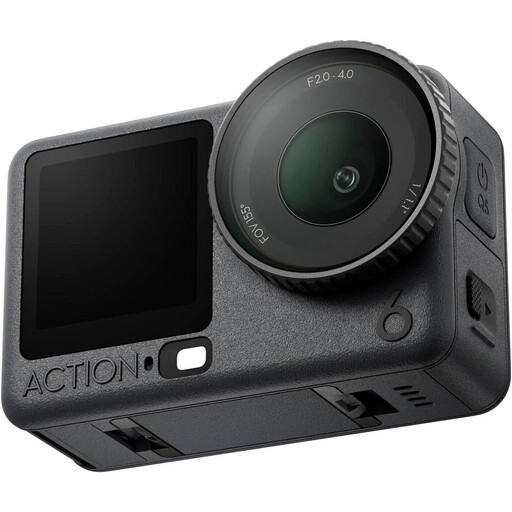
Check whether an action camera suits the angle and distance of your desk recording.
The product description lists a variable aperture of f/2.0–f/4.0.
No. As well as resolution, check the focusing distance at your working distance and the framing. Sony Netherlands lists different minimum focusing distances for the ZV-1 in wide-angle and telephoto modes; DJI lists the Osmo Pocket 3’s focusing range as starting at 0.2 m.
The Netherlands Fire Service advises using a sturdy, non-flammable holder and keeping flammable materials away from candles and tea lights. Position camera supports, cables and other items so they don’t compromise your safe setup.
Not necessarily. The Dutch Data Protection Authority distinguishes between footage kept private and footage shared more widely or for business purposes. The GDPR may apply if people are recognisable in public or business recordings, and you’ll need a valid legal basis. If in doubt, film only the decorations or get things sorted before publishing.
No. According to the Dutch government, there is no fixed statutory guarantee period in the Netherlands. What you can reasonably expect from a product also plays a part. If a product is faulty, contact the seller.
For many consumer purchases made online from a business, you have a 14-day cooling-off period. The Dutch government also notes that exceptions apply and distinguishes between purchases from businesses and private individuals. Check the terms for the specific purchase before using or returning the camera.