Who is this buying guide for?

For capturing fine lines and the edges of the sheet

You want the pen strokes and corners of the entire sheet to remain clear. Pay attention to the lens, framing and a stable setup; Tour of Art Flevoland recommends positioning the camera parallel to the artwork.

For preserving the colour of the paper and ink

You want white paper and coloured ink to look true to life under your studio lighting. Even lighting and, if you edit your images, attention to white balance and RAW support can help.

For working in a home studio with limited space

You want to frame the whole sheet without an impractical setup. Measure the distance between the camera and the sheet, then check that your chosen lens is suitable.

What should you look for in a camera for calligraphy?

Compact camera with built-in zoom

A good fit if: you want to avoid separate lenses and the built-in lens can frame the whole sheet from the distance available to you.

Bear in mind: the lens isn’t interchangeable, so check a test shot with the entire sheet in frame.

Mirrorless camera with a suitable lens

A good fit if: you want to choose a lens based on the sheet size, shooting distance and studio space, or edit RAW files.

Bear in mind: the camera body alone won’t tell you whether the lens is suitable; check the mount and what’s included in the kit too.

Your current camera with a better setup

A good fit if: skewed edges, camera shake, shadows or reflections are affecting your photos and you want to improve your setup first.

Bear in mind: a more stable setup won’t change the sensor resolution or what the lens can do.

What to consider What should you look for? Who is this important for?
Fine lines and sheet edges Test the exact lens with the whole sheet in frame and check the corners too. Use a stable support and the self-timer. If you want to assess pen strokes across the entire sheet, pay particular attention to edge-to-edge sharpness. Around 33% of consumers consider sheet detail their top priority.
Paper and ink colour Check the colour under your own studio lighting and see whether the model supports RAW if you plan to edit your images. If you want the paper and ink to look true to life under your lighting, even illumination and white balance both matter. Around 27% of consumers prioritise colour reproduction.
Space and framing Measure the sheet and the available shooting distance. Check that the whole sheet fits in frame with the camera and sheet parallel to each other. If space is limited and you want to photograph the sheet straight on with ease, check the complete setup. Around 20% of consumers prioritise space and ease of setup.
Complete setup For a mirrorless camera, check the lens and kit contents. Factor in any support and lighting you’ll need. If you want to know what you’ll need to take photos, look beyond the camera body alone. Around 20% of consumers focus on the cost of the complete setup.

Common buying mistakes

  • Assuming megapixels guarantee clear pen strokes

    The number of effective pixels doesn’t tell you how sharp a photo will be with your lens and setup. Camera shake, focus and framing all play a part too.

    Take a test shot of the whole sheet and check the corners. If needed, adjust the alignment, support or lighting first.

  • Comparing mirrorless camera bodies alone

    A camera body without a suitable lens won’t tell you whether you can frame the sheet properly from your working distance.

    Check the full model and kit name, the lens mount and the shooting distance. Also factor in a lens, support or lighting if your setup needs them.

    Buying a body only may mean you need to purchase a suitable lens or other components later.

  • Choosing a wide angle just to fit the sheet in the frame

    An unsuitable wide-angle setup or a camera that isn’t positioned straight can distort the edges and mean you have to crop the image more.

    Check whether you can position the camera further away and parallel to the sheet, then frame the whole sheet using the chosen lens range.

Camera brands to compare

Canon

This comparison includes both a mirrorless camera with an interchangeable lens and a compact camera with built-in zoom from Canon.

  • Canon lists 24.2 effective megapixels and support for RF and RF-S lenses for the EOS R50.
  • According to Canon, the EOS R50 doesn’t have in-body image stabilisation. The PowerShot G7 X Mark III has a fixed zoom lens with a 24–100 mm equivalent range and 20.1 effective megapixels; its lens can’t be changed.

Sony

The Sony α6400, also known as the ILCE-6400, is an APS-C mirrorless camera with an E-mount.

  • Sony Netherlands lists approximately 24.2 effective megapixels and RAW shooting.
  • Check the exact body or kit version and choose a suitable E-mount lens. The specifications alone don’t tell you how sharply that lens will capture the corners of your sheet.

Fujifilm

The Fujifilm X-S20 is an APS-C mirrorless camera with an X-mount, for anyone who wants to choose their own lens.

  • Fujifilm lists 26.1 effective megapixels, RAW shooting and in-body image stabilisation for this model.
  • The stated stabilisation rating applies under specific test conditions. It doesn’t replace checking the lens, setup and lighting when photographing a flat sheet.

Nikon

The Nikon Z50II is a DX/APS-C mirrorless camera in the Z lens system.

  • Nikon lists 20.9 effective megapixels for this model.
  • A lower stated pixel count than some of the other cameras mentioned doesn’t in itself prove that a whole sheet will be too difficult to read at your intended viewing size.

Cameras at Joybuy

This selection of Joybuy products includes compact cameras and a mirrorless camera with a zoom lens. For photographing calligraphy, check that the exact camera and lens suit the size of your sheet, the available shooting distance and the type of editing you want to do.
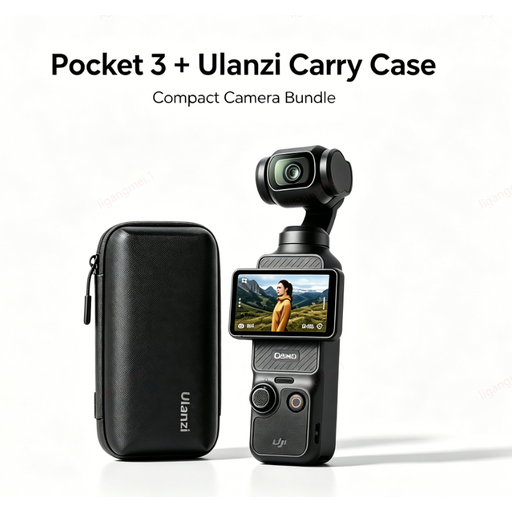
DJI Pocket 3 camera with Ulanzi storage case

DJI Pocket 3 camera with Ulanzi storage case

The product title describes a compact camera. Check that the lens and shooting distance are suitable for framing your entire calligraphy sheet.

Joybuy
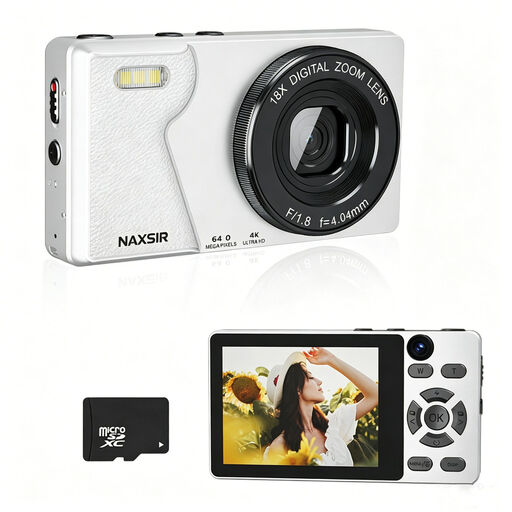
NAXSIR digital camera with 64 MP, 18x digital zoom, autofocus and 32 GB memory card

NAXSIR digital camera, 64 MP, 18x digital zoom, with 32 GB memory card

The product title mentions autofocus and an included memory card. Take a test shot to see whether the camera can capture your entire sheet in focus and without distortion.

The stated 64 MP photo resolution and 18x digital zoom are product features, not proof of sharpness right into the corners of the sheet.

Joybuy

DJI Osmo Pocket 3 Creator Combo

DJI Osmo Pocket 3 Creator Combo

The product title mentions a 1-inch CMOS sensor and 3-axis stabilisation, among other features. Also check whether this camera and the available shooting distance are suitable for framing a complete flat sheet.

The title also mentions 4K/120fps video. This video feature alone doesn’t tell you whether fine calligraphy lines will be clear in a photo.

Joybuy

Songdian Pocket Camera, 4K, 44 MP, 16x zoom, pink

Songdian Pocket Camera 4K, 44 MP, 16x zoom, pink

The product title mentions autofocus and a 44 MP photo resolution. With the whole sheet in frame, check whether the lens and setup deliver the level of sharpness you want right to the edges.

The stated resolution and 16x digital zoom don’t guarantee clear fine lines.

Joybuy

Sony ZV-E10 with 16–50 mm zoom lens, black

Sony ZV-E10 with 16–50 mm zoom lens, black

The product title describes a Sony ZV-E10 with a 16–50 mm zoom lens. Check that the range suits the size of your sheet and the available shooting distance, then assess a test shot for sharpness right into the corners.

Joybuy

Frequently asked questions

How do you set up a camera to photograph a calligraphy sheet straight on?

Position the lens parallel to the sheet and point the centre of the lens at the centre of the sheet. Check that the edges run parallel to the frame, use a tripod or stable surface and the self-timer, and make sure the lighting is soft and even, without distracting shadows or reflections.

Do you need a macro lens to photograph a whole calligraphy sheet?

Not necessarily. First check whether the lens you’re considering can frame the whole sheet in focus and without distortion from the distance available to you. Consider another lens if it can’t do both, or if you want to capture small details at a larger size.

How much does a complete setup cost, and what if a camera bought online isn’t suitable?

The cost of a complete setup depends on the camera and lens you choose, as well as any extras you need, such as support or lighting, so compare the contents of the exact kit. According to ACM ConsuWijzer, online consumer purchases generally come with a statutory cooling-off period of up to 14 days after delivery, although exceptions may apply. The statutory guarantee is separate from any manufacturer’s or seller’s warranty; in the Netherlands, the statutory guarantee doesn’t have a fixed two-year period for all cameras.

Can you publish someone else’s calligraphy sheet online?

Not automatically. According to the Dutch government, you can generally use someone else’s copyright-protected work only with the creator’s permission. You can’t share or publish a private copy made for your own use; check whether the specific sheet is protected and what permission is required.
