Who is this guide for?

Teacher filming brush strokes from above

You want to keep the brush pen’s nib, your hand and the full text in shot. Choosing the right lens, focusing and using a suitable overhead mount are therefore more important than portability. Canon UK describes the EOS R50’s lens mount, while DJI specifies a fixed lens for the Osmo Pocket 3, with a minimum focusing distance of 0.2 m.

Creator working in changing window light

You want the paper and ink to remain clear as the daylight changes. Nikon UK recommends reassessing the white balance when lighting conditions change and describes ways to use fill light.

Teacher giving long or live lessons

You don’t want your recording to stop unexpectedly, or to spend the live demonstration fiddling with the camera. Nikon lists different recording times for the Z 30 depending on the video settings; Logitech describes a webcam feature for showing your desk during a call.

What should you look for?

Mirrorless camera with interchangeable lens

Choose this option if: you want a fixed overhead shot and need to match the lens and framing to your table setup.

Bear in mind: a camera body without a suitable lens or overhead mount isn’t a complete teaching setup. More video settings aren’t automatically more useful for a static writing surface.

Webcam for computer-based lessons

Choose this option if: you mainly teach live using a computer and can point the camera at your desk.

Bear in mind: a desk-view feature doesn’t guarantee that small lettering will be legible from your mounting distance. Check the teaching app you use, too.

Compact gimbal camera

Choose this option if: you want to shoot portable footage as well as use a fixed table setup.

Bear in mind: the fixed angle of view affects how far the camera needs to be from the paper. A portable design doesn’t automatically make overhead mounting easy.

What to consider What should you check? Who should pay particular attention?
Overhead view and focus Measure the available height and test whether the pen nib, your hand and the whole exercise stay in focus and in shot. If I film brush strokes from above, I want to show the whole writing area without losing sight of the pen nib. Around 36% of consumers say a clear overhead view is their main buying concern.
Paper and ink in window light Record a test clip at lesson time and check shadows and white balance as the daylight changes. If the window light changes during my lesson, I want the paper and ink to remain clear. Around 29% of consumers prioritise consistent results in window light.
Recording time and commentary Compare the recording time for your chosen video settings with the length of your lesson, and test the audio source, power supply and storage. If I record a long lesson with spoken instructions, I want to avoid interruptions and unclear audio. Around 21% of consumers give continuity and audio top priority.
Live lessons on a computer Check compatibility with your computer and app, then view a test stream at the screen size your student will use. If I want to show my desk during a computer lesson, I want to do so without repeatedly interrupting the demonstration. Around 14% of consumers mainly look for a simple way to teach live.

Common buying pitfalls

  • Choosing on the basis of 4K alone

    Resolution doesn’t determine whether the paper and pen nib will be framed properly and appear sharp from your table height.

    Check the working distance, angle of view and mounting first; then compare the video settings.

  • Assuming the longest quoted recording time applies at every resolution

    Nikon lists different recording times for the Z 30 in Full HD and 4K UHD. An interrupted lesson may also mean extra recording and editing time.

    Check the recording time for the exact settings you plan to use, and test a recording at least as long as your lesson.

  • Assuming a webcam will automatically give you a good overhead view

    Logitech describes Show Mode for displaying desk work during a call; that doesn’t guarantee that small lettering will be legible in every setup. You may also need a separate mount.

    Preview a test stream in the teaching app you plan to use, with the pen nib and the full exercise in shot.

  • Treating changing shadows as a camera issue alone

    Window light, the position of your hand and the use of fill light all affect how clearly the work surface appears.

    Test your setup at lesson time and, if needed, try a reflector or controlled fill light.

Brands to compare

Canon

The EOS R50 is a mirrorless camera with a choice of RF and RF-S lenses, making it suitable for a fixed shot where you can match the lens to your table setup. Canon UK lists UHD 4K 30p and recording times of more than 30 minutes.

  • The lens mount supports RF and RF-S lenses, subject to the exceptions specified by Canon.
  • According to the published specifications, the EOS R50 has no sensor-shift stabilisation. Check the lens and mounting separately.

Sony

The ZV-E10 II is a mirrorless camera for anyone who makes other videos as well as filming writing lessons. Sony lists video settings up to 4K 60p.

  • The listed video settings offer a choice of up to 4K 60p.
  • Those extra features don’t, by themselves, offer an advantage for a static shot of paper. Check the lens and bundle before comparing versions.

Nikon

The Z 30 offers 4K UHD 30p and a choice between its built-in stereo microphone and an external microphone for recorded commentary.

  • Nikon lists two audio recording options: the built-in stereo microphone or an external microphone.
  • Nikon quotes around 35 minutes for 4K UHD and up to 125 minutes for Full HD 24p/25p at 25 °C. Actual recording time depends on factors including battery charge and internal temperature.

Logitech

The MX Brio is a webcam for computer-based lessons. Logitech lists 4K 30 fps and Show Mode for displaying desk work during a call.

  • Show Mode is designed to show your desk during a call.
  • Check whether small lettering is legible in your teaching app and from your mounting distance.

DJI

The Osmo Pocket 3 is a compact camera with a fixed lens, for creators who also film away from a fixed table setup.

  • DJI specifies a lens with a 20 mm equivalent focal length and focusing from 0.2 m.
  • The fixed angle of view means you’ll need to check the working distance and paper framing. Its portable design doesn’t automatically make secure overhead mounting easy.

Joybuy product picks

This selection includes webcams for computer-based lessons and a portable 360° camera. Check that each model’s mounting and framing suit a fixed shot of your writing area.

Philips 4000 Series 4K UHD Webcam SPL6408BT/00, black, EU version

Philips 4000 Series 4K UHD Webcam SPL6408BT/00, black, EU version

If you teach using a computer, you can compare this desktop webcam with other options for showing your desk.

The product name lists 4K UHD, 8 MP, autofocus, two built-in microphones and a privacy cover. Check that the included connection and mounting suit your computer setup.

View product at Joybuy

Philips 2K QHD PC Webcam SPL6308S/00, silver, EU version

Philips 2K QHD PC Webcam SPL6308S/00, silver, EU version

For a lesson on a PC or laptop, you can assess this webcam based on the picture settings and mounting you need.

The product name lists 2K QHD and a clip mount for a desktop or laptop. The product description mentions a noise-cancelling microphone and tripod mounting.

View product at Joybuy

Insta360 Link 2C Standard Bundle, Graphite Black, 4K webcam

Insta360 Link 2C Standard Bundle, Graphite Black

If you want to show your desk during a computer lesson, you can compare this webcam with other options for live use.

The product name lists a 4K webcam for PC and Mac and a 1/2-inch sensor. The product information mentions autofocus, HDR, auto framing and a microphone with AI noise reduction. Check that it’s compatible with your computer and teaching app.

View product at Joybuy

Insta360 Link 2 Standard Bundle, 4K webcam

Insta360 Link 2 Standard Bundle

For a computer lesson or stream, you can assess this webcam based on its listed video and audio features and software compatibility.

The product name lists 4K, a 1/2-inch sensor and use with PC or Mac. The product information mentions AI tracking, HDR, gesture control and a microphone with AI noise reduction.

View product at Joybuy
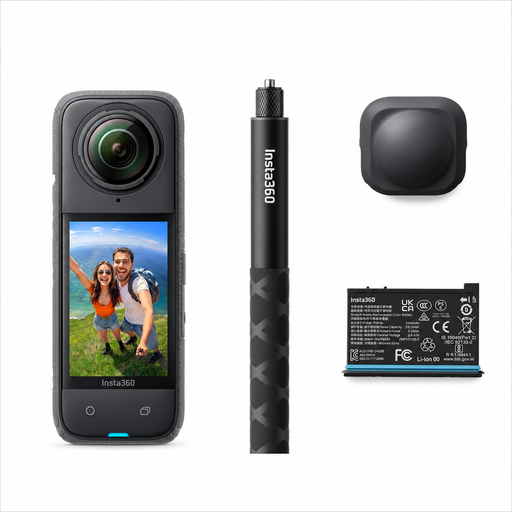
Insta360 X4 Air Starter Bundle, 165 g, 8K 360° camera

Insta360 X4 Air Starter Bundle

If you want to reframe your footage afterwards, you can compare this camera with a fixed webcam setup.

The product information lists 8K 30 fps 360° video, a weight of 165 g and the option to reframe footage later in the app. This is a different way of working from recording a fixed overhead shot straight away.

View product at Joybuy

Frequently asked questions

How can I stop the paper appearing to change colour during a lesson?

Start with lighting that stays as consistent as possible, and check the white balance before recording. Nikon UK recommends reassessing this setting when lighting conditions change, so record a test clip of the paper and ink if the window light varies.

Can I record for 125 minutes in 4K with the Nikon Z 30?

No. Nikon quotes a maximum of 125 minutes for Full HD 24p/25p at 25 °C, and around 35 minutes for 4K UHD. Battery charge and internal temperature can also affect recording time.

What other equipment should I check for my camera setup?

If you’re choosing a mirrorless camera, check whether the version you’re buying includes a suitable lens and whether you need a secure overhead mount, suitable storage or an external microphone. The equipment you need depends on the camera and your workspace.

What can I do in the Netherlands if my camera is faulty?

When you buy as a consumer, you’re entitled to a product that works properly. Depending on the fault, the retailer may need to offer a solution such as a repair, replacement or refund. According to the Dutch government, there is no fixed statutory guarantee period in the Netherlands. Contact the retailer if your camera is faulty.

Can I film students so they can be identified and publish the lesson?

Not without checking the privacy rules that apply. According to the Dutch Data Protection Authority, images in which people can be identified count as personal data. If you share footage beyond personal or household use, the GDPR may apply and you’ll need an appropriate legal basis. The exact requirements depend on how you use the recording.
