
Teacher with a permanent workbench
You want learners to follow the book and your movements from a single overhead view. Focus on the capture area, the distance from the work and a stable mounting position.


If you mainly film a fixed overhead view to show on a computer, a USB document camera suits the way you work. If you want to film independently and adjust the framing with a lens, consider a mirrorless camera. Always check at the actual mounting height that small bookbinding details are in focus and large enough to see. Also record a test under your own lights, and check the sound, power and storage before filming a full lesson.
You want learners to follow the book and your movements from a single overhead view. Focus on the capture area, the distance from the work and a stable mounting position.
You operate the camera while your hands are busy, and want to switch between a wide view and close-up details. Lens choice, focusing and monitoring the recording are important considerations.
You film at and around the workbench. Built-in zoom or stabilisation can be useful in this situation, but won’t automatically help with a fixed overhead view.
Suitable for: a fixed overhead view that you present or record using a computer.
Bear in mind: you’ll need a compatible computer and software. Check that the book and your hands fit in the frame together.
Suitable for: filming independently, with the flexibility to choose a lens and framing for wide views and close-up details.
Bear in mind: the lens you choose and what’s included in the box. A camera body alone won’t tell you whether you can focus at close range.
Suitable for: switching between the whole piece and a close-up without changing lenses.
Bear in mind: focusing and framing at your working distance. Zoom alone doesn’t guarantee a usable close-up.
Suitable for: lessons where you also film from moving viewpoints around the work area.
Bear in mind: a gimbal is no substitute for a stable mount above the book.
| What to consider | What should you check? | Who is this important for? |
|---|---|---|
| Book and details in frame | From the planned camera height, check that both the work surface and a small bookbinding detail are visible and in focus. The manufacturer lists a capture area of up to 440 × 330 mm for the IPEVO V4K PRO 120; compare this with your book and workspace. With a mirrorless camera, the lens also affects the framing. | If I want learners to follow both the position of my hands and a small detail, I need to be able to assess both in a test recording. Around 36% of consumers prioritise a clear view of the book and the work being done. |
| Image under artificial light | Record a short video using the lights you actually use, then check the footage for flicker, banding or colour changes. Sony Support suggests 1/50 or 1/100 second as possible shutter speeds in situations with a 50Hz mains supply; test whether they work with your lights and camera. | When I use the lighting at my own workbench, I want to see how it looks in the recorded video first. Around 29% of consumers prioritise avoiding problems with artificial light. |
| Voice and recording process | Check that your explanation is clear at the intended distance, and test the power supply, storage and recording software. According to the manufacturer, the IPEVO V4K PRO 120 has a built-in microphone. The DJI Osmo Pocket 3 saves video to an inserted microSD card and, according to DJI, has no built-in storage. | If I’m explaining something while my hands are busy, I want to know in advance that both my voice and the recording will be captured properly. Around 21% of consumers prioritise clear explanations and uninterrupted recording. |
| Different viewpoints | Decide whether you’ll change position during the lesson, then test focus and framing from each spot. DJI lists three-axis stabilisation for the Osmo Pocket 3; Panasonic lists a fixed lens with 24× optical zoom for the HC-VX3. | If I want to film other spots around the workbench as well as the overhead view, I want to see how the framing works from each position. Around 14% of consumers prioritise being able to use different viewpoints. |
High resolution doesn’t tell you whether a small bookbinding detail will appear large enough and in focus from your working distance.
At the planned camera height, test both the detail and the view of both hands.
Canon lists the EOS R50 V version mentioned here as a body without a lens. So the body alone won’t tell you whether you can get the framing you want.
Check the exact version and which lens suits your working distance.
The DJI Osmo Pocket 3’s stabilisation compensates for camera movement, but it won’t position the camera above the book and keep it there.
Arrange a separate, stable mount for the overhead view.
Sony Support explains that some artificial light sources can cause flicker or banding in camera recordings.
Watch a test video recorded under your actual lights before filming a full lesson.
The V4K PRO 120 is a USB document camera for showing materials from above, for example during a lesson presented on a computer.
The EOS R50 V is a video-focused mirrorless camera with an RF mount, for anyone who wants to choose their own lens and framing.
The ZV-E10 II is a mirrorless camera with an interchangeable lens, for anyone who wants to create different shots within a single lens system.
The HC-VX3 is a camcorder with a built-in zoom lens, for anyone who doesn’t want to change lenses.
The Osmo Pocket 3 is a compact gimbal camera for lessons that include moving or changing viewpoints.
These product options suit computer-based filming, recording independently and situations where you move the camera or change your viewpoint.
 No image available
A webcam for recording lessons on a computer; the product description lists autofocus and a USB connection.
4K video; two built-in microphones; privacy cover.
 No image available
This compact gimbal camera is suited to filming from moving viewpoints. For a fixed overhead view, use a stable mount as well.
1-inch CMOS sensor; 4K video up to 120 fps; three-axis stabilisation; 2-inch rotating touchscreen. The 120fps mode is for slow motion. According to DJI, a microSD card is required for storage.
 No image available
The zoom lens lets you switch between a wider view and a tighter frame; test the focus at the distance you’ll be filming from.
The product title lists 5K video, 64 MP and a dual lens. The description lists autofocus and manual focus.
 No image available
A mirrorless camera supplied with a zoom lens, for filming independently and varying your framing.
16–50mm lens; the description lists 4K video, an APS-C sensor and autofocus. A compatible SD memory card is not included.
 No image available
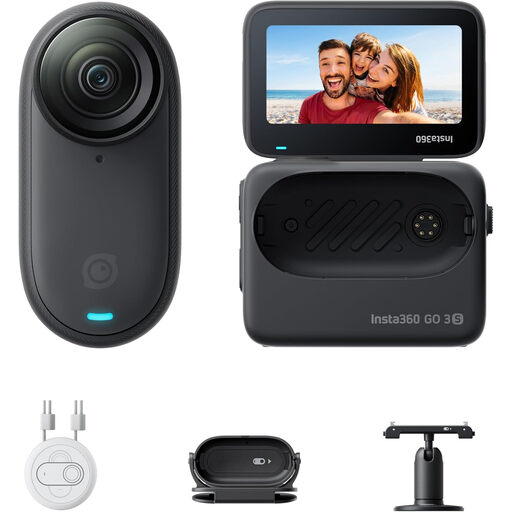
A wearable camera for hands-free POV recording; the description lists mounting accessories and an Action Pod with live preview.
4K video; FlowState stabilisation; 128 GB in the standard bundle.
Record a short test video with the lights and camera settings you plan to use for the lesson, then watch the recording. Sony Support describes flicker and banding with some artificial light sources, and suggests 1/50 or 1/100 second as possible shutter speeds in conditions with a 50Hz mains supply. Test the result with your lights and camera.
According to the manufacturer, the IPEVO V4K PRO 120 sends USB video to a compatible computer or app. Check that your computer, recording software and teaching platform work together; a USB connection alone doesn’t mean that a lesson video will be saved.
According to DJI, the camera has no built-in storage and saves video to an inserted microSD card. Before a long recording, check that the card is compatible and has enough space.
According to ACM ConsuWijzer, a consumer purchase is covered by statutory guarantees as well as any manufacturer’s warranty. If the product doesn’t do what you could reasonably expect, the seller is responsible for providing an appropriate remedy at no extra cost, subject to the applicable terms.
According to the Dutch Data Protection Authority, if identifiable participants are filmed for business or professional purposes, or footage is published, you need a legal basis under the GDPR. Consent is one possible legal basis, but it isn’t automatically the only one; different rules may apply to footage kept solely for private use. What applies in your situation depends on the people involved, the purpose and the legal basis you choose.