For second-hand book listings, a compact camera with a documented close-up mode is useful if you want to take both overview and detail shots without changing lenses. A mirrorless camera with a standard zoom is a better fit for a permanent setup and gives you the option of trying a different lens later. The OM SYSTEM manual describes a mode on the Tough TG-7 for shooting from 1 cm away, while what a kit lens can do depends on the exact lens and settings. If your current camera already captures the book and its details clearly, improve the lighting and setup before buying another one.
Who is this guide for?
Seller of complete books
You mainly create listings where the cover, spine and overall condition of the book need to be clear. A clean composition and separate detail shots matter more than extreme magnification. Marktplaats recommends photographing the item with as few other objects around it as possible.
Photographer of small details
You want to show damage, small inscriptions or an object next to the book up close and in sharp focus. Check the close-up capabilities of the exact lens or camera mode; for example, the OM SYSTEM manual describes a close-up mode for the Tough TG-7.
Seller with a permanent photo setup
You photograph several items regularly and want to set the lighting, camera angle and framing consistently. A tripod can help you keep the composition steady, as MPB explains in its product photography guide.
What should you look for when choosing?
Compact camera with close-up mode
Choose this option if: you want to take overview and detail shots without changing lenses. According to its manual, the OM SYSTEM Tough TG-7 has a mode for shooting from 1 cm away.
Bear in mind: a short shooting distance alone doesn’t tell you whether the whole book will fit in the frame or leave enough room for lighting.
Mirrorless camera with a standard zoom
Choose this option if: you photograph books and larger details from a fixed table, and might want to try a different lens later.
Bear in mind: a standard zoom isn’t automatically a macro lens; its capabilities depend on the exact lens and focus settings. Canon Nederland and Nikon Nederland publish specifications for the lenses in their respective kits.
Your current camera or phone
Choose this option if: your current device already captures the book and the details you want clearly enough to read. Try a plain background, suitable lighting and, if needed, a tripod first.
Bear in mind: only buy another device if test shots reveal a specific limitation, such as difficulty capturing small details.
| What to consider |
What should you look for? |
Who is this important for? |
| Overview shot |
Check whether the available distance and angle of view let you fit the whole book into a clean frame. Photograph small objects separately if needed. |
If I want buyers to see straight away which book I’m selling, I keep the composition uncluttered and make sure the book is easy to recognise. Around 33% of consumers prioritise a complete view of the book. |
| Small details |
Compare both the magnification and focusing distance of the exact lens or camera mode; also check that there’s room for lighting. |
If I want to show a small inscription, sign of wear or object separately, I check that it appears sharp and large enough in the frame. Around 27% of consumers prioritise small details. |
| Colour and condition |
Check the colour and exposure against the actual book in even lighting. Take separate photos of any visible signs of wear. |
If the cover colour and condition need to come across clearly, I want to be able to assess shadows and reflections in my photos. Around 20% of consumers prioritise colour and condition. |
| A repeatable process |
See what you already own and what’s included in the exact kit. A tripod can help you keep the camera in the same position at a permanent table setup. |
If I often photograph several listings, I want to be able to recreate the framing and lighting easily and avoid unnecessary purchases. Around 20% of consumers prioritise a repeatable process and manageable overall costs. |
Common buying mistakes
-
Assuming the focusing distance guarantees macro shots
Focusing distance and magnification are different things. For the Canon RF-S 18-45mm, the stated magnification also depends on the zoom setting and focusing method.
Compare the specifications for the exact lens and take a test shot of the smallest detail you want to photograph.
-
Assuming similarly named versions are the same kit
The Sony ZV-E10 and ZV-E10 II are different models; likewise, 16-50mm OSS and OSS II refer to different lens versions.
Before buying, check the full model name, lens version and what’s included in the box.
-
Letting a styled photo hide the book’s condition
A lifestyle shot can distract from what’s actually for sale, while signs of wear may be hard to spot in an overall view. Marktplaats recommends photographing the item with as few other objects around it as possible.
As well as any lifestyle shot, take a photo of the book on its own and separate photos of any visible damage.
Brands to compare
Canon
The EOS R50 with RF-S 18-45mm is a mirrorless camera kit for book overview shots and general detail photography. Other RF or RF-S lenses are a separate choice.
- Canon Nederland Store lists the EOS R50 body and RF-S 18-45mm lens as included in the kit reviewed.
- Canon Nederland gives different values for the lens depending on the zoom setting and focusing method. So don’t attribute its close-up capabilities to the camera body alone.
Nikon
The Z50II with NIKKOR Z DX 16-50mm VR is an interchangeable-lens option for overview shots from a photo table.
- Nikon Nederland states that the kit reviewed includes the camera and 16-50mm zoom lens.
- Nikon gives the lens a minimum focusing distance of 0.2 m. Also consider whether it can capture the small details at the size you actually need.
Sony
The ZV-E10 II with E PZ 16-50mm OSS II is a mirrorless camera option for anyone who wants to use its video features as well as take photos.
- Sony Nederland states that the ZV-E10 II kit comes with the E PZ 16-50mm OSS II zoom lens.
- Sony Nederland specifies a maximum magnification of 0.215× for this lens. The ZV-E10 II and OSS II are not the same versions as the ZV-E10 and OSS.
OM SYSTEM
The Tough TG-7 is a compact camera alternative for close-ups without an interchangeable lens.
- The OM SYSTEM manual describes a mode for shooting from 1 cm away.
- For your book setup, also check that the whole composition fits and there’s room for lighting; a short shooting distance doesn’t guarantee a better photo.
Joybuy products
This selection features compact vlog and gimbal cameras. If you plan to use one for book photos, first check that it can frame both the complete book and small details sharply. The product names mainly highlight vlog and video features.
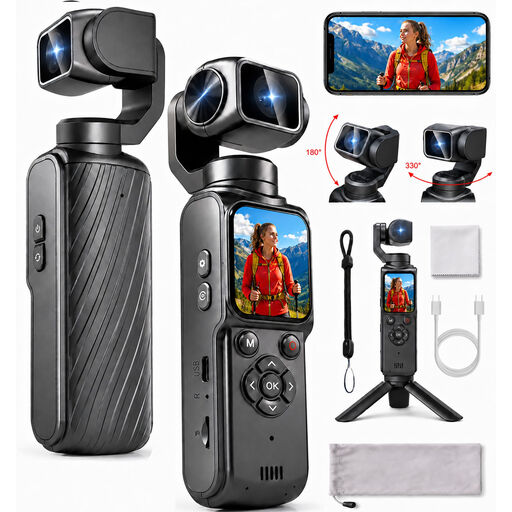 Image unavailable
4K action camera with 330° rotating lens
Use test shots to check whether the device captures the whole book and the details you want in sharp focus.
The product name lists a 330° rotating lens, a 1.72-inch touchscreen and photos up to 64 MP.
View at Joybuy
 Image unavailable
KINSI Mini Vlog Camera 4K, 64 MP
Use test shots to check whether you can take a clean overview of the book and separate detail shots with this camera.
The product name lists a 330° rotating lens, a 150° wide-angle lens and an included mini tripod.
View at Joybuy
 Image unavailable
DJI Osmo Pocket 4 Standard Combo
Check in advance whether the camera’s framing suits the book and the small details you want to show.
The product name lists a 1-inch CMOS sensor, 4K/240fps, 2× lossless zoom and 107 GB of built-in storage.
View at Joybuy
 Image unavailable
DJI Osmo Pocket 4 Creator Combo
Take a test shot to check whether you can photograph the whole book and small signs of wear separately.
The product name lists 2× lossless zoom, 14-stop dynamic range, 107 GB of built-in storage and a handle with a 1/4-inch thread.
View at Joybuy
 Image unavailable
DJI Osmo Pocket 3 Creator Combo
Take some test shots first to check whether the camera suits the book overview and detail shots you want.
The product name lists a 1-inch CMOS sensor and 4K/120fps video.
View at Joybuy
Frequently asked questions
Do I need a macro lens straight away to photograph small signs of wear?
Not necessarily. First take a separate detail shot from the working distance you have, then check the magnification and focusing settings of the exact kit lens. Canon Nederland lists different values for autofocus and manual focus on the RF-S 18-45mm.
How can I make a series of book photos look consistent?
Use a clean composition, shoot in suitable lighting and keep the camera in a stable position for repeat shots. After changing the book or lighting, check the framing and colours again; a tripod can help you keep the camera in the same position.
What returns and warranty rules apply when you buy a camera online?
For online distance purchases from a business, you generally have a 14-day cooling-off period; the Dutch government lists an online purchase from a private individual as a different case. If a product is faulty, the seller is your point of contact for a consumer purchase. According to the Dutch government, there is no fixed statutory warranty period covering all products in the Netherlands.
What should you bear in mind if people appear in your listing photos?
Where possible, make sure other people aren’t recognisable in the image. The Dutch Data Protection Authority treats images in which people are recognisable as personal data; check the relevant privacy rules before publishing a photo like this.


