Start with a stable, straight setup and even lighting that you can move around. Only replace your camera if it can’t capture the lettering sharply enough or lacks the settings you need. A mirrorless camera gives you a choice of lenses and, on compatible models, RAW capture for post-processing. But a camera body on its own isn’t a complete kit. The Consumers’ Association points out that the lens and image sensor both affect the photo, so test the camera, lens and lighting with your own covers.
Who is this buying guide for?
Book sellers
If you regularly photograph covers for product listings, you’ll want readable titles and a repeatable process. The Consumers’ Association and Canon Netherlands both highlight camera setup and product presentation as important considerations.
Catalogue image creators
If you want to capture covers consistently, assess the camera, lens, lighting and image processing as a complete setup. Metamorfoze/KB and Canon Netherlands highlight even lighting and product presentation.
Photographers of glossy covers
Light can obscure text or illustrations on a glossy cover, so you’ll need to adjust the position of the light and the angle of the shot. Nikon describes polarising filters as a way to reduce unwanted reflections.
What should you look for when buying?
Assess the camera alongside the lens, lighting and shooting angle. Metamorfoze/KB highlights even illumination and white balance across the whole image; Canon Netherlands recommends shooting in RAW if you want to choose the white balance later, provided the model supports RAW.
Improve your existing camera and setup
Choose this if: your current camera already captures the lettering sharply and you want to try a fixed position, even lighting and a suitable white balance first.
Trade-off: a better setup won’t automatically make an unsuitable lens, insufficient detail or missing settings any less of a problem.
Compact camera
Choose this if: you want a camera with a fixed lens, and that lens can capture the whole cover at the right size.
Trade-off: a fixed lens limits your choice of focal length and other lens characteristics.
Mirrorless camera with a suitable lens
Choose this if: you photograph covers regularly and want a choice of lenses, manual control or RAW processing.
Trade-off: check the lens mount and what’s included in the kit; a camera body on its own isn’t a complete photography setup.
| What to consider |
What to look for when buying |
Who is this important to? |
| Colour under artificial light |
Check the white balance with your own lights and whether the model supports RAW capture. |
If I use the same lights for a series, I want to assess the cover colour and correct it if needed. Around 31% of consumers rank colour reproduction under artificial light as their top priority. |
| Readable text and straight edges |
Assess a test image of the whole cover, including the corners and small lettering; don’t just look at the megapixel count. |
For small titles, I want to see sharp lettering and straight lines right to the edges. Readability and shape come first for around 25% of consumers. |
| Reflections and banding |
Test whether you can move the lighting and, under flickering light, compare test shots using different shutter speeds or shutter types. |
For a glossy cover, I want to be able to move the light before a reflection obscures text or an image. Reflections and flicker are top concerns for around 25% of consumers. |
| A complete, repeatable setup |
Compare a fixed lens with an interchangeable lens, and check what’s included in the kit, the lens mount and any accessories you’ll need. |
If I’m photographing lots of books in a row, I want a complete, repeatable setup rather than having to find separate parts afterwards. Ease of use and a complete kit matter most to around 19% of consumers. |
Common buying mistakes
-
Choosing based on megapixels alone
A high resolution figure doesn’t automatically mean small lettering will be readable right into the corners. The Consumers’ Association points out that the lens and image sensor both affect the photo.
Take a test shot of a whole cover and check the text, corners and edges.
-
Mistaking a camera body for a complete kit
A camera may be sold as a body only or with a lens. Nikon Netherlands notes that a charger isn’t included with the Z50II body-only option.
Check the exact version, included lens, lens mount and box contents for each listing.
-
Expecting a different camera to solve glare or flickering light
Reflections depend on the lighting setup, while some flickering light sources can cause banding. Changing the camera body won’t automatically eliminate these issues.
Test with your own covers and lights to see whether moving the light, changing the shutter speed or choosing a different shutter type helps.
Trying out and moving lights may take extra time before you find a setup that works consistently.
Camera brands to consider
Canon
The EOS R50 is an APS-C mirrorless camera for anyone looking to choose a lens from the RF or RF-S range.
- Canon specifies 24.2 effective megapixels.
- Canon says the R50 doesn’t have sensor-shift stabilisation. Check the lens and what’s included in the kit on offer.
Fujifilm
The X-S20 is an APS-C mirrorless camera with interchangeable X lenses, suited to a workflow that includes RAW files.
- Fujifilm specifies 26.1 effective megapixels and 14-bit RAW.
- These specifications don’t measure colour accuracy under your artificial lighting; test it with one of your own covers.
Nikon
The Z50II is available as a body only or in lens kits, so it’s important to check which version you’re choosing.
- The body-only and kit options let you compare the lens bundle on offer.
- Nikon Netherlands notes that a charger isn’t included with the body-only option; check the contents of the specific listing.
Panasonic
The LUMIX DC-G97 is a Micro Four Thirds mirrorless camera, so the lens and setup are part of your choice.
- Panasonic lists a 20.3-megapixel sensor.
- Check which G97 version and lens are included in the specific listing.
Sony
The α6400A is an APS-C camera with an E-mount, and is available as a body only, among other options.
- The body-only option lets you choose a suitable E-mount lens yourself.
- Sony warns that anti-flicker features vary by camera model. Check the α6400A specifications and whether the listing includes a body only or a lens bundle.
Cameras at Joybuy
The products below range from point-and-shoot and vlog cameras to a Sony mirrorless camera with a 16–50mm lens. Take a test shot to check whether your chosen combination can handle the text, colour and reflections on your cover.
 No image available
KINSI Mini Vlog Camera 4K
The product title positions this model as a mini vlog camera; take a test shot to check whether small cover text is captured sharply and evenly.
The product title lists 64 MP, 18x digital zoom, a 330° rotating lens and a 1.72-inch touchscreen.
The title also mentions a tripod and Type-C connection.
View at Joybuy
 No image available
KOMERY G7 5K, white
The product title describes this model as a portable point-and-shoot camera; use a test shot to assess how it captures small lettering and the edges of a cover.
The product title lists 80 MP and 18X zoom.
View at Joybuy
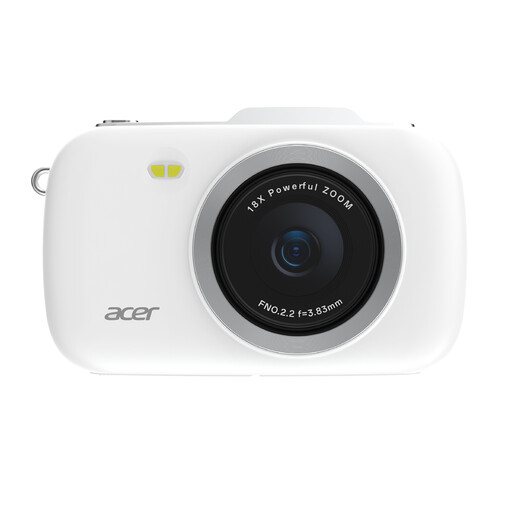 No image available
KOMERY G7-A 4K, white
The product title describes this model as a portable point-and-shoot camera; take a test shot to see how the camera you choose captures your cover.
The product title lists 80 MP and 18X zoom.
View at Joybuy
 No image available
Sony ZV-E10 with 16–50mm zoom lens, black
According to the product information, this offer includes a Sony E-mount and a 16–50mm lens. Check whether the lens can capture the whole cover at the right size from your shooting distance.
According to the product information, an adapter/charger and SD memory card aren’t included.
View at Joybuy
 No image available
Sony Alpha A6100 with 16–50mm f/3.5–5.6 OSS II lens
The product title lists a Sony Alpha A6100 with a 16–50mm lens; take a test shot to check whether the lens and shooting distance suit the size of your book covers.
The product title lists a 16–50mm lens range and f/3.5–5.6.
View at Joybuy
Frequently asked questions
What should you do first if colours look different under artificial light?
Start by taking a test shot under the lighting you’ll use for the series, then adjust the white balance to suit. If your chosen model supports RAW, you can also adjust the white balance when processing the RAW file. Then check the result against the actual cover.
What can you do about glare or banding in your photos?
If you’re getting glare, move the light first and check the whole cover; you could also try a suitable polarising filter. Flickering light can cause banding, so compare test shots at different shutter speeds or, if your model allows it, with a different shutter type. Canon Europe explains that some flickering light sources can cause banding when using the electronic shutter. Sony emphasises that anti-flicker features vary by camera model.
What are your rights when you buy a camera online?
When you buy from a business at a distance, you usually have a 14-day cooling-off period, although exceptions and the type of seller may matter. According to ACM ConsuWijzer, your statutory guarantee is separate from any commercial manufacturer’s warranty. If a product is faulty, the seller is your point of contact.
Can you publish a photograph of a book cover without permission?
Don’t assume you can do so without permission. The Dutch Government distinguishes between a private copy for personal use and distributing or making copyright-protected work public. Check which rights and permissions apply to your intended use.


