Start by working out the camera height: the whole board, the cards and any moving hands need to be in focus and fit in the frame together. If you’re recording on a computer, compare a document camera with a downward-facing webcam. For more flexibility with framing or a longer standalone recording, you could also consider a mirrorless camera with a suitable lens or a camcorder. Before you buy, test the picture, voice audio, room lighting, power and storage in your own setup.
Who is this choice relevant to?
If you want to film the whole board
You’re explaining the rules while cards and hands are moving. Test from the highest position your room allows to see whether the entire playing area remains clear; the stated resolution alone won’t tell you whether everything fits in the frame.
If you record on a computer
You want to connect the camera to your computer and record the video and spoken explanation there. Compare the camera angle with the space on your table, then make a short test recording with both picture and sound.
If you record longer explanations
You want to record a session without unexpected interruptions. Check how power, storage and audio connections work with your recording setup for the exact model you’re considering.
What should you look for when buying?
First decide how much of the board needs to be visible and how you want to connect the camera. Then compare how it records your voice, the lighting in your room and what you’ll need for the full recording time.
Document camera
A good fit if: you want a fixed overhead shot and can fit the whole board in frame from the available working distance.
Bear in mind: a built-in stand won’t necessarily work for every board; also check that it won’t get in the way of playing.
Downward-facing webcam
A good fit if: you already have a suitable computer and want to record on it. Logitech describes a Show Mode on the MX Brio for showing your desk.
Bear in mind: tilting a webcam doesn’t automatically give you a straight overhead view or enough room for a large board; your computer, recording app and microphone are also part of the setup.
Mirrorless camera with interchangeable lens
A good fit if: you want to tailor the framing to your distance from the table, or film yourself as well as the board. Canon and Sony offer models with interchangeable lenses.
Bear in mind: check which lens is included, how to mount the camera securely and what power you’ll need; a camera body or high resolution doesn’t guarantee that the whole board will fit.
Camcorder with built-in zoom
A good fit if: you want to reframe between the board and individual game pieces during a standalone recording without changing lenses.
Bear in mind: zoom isn’t necessarily useful at a small, fixed table. Test the wide-angle view from your recording distance and check that the size and setup work in your room.
Compact gimbal camera
A good fit if: you want to capture moving close-ups as well as a fixed explanation of the game.
Bear in mind: stabilisation is no substitute for a secure, fixed mount above the board; test the framing and focus, and check which version you’re choosing.
| What to consider |
What should you check? |
Who is this important for? |
| Getting the whole board in frame |
At your intended camera height, test the framing with the largest board, loose cards and both hands; check the framing and focus. |
When I explain the game, I want the board and actions to stay clear, without anything falling outside the frame. Around 29% of consumers prioritise a complete, sharply focused playing area. |
| A practical setup |
Check what equipment you already have and what’s included with the exact model; work out the cost of the complete, working setup. |
If I already have a computer, or need to put together a setup in my room, I want to know which parts I really need. Around 23% of consumers prioritise a practical computer setup. |
| Clear spoken explanations |
Record a test from where you’d normally speak and check which microphone is actually being recorded. |
When I talk through the rules, I want my explanation to be easy to follow and not get lost in the recording. Around 18% of consumers prioritise clear spoken explanations. |
| Recording time |
Test for at least as long as your planned explanation and check the saved file. |
For a longer explanation, I want to avoid an empty battery, full storage or incorrect setting interrupting the recording. Around 18% of consumers prioritise an uninterrupted session. |
| Room lighting |
Film under your usual lights and at the time you normally record; check the recording for visible flicker. |
If the daylight changes or my room lighting is tricky, I want to see how the picture looks in my usual recording conditions first. Around 12% of consumers prioritise a clear picture in room lighting. |
Common buying mistakes
-
Comparing video resolution alone
High resolution doesn’t guarantee that the whole board, cards and moving hands will fit in the frame. Clarity also depends on distance and focus.
First test the largest board at your planned camera height, then check whether small text is readable in the recording.
-
Assuming a camera body is a complete table setup
The lens included with the Canon EOS R50 V depends on the version you choose; the body alone won’t determine how much of your table you can capture.
Compare the full product name and what’s included in your chosen kit. You may need to buy a suitable lens or secure mount separately.
-
Assuming a desk mode or gimbal guarantees an overhead view
Logitech’s Show Mode is designed to show your desk, while DJI describes the Osmo Pocket 3 as a camera with stabilisation. Neither feature on its own guarantees a secure, complete overhead view.
Check the mount, camera angle and clear space for players’ hands.
-
Testing the picture but overlooking sound and lighting
You may not notice the wrong microphone source or flicker under artificial light until you watch the saved video.
Record a short clip under your usual room lighting, then watch and listen to it before filming a full explanation.
Camera brands to compare
IPEVO
Document cameras for a fixed view of a work surface, including the VZ-R Ultra.
- IPEVO says the VZ-R Ultra has autofocus, a built-in microphone and video modes up to 3840 × 2160 at 30 fps.
- The specifications don’t confirm that the whole playing area will fit in frame from the height available in your room; test the framing.
Logitech
Webcams for recording on a computer; the MX Brio has a mode for showing your desk.
- Logitech specifies 4K at 30 fps, Show Mode and built-in microphones for the MX Brio.
- Show Mode doesn’t prove that you’ll get a full, straight overhead view or enough room for every game board.
Canon
The interchangeable-lens EOS R50 V and the LEGRIA HF G70 camcorder with built-in zoom offer different setup options.
- Canon specifies RF/RF-S lenses for the EOS R50 V. For the LEGRIA HF G70, Canon lists 20× optical zoom, two SD card slots and an external microphone input.
- These features apply to the models listed, not to every Canon camera. Check which lens is included with your chosen EOS R50 V kit.
Sony
Interchangeable-lens mirrorless cameras, including the ZV-E10 II for a table setup you put together yourself.
- Sony lists an APS-C sensor and interchangeable lenses for the ZV-E10 II.
- The framing you can achieve also depends on your chosen lens and camera height; features of one version don’t automatically apply to other bundles.
DJI
Compact gimbal cameras for anyone who wants to capture moving footage as well as a fixed explanation of the game; this section covers the Osmo Pocket 3.
- DJI lists a minimum subject distance of 20 cm and several focus modes for this model.
- For a long recording directly above the board, you’ll still need a suitable fixed mount and a framing test.
Joybuy products
This Joybuy selection includes webcams for computer recording, a compact gimbal camera and a mirrorless camera with a zoom lens. For each model, test whether the angle of view, sound and setup work for your game board and room.
 No image available
Philips 4000 Series SPL6408BT/00 4K UHD webcam, EU version
An option to compare if you want to record on a computer; test the framing from your preferred height and listen to a test recording.
4K UHD, 8 MP, autofocus, two built-in microphones and a privacy cover.
Joybuy
 No image available
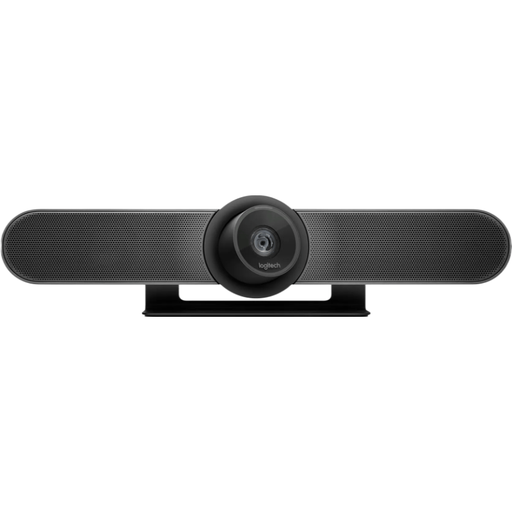
Logitech MeetUp, black, 3840 × 2160 pixels at 30 fps
This option suits a computer setup; check in a test recording whether the camera angle captures the whole board and the players’ hands.
3840 × 2160 pixels at 30 fps.
Joybuy
 No image available
DJI Osmo Pocket 3
Suitable if you want to capture moving close-ups as well as a fixed explanation of the game; for recording above the board, test a secure mount and your preferred framing.
The product name lists 4K/120 fps, 3-axis stabilisation, fast focusing and a 2-inch rotating touchscreen. DJI lists a minimum subject distance of 20 cm for the Osmo Pocket 3.
Joybuy
 No image available
Sony ZV-E10 with 16–50 mm zoom lens, black
An option if you want to frame the table using the included zoom lens; test from your intended camera height to see whether the whole game fits in the shot.
Includes a 16–50 mm zoom lens. The product information says the adapter/charger is not included; check what you’ll need for your setup.
Joybuy
 No image available
Insta360 Link 2C Standard Bundle, Graphite Black
This webcam suits anyone who also wants to show a work surface during computer recording; check the camera angle and compatibility with your computer.
The product name lists 4K, a 1/2-inch sensor and HDR. According to the product information, this webcam isn’t compatible with ARM-based Windows systems.
Joybuy
Frequently asked questions
Does the camera need 4K to film the rules clearly?
Not necessarily. First check whether the whole board fits in frame from your recording distance and whether small text is readable in a test recording; a 4K mode alone doesn’t prove that it will be.
How do I set up a computer recording?
In OBS, add the camera as a video source, select the microphone you intend to use and check the audio meters. OBS Project recommends making a test recording of a few minutes and checking the result first.
What should I check before recording a full explanation?
Check the mount and framing after moving the table. Also make a short picture and sound test if the lighting, camera settings or microphone change.
What if the camera doesn’t work properly after I buy it?
According to ACM ConsuWijzer, if a product is faulty despite normal use, the seller must offer an appropriate solution free of charge, such as repair or replacement. Dutch statutory guarantees don’t simply have a fixed two-year expiry date for every camera.
Can I publish a video featuring other players who can be recognised?
For private use or sharing with a very limited circle, the Dutch Data Protection Authority describes an exception for personal or household use. That exception doesn’t apply when publishing more widely with identifiable people; you’ll then need a lawful basis under the GDPR, which in many cases means consent.


