
Photographers with one battery
You want to charge the battery in the camera and are looking for a combination that suits your camera model. Sony and Nikon explain that charging requirements depend on the camera and battery type.


First, check the exact camera and battery type. You can only charge the battery in the camera if the manual supports USB charging; to charge a battery outside the camera, you’ll need a charger that explicitly supports its battery number. Then choose a power supply and cable that meet the camera or charger’s requirements. USB-C or a high wattage rating alone won’t guarantee compatibility, and a dual charger is most useful if you use two compatible batteries.
You want to charge the battery in the camera and are looking for a combination that suits your camera model. Sony and Nikon explain that charging requirements depend on the camera and battery type.
You want to charge a battery outside the camera, or possibly two batteries at once, without waiting for the in-camera charging process. Nikon, Sony and PATONA describe chargers for specific battery types.
First check whether the camera can charge via USB. If not, you’ll need a charger for the exact battery type. Charging options vary by camera model and battery.
First check that your camera and battery are compatible. Then decide whether you want to charge in the camera or with a separate charger, and compare the power supply and cable requirements.
| What to consider | What to look for when buying | Who it matters to |
|---|---|---|
| Camera and battery compatibility | Check the full battery number and whether the manual supports charging in the camera. | When choosing a charger, I want to be sure it works with my camera and exact battery; around 36% of consumers put compatibility first. |
| USB power supply and cable | Compare the required connection, cable and any USB-PD requirement with the power supply you plan to take. | I want to power my charging setup in the holiday home with the right adapter and cable; around 29% of consumers say this connection is their top priority. |
| Charging two batteries at once | Check the number of charging bays, the supported battery type and any requirements for charging two batteries simultaneously. | When I use spare batteries, I want to be able to charge them outside the camera; around 21% of consumers prioritise charging multiple batteries. |
| Complete charging kit and ease of use | Check which cables are included and whether you’ll need a suitable external power supply. | I want to put together a complete setup for the holiday home and be able to check the necessary safety information; around 14% of consumers say this is their main buying concern. |
USB support and output power requirements vary between cameras and chargers. A connector that fits won’t necessarily provide the performance you need.
Compare your camera or separate charger’s requirements with the power supply and cable specifications.
You may still need a different, suitable power supply or charger.
A charger may be designed for a specific battery family. For example, Nikon lists the EN-EL15b and EN-EL15c for the MH-34; PATONA lists Canon LP-E17 for the dual charger reviewed.
Compare the full battery number with the charger’s compatibility information.
An adapter for charging in the camera won’t automatically charge a spare battery removed from the camera. The Nikon EH-8P is intended for in-camera charging with supported battery types; the MH-34 is a separate battery charger.
Before buying, decide whether the battery will stay in the camera or be removed while charging.
Nikon offers various charging options for specific camera models and battery types.
The BC-ZD1 is a dual USB-PD charger for Sony NP-FZ100 batteries.
PATONA lists a dual USB-C charger for Canon LP-E17 batteries.
Canon offers a USB power adapter for charging certain cameras, as well as battery chargers for specific models.
Jupio’s manual overview describes single and dual USB-powered chargers for specific uses.
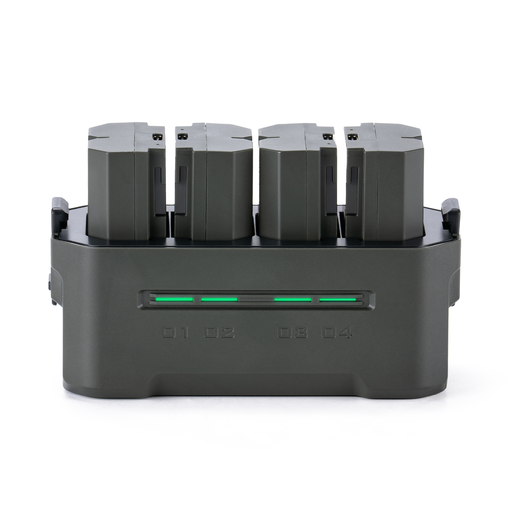
This selection focuses on a portable charging station for Sony NP-FZ100 batteries. Before buying, check that the battery number matches yours exactly.
 No image available
For anyone looking for a charging station for Sony NP-FZ100 batteries; check that this is exactly the type of your battery.
The product title specifies four charging channels and the Green version (TBC-FZ100-GN).
No. A USB port doesn’t automatically mean the battery can be charged through it. Check the manual for your exact camera model and supported battery; Sony describes charging options and exceptions that vary by model.
It depends on the camera and charging method. For the models covered by the relevant support article, Sony says the camera must be switched off while charging via a computer; Canon describes charging with the camera in use for compatible applications with the PD-E2.
For the BC-ZD1, Sony specifies a USB-PD-compatible power supply of at least 30 W to charge two NP-FZ100 batteries simultaneously in approximately 155 minutes. Before you leave, check that you have the required power supply and a suitable cable.
It varies by product. PATONA lists a USB-C cable with the LP-E17 dual charger reviewed; Sony specifies an external USB-PD power supply for the BC-ZD1. Check what’s included with the version you choose.