Who will benefit most?

Camera user looking for reliable charging

You want to know whether your camera or separate battery charger will work with your chosen USB power supply. Requirements vary by model; Sony Support and Canon Europe explain the charging requirements for specific cameras.

Shared-desk user

You want a charging set-up that’s easy to put out and pack away, with as few loose cables as possible. A built-in cable can help, as long as the connection and length are right.

User with several charging needs

You may also want to connect another device from time to time. So check the number of ports and the available power when charging several devices at once.

What should you look for when buying?

Charging through the camera

Choose this if: the manual confirms that the installed battery can be charged via USB and specifies the connection and power supply required.

Keep in mind: some cameras only start charging when switched off, so check the instructions for your model.

Charging with a separate USB battery charger

Choose this if: you want to charge a spare battery, or your camera doesn’t support USB charging, provided a suitable USB charger is available for your battery type.

Keep in mind: you’ll need a compatible charger and possibly an extra cable. Check what power supply the charger requires.

What matters What to look for when buying Who should prioritise this?
Charging compatibility Check whether the camera or separate battery charger can charge the battery via USB, and which output, cable and, if needed, USB Power Delivery are required. If I want to charge my camera battery at a desk, I first need to know whether the chosen charging method works with my exact model. Around 36% of consumers put charging compatibility first.
Fewer cables and less clutter Check that a built-in cable matches the connection you need and is long enough for your desk set-up. At a shared desk, I want to set out and pack away my things quickly, without leaving loose cables lying around. Around 29% of consumers prioritise a tidy workspace.
Capacity and ports Work out how many devices or charging sessions you need, and check the power available from each output and when charging simultaneously. Don’t estimate an exact number of battery charges from the mAh rating alone. If I want to charge other devices as well as my camera battery, I look for enough connections and suitable power when using them at the same time. Around 21% of consumers say multiple charging needs are their top priority.
Safe use and support if something goes wrong Check the full model number against safety warnings, use undamaged cables and keep the seller’s details. It matters to me that I can use my charging equipment safely and know who to contact if something goes wrong. Around 14% of consumers prioritise safe use and after-sales support.

Common buying mistakes

  • Assuming a USB port or high wattage means the battery will charge

    Whether a camera can charge its installed battery via USB, and what power supply it needs, varies by model. You may need a separate USB battery charger if the camera can’t charge the battery via USB.

    First, check the charging requirements for the exact camera model or separate battery charger. If you want to charge a spare battery, also check whether a USB charger is available for that battery type and what power supply it requires.

    Brands to consider

    Anker

    The Nano A1638 is an example of a 10,000 mAh power bank with a retractable USB-C cable and extra USB ports. It could suit you if your charging set-up uses USB-C and you want fewer loose cables.

    • The Consumentenbond describes the A1638 as easy to use and fast-charging; Anker states that it delivers a maximum of 45 W from a single USB-C output.
    • According to Anker, the combined output is lower when the USB-C cable and a USB-C port are used at the same time. The 2025 warning from the Netherlands Food and Consumer Product Safety Authority concerned other, specifically named models.

    Samsung

    The Galaxy 25W Battery Pack EB-P3400XUEGEU is a 10,000mAh model with two USB-C connections, as described by Samsung Netherlands and the Consumentenbond.

    • Two USB-C connections may suit a charging set-up that needs compatible USB-C connections.
    • These connections alone don’t confirm compatibility with a specific camera or battery charger. Check your model’s instructions to be sure.

    Xtorm

    Xtorm lists a capacity of 10,000 mAh, two USB-C ports and one USB-A port for the Fuel Series 5 FS5100. This combination may be useful if you use compatible cables with different connections.

    • Xtorm specifies 20 W USB-C PD for this model.
    • This is a manufacturer’s specification, not a measured charging performance for your camera battery. Check that the connection and power supply match what you need.

    Belkin

    Belkin lists one USB-C port, two USB-A ports and a USB-A/USB-C cable included with the BoostCharge BPB011btBK.

    • These connections may be useful if your charging set-up needs a compatible USB-A or USB-C connection.
    • Belkin states a maximum total output of 15 W when all three ports are used at once. Check the connection and power requirements of your camera or battery charger. The manufacturer’s warranty is in addition to your statutory rights against the seller.

Power banks on Joybuy

This selection includes power banks with USB-C connections or a built-in USB-C cable, including models with connections for several charging needs. Always check that the output and charging method are suitable for your camera or separate battery charger.
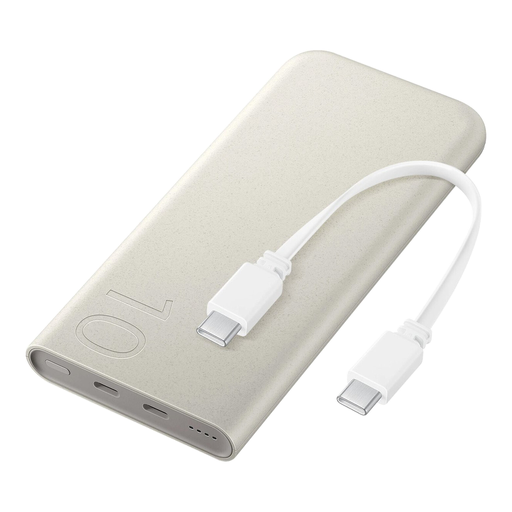
Samsung 25W Inductive Power Bank, 10,000 mAh, beige

Samsung 25W Inductive Power Bank, 10,000 mAh, beige

A built-in USB-C cable may suit you if you want to charge via USB-C with fewer loose cables.

The product description states up to 25 W wired and 7.5 W wireless charging, a maximum of three devices at once and a weight of 210 g.

Joybuy

Samsung Power Bank Fast Charge 45W, 20,000 mAh, beige, 3 USB-C ports

Samsung Power Bank Fast Charge 45W, 20,000 mAh, 3 USB-C ports, beige

Three USB-C ports can be useful if you want to connect several compatible devices. Check the combined output when charging at the same time.

The product description states up to 45 W, Power Delivery 3.0 and includes a USB-C cable.

Joybuy
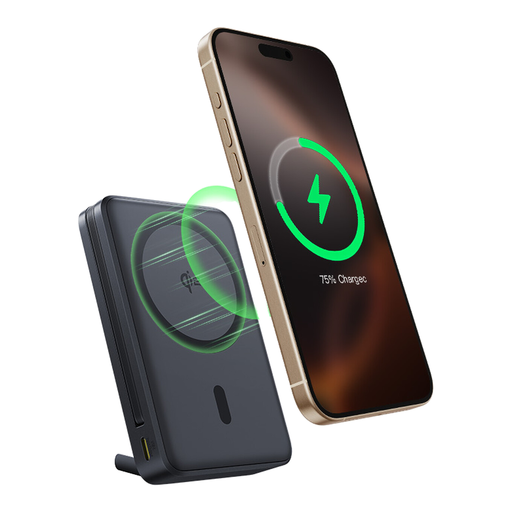
Baseus Nomos Qi2 Power Bank, 10,000 mAh, 45 W, with built-in USB-C cable and magnetic stand

Baseus Nomos Qi2 Power Bank, 10,000 mAh, 45 W, with built-in USB-C cable and magnetic stand

The built-in USB-C cable can help keep loose cables off your desk; the magnetic stand is a listed feature of this version.

The product name lists Qi2, 45 W and 10,000 mAh.

Joybuy

Samsung Fast Charge Duo Power Bank, 25 W, 10,000 mAh, beige

Samsung Fast Charge Duo Power Bank, 25 W, 10,000 mAh, beige

Two USB-C connections may suit you if you use a compatible USB-C charging method or want to connect more than one device.

The product description states Power Delivery 3.0 and a weight of 210 g.

Joybuy
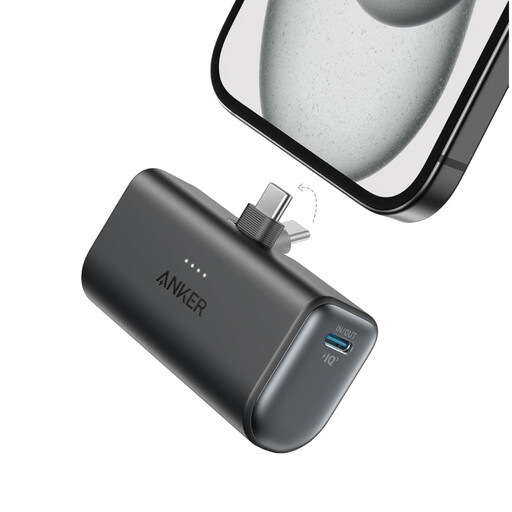
Anker Nano Power Bank, 5,000 mAh, black

Anker Nano Power Bank, 5,000 mAh, black

This model may suit you if you need a USB-C connection for a particular charging task. Check that the capacity meets your needs.

The product description states a total output of 22.5 W and a weight of 100 g.

Joybuy

Frequently asked questions

Can I charge my camera battery through any USB port on the camera?

No. Don’t assume it supports charging just because the camera has a USB port. Check the manual for your exact model to see whether it can charge the installed battery and which port and power supply are required. Sony Support explains that charging requirements vary by model.

Why won’t my camera charge while it’s switched on?

For the cameras covered by Sony Support’s instructions, USB power may run the camera without charging the battery at the same time. The instructions say charging starts when the camera is switched off; check your model’s manual.

How can I charge safely at a shared desk?

Follow the instructions, don’t use damaged cables, and place charging equipment in an open area so heat can escape. These are safety recommendations from the Fire Service, not fixed legal requirements for every desk.

What can I do in the Netherlands if my power bank stops working?

Contact the seller. According to the Dutch government, statutory consumer guarantees apply, and a manufacturer’s warranty is an addition to these. The expected lifespan depends on the product and circumstances, so there isn’t automatically one fixed period for every power bank.

Where can I take a power bank or camera battery for recycling?

Don’t put a flat battery in your general rubbish. The Dutch government lists shops and supermarkets that sell batteries among the collection points. For a discarded power bank as an electrical device, the government also describes collection schemes for used electrical appliances.
