
Photographers checking charging compatibility
You know which camera and battery you have, but want to make sure a power bank will work with your camera or USB battery charger. Canon and Sony set out charging conditions for specific combinations.


First, check whether your camera battery can be charged via USB in the camera itself, or whether you need a USB battery charger for that exact battery type. Canon and Sony specify charging conditions that vary by camera and battery type. Then choose a power bank with a port, cable and, if needed, USB-PD profile that suits your charging setup. Extra capacity and ports can give you more charging options, but if there’s a suitable mains charger and a usable socket in your hotel room, you may not need to bring a power bank at all.
You know which camera and battery you have, but want to make sure a power bank will work with your camera or USB battery charger. Canon and Sony set out charging conditions for specific combinations.
You want to have several charging opportunities or connections available during your stay, and are weighing up extra capacity against the added weight. The Consumers’ Association points out that smaller, lighter models may offer fewer charges.
You’re looking for a compact charging setup with fewer separate cables, and want to be able to leave your equipment safely in your room. An integrated cable is only useful if it suits your charging setup; the Netherlands Fire Service advises placing chargers in the open so they can dissipate heat.
Choose this if: your camera and battery manuals confirm that USB charging is supported with the cable and power source available.
Trade-off: you may not need to bring a separate battery charger, but charging while using the camera is not the same as charging the battery on every camera.
Choose this if: in-camera charging isn’t supported, or you want to charge a spare battery separately.
Trade-off: the charger and a suitable cable take up extra space; check the exact battery type, charger model and power requirements.
Choose this if: a usable socket and suitable mains charger are available, and you don’t need a reserve power source away from the socket.
Trade-off: you won’t need to carry a power bank, but you’ll depend on having access to a socket.
| What to consider | What to look for | Who is this important for? |
|---|---|---|
| Compatibility | Check the camera, battery and charger models, the cable required and any USB-PD profiles. | If I want to be sure my specific charging setup will work, I’ll check every part of the combination first. Around 36% of consumers prioritise compatibility. |
| Charging capacity | Decide how many batteries and devices you want to charge; compare capacity and output when charging several devices at once. | For several charging sessions or devices, I value extra capacity more than having as few connections as possible. Around 29% of consumers consider charging capacity their main priority. |
| Portability | Compare the power bank’s weight and size, and check whether you’ll also need to bring a separate charger or cable. | If I want to travel light, I want to know how many extra items I’ll need to bring alongside the power bank. Around 14% of consumers prioritise portability. |
| Safe charging | Check the exact model for warnings, don’t use damaged parts and place the charger in the open. | In a hotel room, I want to avoid damaged equipment and heat building up while charging. Safe charging is a priority for around 21% of consumers. |
The charging method and power required depend on the combination of camera, battery and charger. A USB port on its own doesn’t confirm that it can charge your battery.
First, check the manuals, the required connection and the power profiles. Bear in mind that you may also need to bring a suitable cable or camera battery charger.
A stated capacity doesn’t tell you directly how many full charges you’ll get for your specific camera battery.
Don’t treat the number of phone charges as a promise of how many times a camera battery can be charged; check the requirements of your charging setup.
The NVWA has published safety warnings for specific Anker models. The Netherlands Fire Service warns of risks from damaged charging equipment.
Compare the full model number with current warnings, and don’t use damaged cables or casings.
For the Fuel Series 5 FS5103U, Xtorm lists a capacity of 10,000 mAh, two USB-C ports, one USB-A port and USB-C PD output of up to 20 W.
For the BoostCharge BPB021hqPK, Belkin lists a capacity of 10,000 mAh, an integrated cable and output of up to 20 W.
According to Anker’s product information, the Zolo A1688 has a capacity of 10,000 mAh, a built-in USB-C cable and USB-C output of up to 30 W.
These power banks offer a range of USB-C connections, capacities and cable setups to compare. For your camera battery or USB battery charger, always check that the charging requirements match.
 No image available
An option to compare if you want a USB-C charging setup and need to connect more than one device.
The product information lists 10,000 mAh, 25 W, Power Delivery 3.0 and two USB-C connections. It also states that two devices can be charged at the same time.
 No image available
An option to compare if you’re looking for a USB-C connection and stated output of up to 30 W.
The product information lists 10,000 mAh, USB-C, 30 W and a colour display.
 No image available
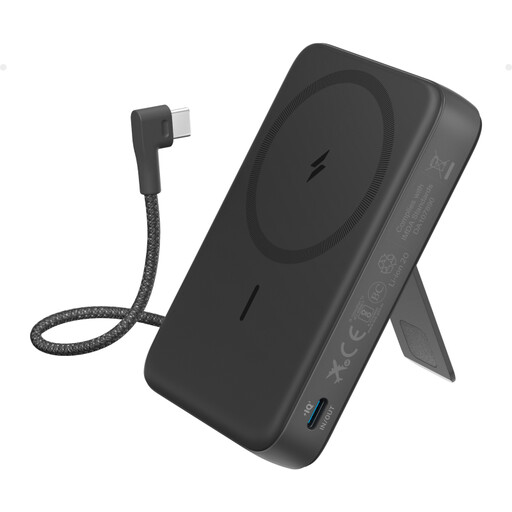
An option to compare if a built-in USB-C cable suits your charging setup and you’d also like the option of wireless charging.
The product information lists 10,000 mAh, up to 30 W wired charging and 7.5 W wireless charging. An adjustable stand is also mentioned.
 No image available
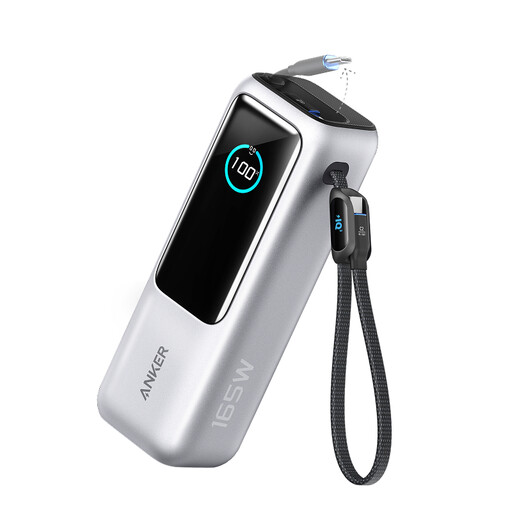
An option to compare if you want to connect several USB devices; check that the ports and power distribution suit your charging equipment.
The title lists 165 W. The product information mentions two built-in USB-C cables, three USB-C connections, one USB-A connection and up to four devices connected at the same time.
 No image available
An option to compare if you want to bring more capacity and several USB-C connections; weigh this against the stated weight.
The product information lists 20,000 mAh, three USB-C ports and Power Delivery 3.0. According to the information, 45 W is only available when one device is connected; the stated weight is 402 g.
Not simply because the power bank has a USB connection. Check whether your battery can be charged via USB in a compatible camera, or use a USB battery charger designed for the exact battery type. Canon specifies USB-PD charging with compatible EOS cameras for the LP-E6NH.
That depends on the camera and charging function. Sony’s support information says the camera must be switched off when using its USB charging method; check your model’s manual.
Place the charger in the open so it can dissipate heat, and don’t charge it under a pillow or duvet. The Netherlands Fire Service also advises against using damaged charging equipment and recommends following the instructions for use.
Compare the full model number with the NVWA warning. The NVWA includes the Anker Zolo A1689, among others; this is not the same model designation as A1688, but always check the exact product number.
Check your own airline’s terms before you travel. KLM allows a maximum of two power banks as spare batteries and sets conditions for capacity in Wh; this information applies to KLM’s rules and doesn’t automatically apply to every airline.