Who is this guide for?

Camera owners who want to check charging compatibility

You want to avoid buying a power bank with the right connection only to find that it won’t charge your camera or separate battery charger as intended. The exact camera model and charging method determine what you need to check.

Holidaymakers who also want to charge away from their cottage

You want to take a backup power source with you when you’re away from a socket. Capacity and portability are both important to you.

Travellers with a camera and other devices

You may want to connect several devices, so you’ll need to consider the number of outputs, the cables and the power available when charging more than one device at a time.

What should you look for when choosing?

Compact power bank

Choose this option: if you want a handy backup for days out and your camera or separate USB battery charger supports the relevant output.

Bear in mind: according to Xtorm, the Xtorm version reviewed has a capacity of 10,000 mAh, USB-C PD up to 20 W and USB-A up to 18 W. Its stated capacity is lower than that of the 20,000 mAh models discussed.

Higher-capacity power bank with more outputs

Choose this option: if you’ll be without a usable socket for longer, or want to connect other devices as well as a compatible camera.

Bear in mind: according to Anker, the Anker Zolo version reviewed has a capacity of 20,000 mAh and supports USB-C charging up to 30 W. According to Belkin, the Belkin BPB024hqBK reviewed has a capacity of 20,000 mAh, an integrated USB-C cable, plus USB-C and USB-A ports. Check the power available when charging multiple devices and make sure the cable is compatible with your device.

USB charger already in the cottage

Choose this option: if you only charge indoors, have a usable socket and already have a charger that’s suitable for your battery.

Bear in mind: you won’t have a backup for days out or times when the socket isn’t available. Sony says that, for some camera models, the camera must be switched off to charge the battery in the camera. Check the instructions for your model.

What to consider What to check before buying Who is this important for?
Compatibility with your camera or separate battery charger Check the manual to see whether the battery charges in the camera or in a separate USB charger. Compare the required connection and, if specified, USB-PD and power requirements with the correct output. I want to make sure my camera battery will charge using the chosen method before I buy. Around 38% of consumers put compatibility first.
Backup power when there’s no socket Work out how many times you expect to charge your devices before you can recharge the power bank. Compare the stated capacities, but don’t use them to calculate exactly how many times they’ll charge your camera. If I’m without a usable socket for a while, I want to take enough backup power with me. Around 23% of consumers give backup power their highest priority.
Portability Compare the weight and dimensions of the exact version with the space in your bag and the time between opportunities to recharge. For a day out, I want a backup that fits easily into my bag. Around 23% of consumers put portability first.
Cables, outputs and charging multiple devices Check which cable is built in or included, and whether it’s compatible with your device. Also check the specifications for each port and for charging multiple devices at once. I want to carry fewer separate cables or connect other devices as well as my camera. Around 16% of consumers give connection convenience their highest priority.

Pitfalls to avoid

  • Assuming USB-C is automatically compatible

    A matching connection alone doesn’t tell you whether your camera battery can be charged using that method. The requirements may differ depending on whether you charge the battery in the camera or use a separate battery charger.

    Before buying, check the manual for your exact camera, battery and any separate charger. Compare the required charging method, connection and power with the power bank’s specifications.

  • Using phone charges to estimate camera charges

    Manufacturers sometimes use phones as an example when describing a power bank’s capacity. That example doesn’t tell you how many times it will charge your camera battery.

    Use the stated capacity to compare models, but don’t assume it will provide a particular number of full camera battery charges based on a smartphone claim.

  • Looking only at the highest wattage

    The stated power for one output doesn’t necessarily tell you how much power is available when several devices are connected at once. Your camera or charger also needs to support the relevant charging method.

    Compare your camera or charger’s requirements with the specifications for the correct output, and check what the manufacturer says about charging multiple devices at once.

Brands to consider

Xtorm

The models reviewed have different stated capacities: 10,000 mAh for the Go2 version and 20,000 mAh for the Fuel Series 5 version.

  • According to Xtorm, the Go2 model reviewed has USB-A and USB-C, with USB-C PD up to 20 W. The Fuel Series 5 model reviewed has three outputs and USB-C PD up to 35 W.
  • These specifications don’t confirm how many times a particular camera battery can be charged. Check compatibility with your camera or battery charger.

Anker

The Zolo Power Bank reviewed has a capacity of 20,000 mAh and a built-in USB-C cable.

  • According to Anker, this model supports USB-C charging up to 30 W.
  • A Zolo version listed on Joybuy states 22.5 W, and hasn’t been confirmed as the same 30 W model. So check the exact version; phone charging examples don’t predict how many times a camera battery can be charged.

Belkin

According to Belkin, the BoostCharge BPB024hqBK reviewed has a capacity of 20,000 mAh, an integrated USB-C cable, plus USB-C and USB-A ports.

  • Belkin states that this model delivers up to 30 W in total and supports charging multiple devices at once.
  • The fixed cable and stated power don’t automatically make this model suitable for every camera or separate battery charger. Check your device’s charging requirements.

Baseus

According to Baseus, the compact version reviewed has a capacity of 10,000 mAh and a built-in USB-C cable.

  • Baseus states that the magnetic version reviewed delivers 30 W through its built-in cable.
  • The magnetic wireless function isn’t a camera charging feature in itself. Check that the wired charging method is compatible with your camera or battery charger.

Power banks at Joybuy

These Joybuy products are power banks for anyone who wants to take backup power with them. Check that the connection and charging method of the exact version are compatible with your camera or separate battery charger.
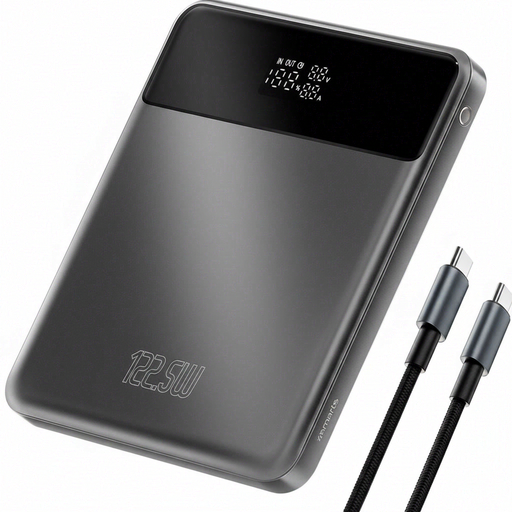
4smarts Enterprise Compact Power Bank, 122.5 W, 20,000 mAh, Space Grey

4smarts Enterprise Compact Power Bank, 122.5 W, 20,000 mAh, Space Grey

A good option if you want to take backup power with you. Check that the output is suitable for your camera or battery charger.

The product name states 20,000 mAh and 122.5 W.

View at Joybuy

Samsung Power Bank Fast Charge, 45 W, 3 USB-C ports, 20,000 mAh, beige

Samsung Power Bank Fast Charge, 45 W, 3 USB-C ports, 20,000 mAh, beige

A good option if you need backup power and several USB-C connections. Check that your camera or charger works with the port you plan to use.

The product name states 20,000 mAh, 45 W and three USB-C ports.

View at Joybuy
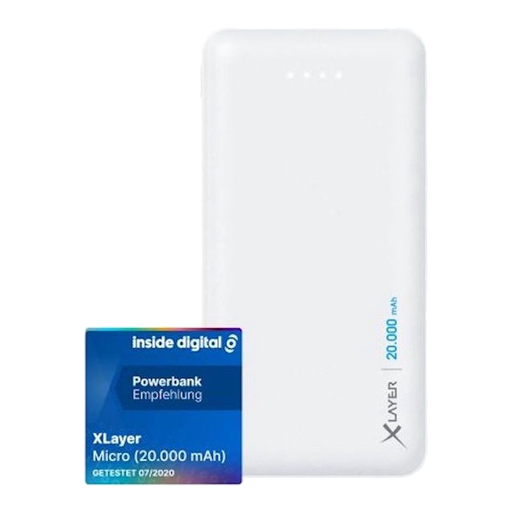
Xlayer Power Bank Micro White, 20,000 mAh, white

Xlayer Power Bank Micro White, 20,000 mAh, white

A good option if you want to take backup power with you. Check that the output is compatible with your charging equipment.

The product name states 20,000 mAh, two USB outputs and one USB-C input.

View at Joybuy

Samsung Fast Charge Duo Power Bank, 25 W, USB-C, 10,000 mAh, beige

Samsung Fast Charge Duo Power Bank, 25 W, USB-C, 10,000 mAh, beige

A good option if you’re looking for a power bank to take with you. Check that the USB-C charging method is suitable for your camera or battery charger.

The product name states USB-C, 25 W and 10,000 mAh.

View at Joybuy
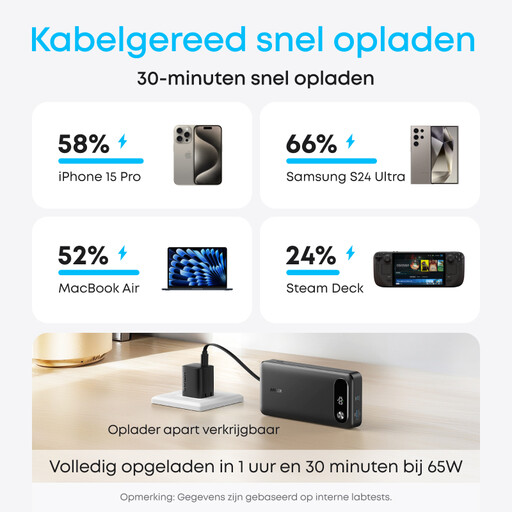
Anker Power Bank (20K, 87W, Built-In USB-C Cable)

Anker Power Bank (20K, 87W, Built-In USB-C Cable)

A good option if you need backup power and a built-in USB-C cable. Check that the cable is compatible with your camera or battery charger.

The product name states 20K, 87W and a built-in USB-C cable.

View at Joybuy

Frequently asked questions

Can I charge my camera battery from a power bank while filming?

It depends on the camera model and charging method. For the models covered by the relevant support article, Sony says a portable battery can’t charge and power the camera at the same time; according to its instructions, charging starts when the camera is switched off. Don’t assume this applies to other models without checking.

Should the battery stay in the camera, or do I need a separate USB battery charger?

It depends on your camera and battery. Sony describes charging in the camera as one option. For the separate BC-ZD1 charger for NP-FZ100 batteries, Sony requires a USB-PD power supply of at least 30 W when charging two batteries at once. Check the manual for your own setup.

What should I check if the battery won’t start charging in the holiday cottage?

Check your model’s instructions and charging indicator, whether the camera needs to be switched off while charging, and that the cable and battery are properly connected. Sony also lists model-specific indicators, for example for temperature issues or a possibly incorrect or faulty battery.

Can a power bank power a separate charger for two camera batteries?

Only if the power bank meets the requirements of the specific charger. For the Sony BC-ZD1 charger for NP-FZ100 batteries, Sony specifies a USB-PD power supply of at least 30 W when charging two batteries at once. Also check the requirements of your own charger and the power bank’s output.
