First, check the full battery code, then confirm whether your camera model supports in-camera charging. A separate USB charger keeps your camera free to use while the battery charges; a dual or triple charger is most useful if you have several compatible batteries. Also check the required USB power supply, included cables and product safety information.
Which charging option is right for you?
Photographers with limited access to sockets
If you want to charge a battery using a shared USB power supply, check that the charger, cable and power source are compatible. Sony and Nikon specify particular power connections and battery types for their chargers.
Photographers with spare batteries
If you want to keep your camera available while charging several batteries, consider a charger with more charging slots, provided it supports your exact battery type. Sony and Jupio describe models with multiple charging slots.
Photographers looking to avoid an unnecessary purchase
First check whether your camera can charge the battery or whether you already have a compatible charger. Sony and Canon describe charging options that apply only to specific camera and battery combinations.
What should you look for when choosing?
In-camera charging via USB
Suitable if: your camera’s manual confirms that your camera and battery support this charging option.
Bear in mind: your camera won’t be available throughout charging; a USB-C port alone doesn’t confirm USB-PD support.
Separate USB charger for one battery
Suitable if: you want to charge one removable battery outside the camera; Nikon specifies the MH-34 for the EN-EL15b and EN-EL15c.
Bear in mind: the USB-C port doesn’t make the charger suitable for other battery types.
USB dual or triple charger
Suitable if: you want to charge several batteries of a supported type using one USB power source.
Bear in mind: Sony’s approximately 155-minute charging time for two NP-FZ100 batteries applies when using a USB-PD power supply of at least 30 W; charging may take longer with 18 W to under 30 W.
Existing mains charger
Suitable if: you already have a compatible charger and don’t need to use your available USB power supply.
Bear in mind: this option uses a socket, so it won’t help if sockets are in short supply.
| What to consider |
What to check before buying |
Who is this important for? |
| Battery and camera compatibility |
Compare the full battery code with the battery types listed; for in-camera charging, check your camera model too. |
I want to be sure the charger is right for my battery; a USB plug alone doesn’t guarantee that. Around 33% of consumers put compatibility first. |
| Available USB power supply |
Check the required USB-PD support, cable and output power per port. |
With limited access to sockets, I want to use the USB power supply I already have without having to guess whether it will provide enough power. Around 27% of consumers prioritise this choice of USB power supply. |
| Number of charging slots |
Check how many batteries can charge at once and what power supply is needed for any stated charging time. |
If I need spare batteries, I want to charge them without tying up my camera for longer than necessary. Around 20% of consumers consider charging several batteries their top priority. |
| Purchase and product information |
Check what’s included, the required power supply and the applicable CE marking. |
I want to check first whether my existing charging option is suitable and what product information I need to look at. Around 20% of consumers prioritise avoiding an unnecessary or uncertain purchase. |
Common buying mistakes
-
Choosing based only on the camera brand or USB-C connector
Sony and Nikon list different compatible battery types for their chargers. So, having a compatible USB connection doesn’t mean the battery’s shape and contacts will match.
Look up the full battery code, then check the charger’s input, cable and power requirements.
Brands to consider
Sony
Sony’s BC-ZD1 is a USB-PD dual charger for NP-FZ100 batteries.
- Sony specifies two charging slots and an approximate charging time of 155 minutes for two batteries when using a USB-PD power supply of at least 30 W.
- That charging time and compatibility don’t automatically apply to other batteries or power supplies.
Nikon
Nikon says the MH-34 is a USB-C-powered charger for EN-EL15b and EN-EL15c batteries.
- The specified battery types make it clear which batteries this model is designed for.
- Don’t assume that all EN-EL15 variants are compatible; check the exact battery code.
PATONA
PATONA’s Premium Dual PD Performance model is designed for two NP-FZ100 batteries.
- PATONA specifies simultaneous charging and USB-C input and output.
- The product information excludes the Sony ILME-FX2. Claims about protection and performance are made by the manufacturer and aren’t independent test results.
Jupio
Jupio offers separate Tri-Charge models for batteries including NP-FZ100, LP-E6 and EN-EL15.
- Jupio specifies three charging slots and space for SD cards.
- You can’t read the cards using the charger. Check the exact model and battery variant.
Canon
Canon says the LP-E6NH can be charged in certain compatible EOS cameras via USB-PD.
- If your camera supports this charging option, you may not need a separate USB battery charger.
- The LC-E6E is a mains-powered alternative with an AC power cable, so it won’t free up a socket.
Joybuy products
This product selection focuses on charging Sony NP-FZ100 camera batteries.
 No image available
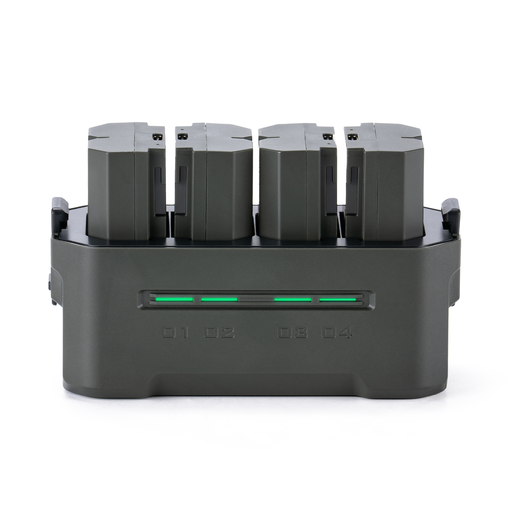
TILTA portable charging station for Sony camera battery NP-FZ100, 4 Channel, Green (TBC-FZ100-GN)
For anyone using Sony NP-FZ100 camera batteries; the product name specifies a model with four charging channels.
Before buying, check which power supply and cable you need, along with the product information on the applicable CE marking.
View at Joybuy
Frequently asked questions
Can you charge your camera battery from a laptop instead of a socket?
It depends on your camera model. Sony says that the cameras covered by its support information can be charged from a computer while switched off. Check your model’s manual for the correct cable and charging method.
How do you use a USB dual charger if your power supply has a low output?
Check the requirements for the specific charger. Sony says the BC-ZD1 can charge using a suitable USB-PD power supply from 18 W; when charging two batteries with less than 30 W, it may take longer. The approximate 155-minute charging time for two batteries applies with at least 30 W.
Does a camera battery charger need a CE marking in the Netherlands?
Electrical chargers offered on the Dutch market are subject to the applicable CE marking requirements. The NVWA lists chargers as electrical equipment. A CE marking doesn’t prove that every individual unit has been independently tested.
Does the USB-C rule mean every camera battery works with any USB-C charger?
No. The Dutch government describes a common connector for new devices on the Dutch market from 28 December 2024; this doesn’t mean removable camera batteries work universally with external chargers. The battery code and charging requirements still matter.
When is it better to charge the battery in the camera?
You can do this if your camera and battery manuals confirm that this charging option is supported and you can manage without the camera while it charges. For example, Canon lists compatible EOS cameras with USB-PD support for the LP-E6NH; this doesn’t automatically apply to other cameras or batteries.


