
Photographers with one spare socket
You want to charge your camera and other USB devices from a single mains charger. Check the number of ports and how much power remains available when several devices are connected at the same time.


If you want to charge a camera that supports USB charging alongside other devices from a single socket, a multi-port USB mains charger is a good fit. For spare batteries, you’ll need a battery charger that supports your exact battery type; also check that the power supply and port meet your camera or charger’s requirements. If your camera can already charge from your existing USB power supply, you don’t automatically need to buy an additional charging station.
You want to charge your camera and other USB devices from a single mains charger. Check the number of ports and how much power remains available when several devices are connected at the same time.
You want to charge batteries outside the camera. First, compare the complete battery code with the batteries supported by the standalone charger.
You want to check whether your camera can charge from your existing USB power supply before buying anything. The camera model’s manual provides the relevant charging requirements.
| What to consider | What should you check? | Who is this important for? |
|---|---|---|
| Connecting several devices | Check the number of USB-C and USB-A ports, and how power is distributed when they’re used at the same time. | I want to charge my camera and other USB devices from a single socket. Around 36% of consumers have this need above all. |
| Camera compatibility | Check the manual to see whether your camera can charge via USB, and what type of power supply, wattage and cable it requires. | I want to avoid finding that a plug that fits still won’t charge my camera model. Compatibility is the top priority for around 29% of consumers. |
| Charging standalone batteries | Compare the complete battery code with the supported batteries, and check the number of charging slots and the required USB power supply. | I want to charge spare batteries outside the camera so the camera remains available. Around 21% of consumers focus mainly on this need. |
| Safety and what’s included | Check which power supply and cable are included and follow the instructions. For a mains charger, also check that it has the applicable CE marking. | I want to know whether I have all the necessary parts and can use the charger according to the instructions. This is the top priority for around 14% of consumers. |
The available power can change when you use more ports at the same time. So, a mains charger with a high total wattage won’t necessarily supply that much power to the port your camera or battery charger is connected to.
Compare the power distribution for your combination of connected devices with the requirements in your camera or battery charger’s manual.
USB ports power devices, but they don’t automatically provide charging slots for camera batteries removed from the camera. A multi-port mains charger therefore won’t necessarily replace a charger that’s suitable for your standalone battery.
First decide whether you want to charge the battery in or outside the camera. For standalone batteries, note the complete battery code and check it against the charger’s specifications.
You may need a separate, compatible battery charger for standalone batteries.
A USB-powered battery charger may need a separate mains adapter. The packaging tells you which parts you’ll actually receive.
Before buying, check the power requirements and the specific contents of the box.
If a suitable USB power supply or cable isn’t included, you may need to buy one separately.
The Fire Brigade advises placing chargers in a clear space so heat can escape, and not using damaged chargers or cables.
Follow the manufacturer’s instructions and keep the charger uncovered while it’s in use.
Multi-port mains chargers for connecting several USB devices to a single socket.
Multi-port USB mains chargers for connecting a range of devices.
The BC-ZD1 is a USB-PD-powered dual charger for Sony NP-FZ100 batteries.
USB-C-powered charging slots for the battery families specified for each model.
The EH-8P is a USB-C mains adapter for compatible Nikon cameras; it isn’t a multi-channel charger for standalone batteries.
These products are multi-port USB charging stations and mains chargers for connecting several devices. Before buying, check whether your camera can charge via USB and whether the wattage and port configuration are suitable for your setup.
 No image available
An option for connecting several devices to a single socket if your camera can charge via USB; check the required power distribution across the ports.
The product name lists 320 W and two retractable USB-C cables.
 No image available
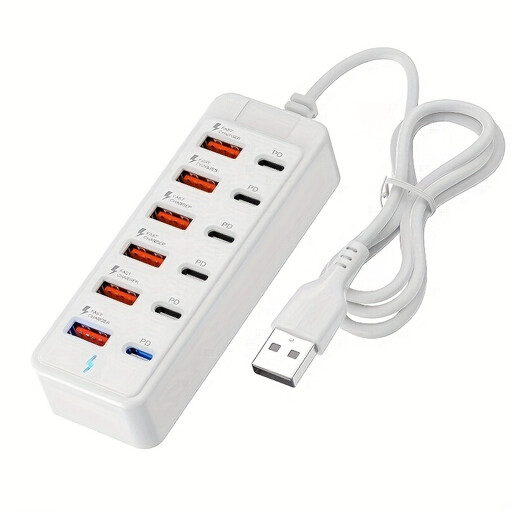
For anyone who wants to connect several USB devices to a single socket; check that the camera’s charging requirements are met by the port you choose.
The product name lists six USB-C ports, six USB-A ports and up to 25 W per port.
 No image available
A multi-port option if you want to connect several devices in one place; check your camera’s connection and charging requirements.
The product description lists USB-C and USB-A configurations; available configurations vary. It also states a maximum of 2.4 A per port.
 No image available
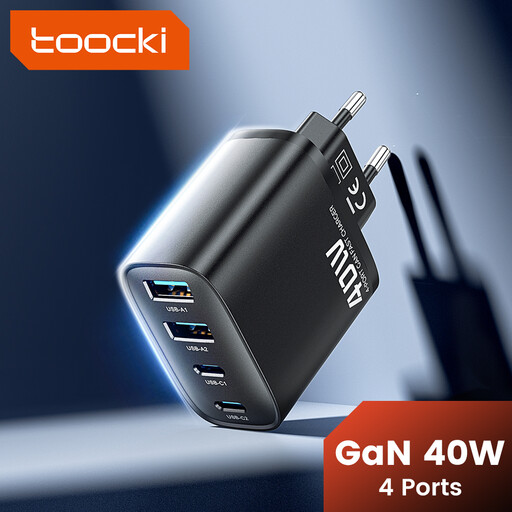
Could suit a setup with several USB devices if your camera can charge via USB; compare the required charging mode with the specifications of the port you plan to use.
The product name lists 40 W, two USB-C ports and two USB-A ports.
 No image available
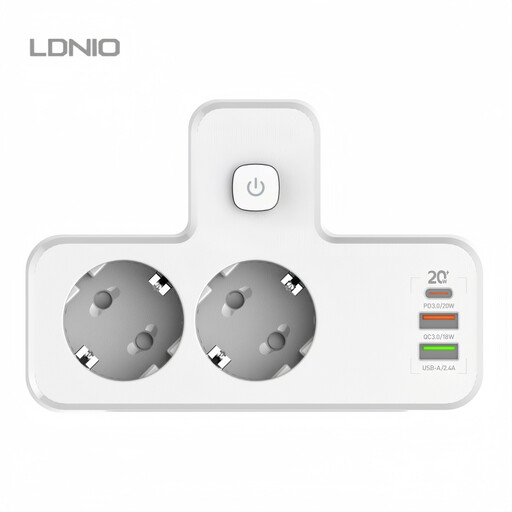
An option for connecting several USB devices if your camera’s charging requirements are met by the available connection.
The product name lists PD20W and a multi-USB connection. Check the port configuration and the parts included.
No. USB-C alone doesn’t guarantee that your camera can charge. Check your camera model’s manual to see whether USB charging is supported and what wattage and charging mode are required.
Choose a battery charger that explicitly supports the complete code of your standalone battery. Also check how many batteries can charge at the same time and what USB power supply the charger requires.
Not necessarily. The available power distribution may depend on how many ports are in use. Compare the specifications for your combination of devices connected at the same time with your camera or battery charger’s requirements.
Follow the manual, don’t use a damaged charger or cable, and place the charger in a clear space so heat can escape. This follows the Fire Brigade’s advice; also follow the product-specific instructions.
CE marking is mandatory for electrical products placed on the Dutch market, according to the Netherlands Food and Consumer Product Safety Authority. The marking alone doesn’t confirm that the adapter is suitable for your camera or that it has been independently tested.