
Photographers with access to a mains socket
You want to charge your camera battery and perhaps other USB devices at your holiday cottage. Sony notes that USB charging support and the required power supply vary by camera model.


First, check the manual for your exact camera and battery model to see whether USB charging is supported and what power supply it requires. If you have a suitable mains socket, a compatible USB mains charger may be all you need. If you can’t rely on mains power, a charged power bank gives you a portable back-up. A power station is worth considering if you also want to power other devices, while a separate battery charger may suit a removable battery that can’t be charged via USB in the camera.
You want to charge your camera battery and perhaps other USB devices at your holiday cottage. Sony notes that USB charging support and the required power supply vary by camera model.
You want to be able to charge outside the cottage or when the power supply is limited, so you’ll need to consider how much spare capacity you need. The Consumers’ Association explains the trade-off between a power bank’s size and weight and how often you can use it to charge your devices.
You want to charge a removable battery outside the camera, so you’ll need to match its battery code to the batteries supported by the separate charger. Canon lists the battery types supported by the LC-E6E.
Start by checking your camera and battery’s charging options. Sony says USB PD support and the required power supply can vary by camera model. Then decide whether you need a mains socket, portable back-up power or multiple connections.
| What to consider | What to look for when buying | Who is this important for? |
|---|---|---|
| Camera and battery compatibility | Check the exact camera model, battery code, USB charging support, required protocol and the right cable or separate charger. | I want to make sure my camera can charge its battery via USB, or find out which separate charger matches the battery code. Around 36% of consumers give camera and battery compatibility top priority. |
| Charging without a mains socket | Check whether there’ll be a usable mains socket during your stay and how much back-up power you’ll need. A power bank or power station must be charged in advance. | If I want to charge outside the cottage too, I’ll need a power source I can take with me when charged. Around 29% of consumers give charging without a mains socket close by top priority. |
| Charging several devices at once | Check how many ports can be used at the same time, which cables fit and how much power is available from each port when charging multiple devices. | I want to connect another device, such as my phone, as well as my camera, and need to know whether both ports are suitable for simultaneous charging. Around 21% of consumers give charging several devices at once top priority. |
| Portability and spare capacity | Consider whether you want to take the solution on a day out and whether you need a larger power source for other devices. | For a day trip, I’d rather not carry more than I need, but I still need a suitable way to charge my devices. Around 14% of consumers give portability top priority. |
A USB-C port doesn’t prove that the camera can charge through it. Support and the required power supply depend on the camera and battery model.
Before buying, check the camera manual, battery code and the manufacturer’s charging instructions.
You may need a compatible separate charger or cable if the charging method you choose isn’t suitable for your camera.
Belkin states that the WCH013 delivers up to 65 W through one port, or 45 W and 20 W when both USB-C ports are in use.
Compare the stated power output per port with the number of devices you want to charge at once.
A power station may be a larger power source than you need if you only want to charge a camera battery via USB.
First, check whether a mains socket is available and which other devices you actually want to power.
A larger power source takes up more room when you’re travelling. Choose the capacity and outputs to suit how you’ll really use it.
Multi-port USB mains chargers for use with a mains socket; the WCH013 we looked at has two USB-C ports.
Portable power banks for anyone wanting to take a USB power reserve with them; the FS5200 we looked at has USB-C and USB-A ports.
Portable power stations for situations where you need a power reserve for more than one small USB device.
Camera models with batteries and separate chargers for specific Canon battery codes.
Camera-specific charging adapters; Nikon says the EH-7P has a fixed USB-C cable.
This selection includes USB mains chargers for use with a mains socket and portable power sources for charging without a mains socket close by. Always check whether your camera can charge through the chosen connection and power supply.
 No image available
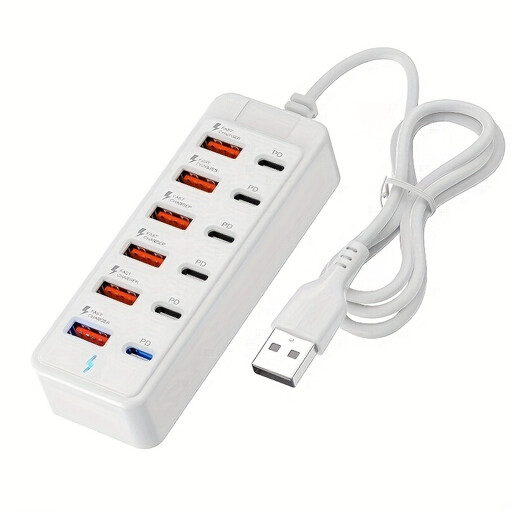
A multi-port charging station for use when you have a mains socket available. Check whether your camera can charge via USB.
The product information states that it can connect up to six devices at once and supports USB-C PD up to 65 W.
 No image available
The multiple ports may suit you if you want to connect other devices as well as a compatible USB camera.
The product title lists six USB-C PD ports and six USB-A ports, with up to 25 W per port.
 No image available
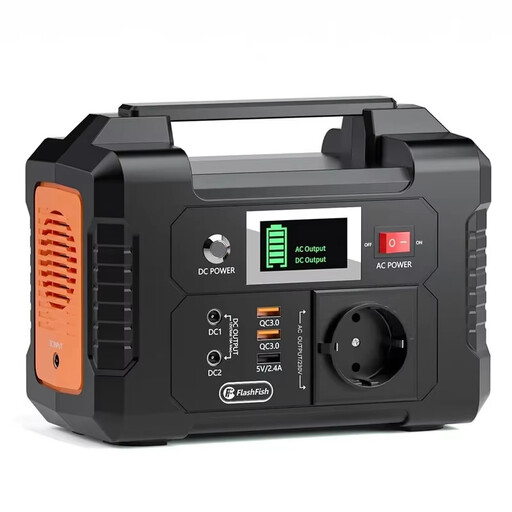
A portable power source worth considering if you want to connect equipment to a mains output as well as USB devices. Check which connection you need.
The product information lists 151 Wh, an AC outlet and USB-C PD outputs.
 No image available
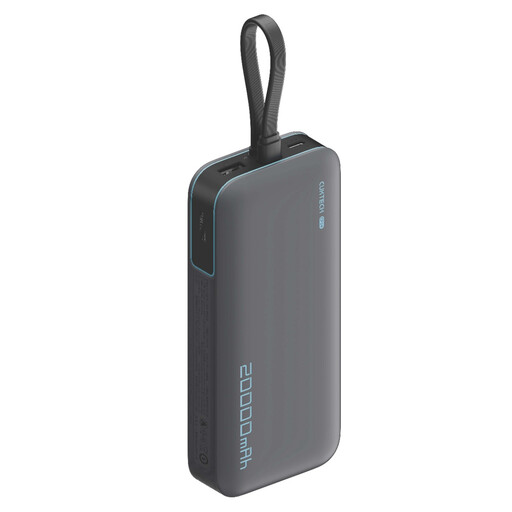
A portable USB power reserve for anyone who wants to charge devices outside their holiday cottage too. Check that the output and charging protocol suit your camera.
The product title lists 20.000 mAh and up to 40 W. The product information lists three output ports.
 No image available
The product description lists digital cameras as possible USB devices. However, check whether your camera model can charge this way.
The product description states up to 2,4 A per port. It says charging speed depends on the port, the device and the total power available.
No. Don’t assume it can just because it has that port. Check the manual for your exact camera and battery model: Sony says USB PD support and the required power supply vary by camera model. Canon specifies USB PD charging of the LP-E6NH only for compatible camera bodies.
Follow your model’s manual. For the camera models covered by the relevant USB charging instructions, Sony says the camera must be switched off. This isn’t automatically a rule for every camera.
Use a suitable charger and follow the instructions for your camera and charger. Don’t charge a damaged or wet battery without first seeking further advice. Brandweer Nederland warns that incorrect charging, damage, short circuits and moisture can pose a fire risk.
Electrical charging devices placed on the market in the Netherlands must meet the applicable EU product safety requirements. The relevant electrical products must carry a CE marking. Check the marking and product information for the device in question. A CE marking doesn’t prove that the charger works with your camera or has been independently tested for charging performance.
For a consumer purchase in the Netherlands, the seller must offer a suitable solution if a product doesn’t meet what you could reasonably expect when used normally. Online consumer purchases generally come with a 14-day cooling-off period from delivery. Check which exceptions apply to your purchase.