Who is this guide for?

Travellers with one camera battery

If you want to carry as little extra gear as possible, first check whether your camera can charge that battery internally via USB. Nikon emphasises that you need to check this for your specific camera model and power supply.

Travellers with spare batteries

If you want to charge a battery outside the camera, check the full battery model number, the number of charging bays and the selected charger’s power requirements. These vary by model, as the product specifications from Nikon, Sony Netherlands and PATONA show.

Travellers with limited charging options

If you’re relying on the power supply available in your hotel room, check in advance what power supply and cable your camera or charger requires. Sony Netherlands, for example, lists specific requirements for the BC-ZD1.

What should you look for in a USB charger for your camera battery?

Charging in the camera

Choose this if: your camera’s manual confirms that the model can charge the specific battery via USB using the power supply you have.

Bear in mind: the cable and power supply required vary by camera model; a compatible connection doesn’t prove that it will work.

A separate charger for one battery

Choose this if: the battery is removable, its exact model is on the compatibility list and one charging bay is enough.

Bear in mind: you can still use your camera, but you’ll also need to bring the required USB power supply and cable.

A separate charger for several batteries

Choose this if: you want to charge several supported batteries at once and your power supply meets the requirements for that number of charging bays.

Bear in mind: extra charging bays only work with the explicitly supported battery types. The Sony BC-ZD1 has specific power supply and cable requirements when charging two batteries.

What to consider What should you check? Who is this important for?
Compatibility Check the camera model and full battery model number. For in-camera charging, check the camera manual; for a separate charger, check its compatibility list. If I’m not sure whether my camera or separate charger is compatible with my battery, I want to check before I leave. Around 36% of consumers prioritise compatibility above all else.
Number of charging bays Check how many batteries can charge at once and whether each battery type you insert is supported. If I’m taking spare batteries, I want to be able to charge them outside the camera, possibly at the same time. Around 29% of consumers focus mainly on the number of batteries that can charge at once.
Power supply and cable Check the required power protocol, wattage and cable specification; don’t rely on hotel USB ports if you don’t know their capabilities. If I’m relying on the power supply and cable I bring or find in my room, I want to know whether they’re suitable for the charger. Around 21% of consumers are most concerned about the available power supply and cable.
Safe charging Follow the manufacturer’s instructions, use undamaged equipment and place the charger in a clear space, not under bedding. If I’m charging in a hotel room, I want to be able to place the charger in a clear space and avoid damaged equipment. Around 14% of consumers prioritise safe charging conditions above all else.

Common mistakes when choosing and using a charger

  • Assuming USB-C means the camera will charge

    Whether in-camera charging works depends on the camera model, battery and permitted power supply. Nikon warns that a plug fitting the socket doesn’t, by itself, prove that the power supply is suitable.

    Check the manual for your exact camera model and the requirements for the battery, cable and power supply.

  • Choosing a dual charger without checking the power supply

    For two NP-FZ100 batteries in the BC-ZD1, Sony requires a USB-PD power supply of at least 30 W and a cable rated for at least 3 A. Using a dual charger without a suitable power supply may mean charging is slower or doesn’t start.

    Check the requirements for the number of batteries you want to charge at once, and what’s included with the charger.

  • Choosing a charger based on the camera brand

    Chargers and versions may be designed for different battery types, even within the same brand.

    Compare the full battery model number with the compatibility list for the exact version you want to buy.

  • Charging under bedding or with damaged equipment

    A damaged cable or charger, or heat that can’t escape, can pose a risk. The Netherlands Fire Service warns against charging under a pillow or duvet.

    Follow the manufacturer’s instructions, don’t use damaged charging equipment and place the charger in a clear space so heat can escape.

Camera battery brands to compare

Nikon

Nikon lists the MH-34 as a USB-C-powered charger for EN-EL15b and EN-EL15c batteries.

  • The stated battery types and USB-C power supply give you specific details to compare with your own battery and power supply.
  • Compatibility doesn’t automatically extend to other Nikon batteries. Check in-camera charging for each camera model too.

Sony

Sony describes the BC-ZD1 as a USB-PD charger with two charging bays for NP-FZ100 batteries.

  • For two batteries, Sony specifies a USB-PD power supply of at least 30 W; for one battery, it specifies at least 18 W.
  • Check the cable specification and power supply for the number of batteries you want to charge. The stated charging time depends on the conditions.

PATONA

For its Dual Quick-Charger, PATONA lists two charging bays and USB-C and micro-USB inputs for the specified Canon battery types.

  • The compatibility information includes LP-E6, LP-E6NH and related types listed for the specific version.
  • These are the manufacturer’s specifications, not an independent performance test; check the exact battery type.

Hähnel

For its Sony version of the ProCube3, Hähnel lists interchangeable plates for NP-BX1, NP-FW50 and NP-FZ100 batteries.

  • According to Hähnel, this version has two charging bays, a display and a 30 W USB-C-PD input.
  • The plates and battery types listed apply to this Sony version; don’t assume every ProCube3 variant has the same compatibility.

Jupio

Jupio lists Tri-Charge versions for different battery types, including Sony NP-FZ100, Canon LP-E6 and Nikon EN-EL15.

  • Jupio lists three charging bays and space for memory cards for the product range.
  • Choose the version that matches your exact battery type; the product range specifications don’t automatically apply to every variant.

Joybuy products for camera batteries

This selection focuses on charging Sony NP-FZ100 camera batteries, including when you want to charge several batteries while travelling.
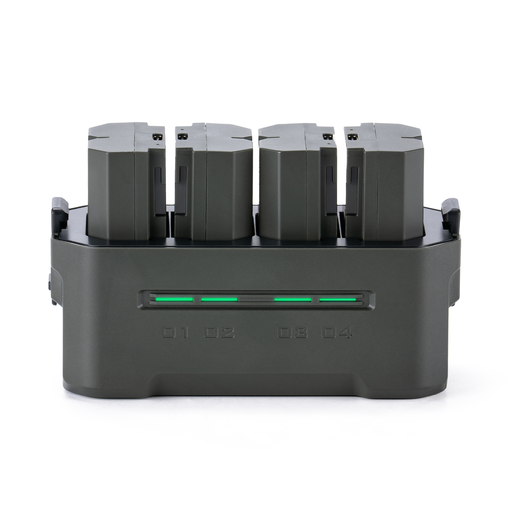
TILTA Portable Charging Station for SONY NP-FZ100, 4-channel, green, model TBC-FZ100-GN

TILTA Portable Charging Station for SONY NP-FZ100 (4 Channel), Green (TBC-FZ100-GN)

Designed for charging Sony NP-FZ100 batteries; the product information says it can be used while travelling.

The product information lists four charging channels and a display showing the charging status and battery details for each bay.

View at Joybuy

Frequently asked questions about charging camera batteries in a hotel room

Can I charge any camera with USB-C through the camera itself?

No. It depends on the camera model, battery and permitted power supply. Check the manual for your exact camera; Nikon warns that a plug fitting the socket doesn’t prove that the power supply is suitable.

Is the USB port in my hotel room enough to use a battery charger?

It depends on the port’s specifications and the requirements of your camera or charger. For the BC-ZD1 charging two NP-FZ100 batteries, Sony specifies a USB-PD power supply of at least 30 W and a cable rated for at least 3 A. Check the requirements for other chargers separately.

How can I position a battery and charger safely while charging?

Follow the manufacturer’s instructions, don’t use a damaged cable or charger, and place the charger in a clear space so heat can escape. The Netherlands Fire Service advises against charging under a pillow or duvet.

Does a camera battery charger need a CE mark in the Netherlands?

The Netherlands Food and Consumer Product Safety Authority states that CE marking is compulsory for electrical products. Check the relevant product information; a CE mark doesn’t prove that the charger is compatible with your camera battery.

What can I do if a charger I bought online isn’t suitable or is faulty?

According to the Dutch government, when you buy from a business online, you’re entitled to a 14-day cooling-off period in many cases. You’re also entitled to a product that works properly; if there’s a fault, contact the seller. Before buying, check the compatibility information and the applicable returns policy.
