
Student who charges the battery in the camera
Wants to use a suitable USB power supply without buying a separate battery charger unnecessarily. First check whether the camera model supports in-camera charging; Nikon says this depends on the model.


First, check the exact camera and battery model. A USB-C port on a power supply doesn’t automatically mean you can use it to charge a separate camera battery. If the manual confirms that you can charge the battery in the camera, choose a suitable cable and power supply. If you want to charge the battery outside the camera, use a charger specifically designed for that battery type.
Wants to use a suitable USB power supply without buying a separate battery charger unnecessarily. First check whether the camera model supports in-camera charging; Nikon says this depends on the model.
Wants to charge camera equipment and, for example, a phone in the same place. With Belkin and UGREEN power supplies, check the power available per port and how it’s shared when you charge several devices at once.
Wants to charge a battery outside the camera, so needs a charger that fits the exact battery type. Sony and Canon describe chargers for specific batteries.
Choose this option if: the manual confirms that your camera and battery support in-camera charging. Also check the required cable, charging protocol and power output.
Trade-off: you may be able to avoid a separate battery charger, but the battery will stay in the camera while it charges.
Choose this option if: you want to charge other devices as well as camera equipment in one place, and the available ports and power output suit all your devices.
Trade-off: the total power output isn’t always available from each port. Belkin lists 40 W combined and up to 20 W per port for the WCB006; UGREEN says that power is shared between the ports.
Choose this option if: you want to charge the separate battery outside the camera and the charger is specifically designed for that battery type. Sony lists the BC-ZD1 for NP-FZ100; Canon lists the LC-E17E for LP-E17E.
Trade-off: the charger won’t necessarily work with other batteries. Sony states that two NP-FZ100 batteries take around 155 minutes to charge with a suitable USB-PD power supply of at least 30 W; the Canon charger mentioned operates on 100–240 V AC.
| Buying concern | What should you check? | Who is this more important to? |
|---|---|---|
| Compatibility with the camera and battery | Look up the exact camera and battery model numbers. Check whether in-camera charging or a separate charger is supported for that combination. | If I want to charge my camera battery, I first want to know whether my camera supports it or whether I need a separate charger. Around 33% of consumers put compatibility first. |
| Charging several devices at once | Check the number and type of ports, and how much power remains available per port when they’re all in use. | If I want to charge other devices in my room too, I make sure there’s enough power when everything is charging at once. Around 27% of consumers prioritise charging in one place. |
| A suitable place to charge | Choose a clear spot where heat can dissipate, and check the cable and battery for damage. | I want to be able to place the charger somewhere unobstructed, not under a pillow or duvet. Around 20% of consumers prioritise safe charging in their room. |
| Cable and power supply included | Check what’s in the box and which suitable cable, power supply or separate battery charger you already have. | If I don’t want to have to sort out extra parts, I want to know in advance what I already own and what else I need. Around 20% of consumers focus on additional items they may need. |
Support depends on the camera, the battery and sometimes the charging protocol. Having a suitable plug doesn’t, by itself, mean the combination will work.
First look up the exact camera and battery model numbers, then follow the charging method the manufacturer describes for that model.
A multi-port power supply may share its available power between connected devices. Belkin lists up to 20 W per port for the WCB006, despite its combined output of 40 W.
Check the power available from the port you’re using, and what remains once other devices are connected.
A USB power supply, cable and external battery charger each have different functions. For example, Sony requires a separate USB-PD power supply for the stated charging performance of the BC-ZD1.
Check that the complete charging set-up works with the cables and power supplies you already have.
A charger covered by bedding may not be able to dissipate heat properly. Damaged cables or batteries also need attention.
The fire service recommends placing chargers somewhere unobstructed, not using damaged cables and not charging under a pillow or duvet. For students, it advises charging during the day, when you’re awake and at home.
A model-specific charging option for certain Z cameras and compatible batteries.
An external charging option for owners of NP-FZ100 batteries.
A mains-powered external battery charger for the LP-E17E battery mentioned.
A two-port USB-C wall charger for compatible devices.
A multi-port power supply for anyone who needs different USB connections.
These products are USB power supplies and charging stations for connecting compatible devices in one place. For your camera or external battery charger, always check the required charging method, connection and available power. A USB port alone doesn’t confirm compatibility.
 Image unavailable
An option for charging compatible USB-C devices in one place; check that it suits the charging method required by your camera or battery charger.
65 W; two USB-C ports; retractable USB-C cable.
 Image unavailable
Could suit a charging set-up for several devices; check the power available per port when you use them at the same time.
65 W; two USB-C ports and one USB-A port.
 Image unavailable
A multi-port power supply for compatible devices; check that its output meets the charging requirements of your camera or battery charger.
Up to 65 W; two USB-C ports and one USB-A port; USB Power Delivery 3.0 and PPS.
The product description states that cables are not included.
 Image unavailable
An option for charging several USB devices in one place. The product description mentions digital cameras as an example; check the requirements of your exact camera or charging accessory.
Ten ports with USB-C and USB-A; up to 2,4 A per port according to the product description.
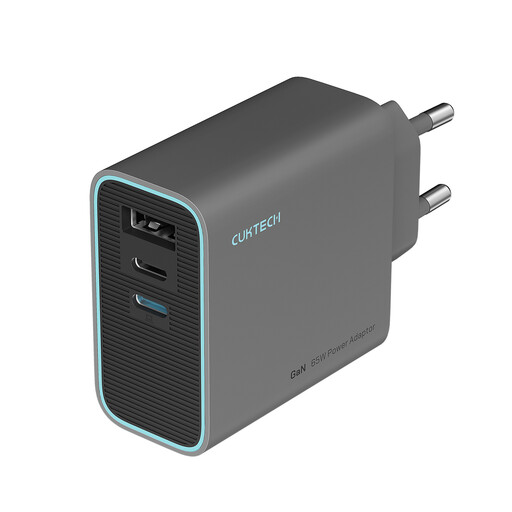 Image unavailable
A compact multi-port option for compatible USB-C devices; check how the power is shared when you connect several devices at once.
65 W; three ports; foldable plug.
Not unless the charging method is suitable for that battery type. Nikon describes USB charging via certain Z products; Sony lists the BC-ZD1 for a separate NP-FZ100 battery. Check the exact battery model number and the manufacturer’s specifications.
No. The European Commission states that the common charging requirements have applied to the relevant digital cameras since 28 December 2024. This doesn’t confirm that every separate battery or external battery charger works with every USB power supply; check your model’s specifications.
That depends on your charging method and what you already have. UGREEN states that no cable is included with model 90496. For the stated charging performance of the BC-ZD1, Sony requires a suitable USB-PD power supply of at least 30 W.
Place the charger somewhere unobstructed so heat can dissipate, and don’t charge it under a pillow or duvet. The fire service advises against using damaged cables and recommends that students charge during the day, when they’re awake and at home.
Check the power available per port and how it changes when you connect several devices at once. The stated total power isn’t automatically all available from one port; Belkin lists up to 20 W per port for the WCB006.