Which charging option is right for you?

Charging the battery in the camera

If you want to check first whether your camera and battery can charge via USB, Canon lists this as an option for the LP-E6NH in compatible camera bodies. Nikon says the EN-EL15c can be charged in the camera, but only with supported camera bodies.

Charging a spare battery

If you want to charge the battery outside the camera, you’ll need a charger that supports the exact battery type. For example, Sony specifies that the BC-ZD1 is for NP-FZ100 batteries.

Charging your camera and other devices

If you want to use several USB connections by your bed, check how much power is available when charging multiple devices at once. Manufacturers may quote a total output that isn’t available from every port individually.

What should you look for in a bedside charging station?

Charging in the camera

Choose this if: your camera manual confirms that your camera body and battery can charge via USB.

Bear in mind: check the required USB protocol and power output. This option charges the battery in the camera, not separately.

External battery charger

Choose this if: you want to remove the battery from the camera and the charger explicitly supports your battery type.

Bear in mind: you may need to buy the power supply and cable separately. The Sony BC-ZD1 is specified for NP-FZ100 batteries.

Camera manufacturer’s charger or adapter

Choose this if: you have a specific camera battery and the manufacturer confirms that the battery, camera and charging method are compatible.

Bear in mind: compatibility varies by model. A charging option for one battery doesn’t tell you anything about other batteries from the same brand.

What to consider What should you look for? Who is this most relevant to?
Compatibility Check the exact battery number and whether it can be charged in the camera or with an external charger. If I want to check first whether my camera and battery charge together via USB, I’ll choose a power supply afterwards. Around 33% of consumers put compatibility first.
Safe positioning Place the charger on a clear, hard surface, not under bedding. Don’t use a damaged cable or charger. The Netherlands Fire Service advises leaving room for heat to dissipate. If I’m charging by my bed, I want to place the charger somewhere clear and check the cables for damage. Around 27% of consumers put safe positioning first.
Multiple devices Compare the number of USB-C and USB-A ports and the available power when you connect devices at the same time. If I also want to connect other devices, I’ll check that the ports and power distribution suit my setup. Around 20% of consumers put simultaneous charging first.
Complete setup Check what’s included and whether you’ll need a power supply or suitable cable as well as the charger. If I’d rather not use several separate components, I’ll check in advance what else I need. Around 20% of consumers put a simple setup first.

Avoid common buying mistakes

  • Assuming a USB port is a charger for loose camera batteries

    A USB connection on its own doesn’t confirm that a loose battery will fit in the charger. Charging in the camera and charging a removed battery are two different methods.

    Look up the exact battery number and check whether your camera body supports USB charging or whether you need an external charger for that battery.

  • Confusing total wattage with the power available per port

    The stated total output of a multi-port power supply isn’t automatically available from every port at the same time. For the Anker Prime A2688, Anker specifies a maximum of 100 W when using two ports and a maximum of 89 W when using three ports.

    Check how the power is shared across the number of devices you want to connect at once, and compare it with your camera or battery charger’s requirements.

  • Looking only at the charger and not the parts you’ll need

    Sony states that the USB-PD power supply and USB cable aren’t included with the BC-ZD1.

    Check what’s in the box and what power supply and cable your chosen charger requires.

    For two NP-FZ100 batteries, Sony specifies a USB-PD power supply of at least 30 W and a cable rated for at least 3 A for the BC-ZD1. You may therefore need to buy these parts separately.

  • Placing the charger between pillows or under bedding

    A covered charger may not be able to dissipate heat as effectively. The Netherlands Fire Service advises placing chargers in a clear space and not charging under a pillow or duvet.

    Choose a clear spot on a hard surface and, ideally, charge while you’re awake and nearby, as the Twente Fire Service advises.

Camera brands and charging options to consider

Sony

According to Sony, the BC-ZD1 is a USB-PD charger for Sony NP-FZ100 batteries.

  • Sony states that the BC-ZD1 can charge two compatible batteries at the same time.
  • For two batteries, Sony specifies a USB-PD power supply of at least 30 W and a cable rated for at least 3 A. The power supply, cable and batteries aren’t included.

UGREEN

The Nexode 100W 5-Port, product number 35536, is designed for those who want to connect several USB devices.

  • UGREEN specifies four USB-C ports and one USB-A port.
  • The stated 100 W is the maximum total output, not a promise of 100 W from every port at the same time. Check separately whether it’s compatible with a loose camera battery.

Anker

The Prime A2688 is a multi-port power supply for a setup with up to three connections.

  • Anker specifies two USB-C ports, one USB-A port and a maximum total output of 100 W.
  • When using three ports, Anker specifies a maximum total output of 89 W. This information doesn’t confirm support for any particular loose camera battery.

Canon

Canon describes USB PD charging for the LP-E6NH in compatible camera bodies.

  • This charging method may be useful if your camera body supports charging the battery in the camera.
  • Information about the LP-E6NH doesn’t confirm compatibility with other Canon batteries or with a generic charging station for loose batteries.

Nikon

Nikon describes model-specific charging options for batteries including the EN-EL15c and EN-EL15.

  • According to Nikon, the EN-EL15c can be charged in the camera if the camera body supports this function. The MH-25a is a charger for the EN-EL15.
  • Check the exact combination of battery type, camera body and charger. Compatibility isn’t automatic across all Nikon models.

USB charging stations and power supplies at Joybuy

These products are USB power supplies with multiple connections for a camera setup where the camera body can charge the battery via USB. They aren’t automatically external chargers for loose camera batteries.
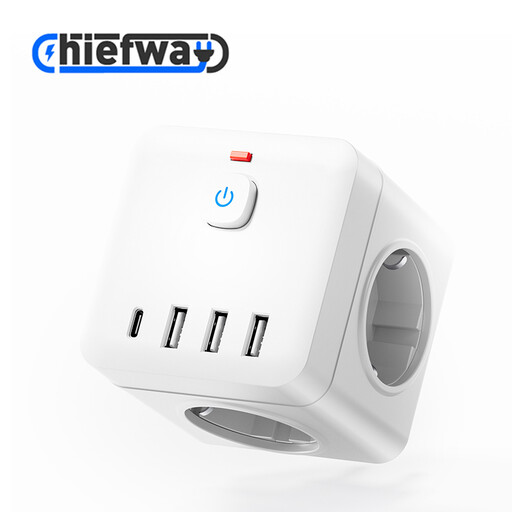
7-in-1 Cube Power Strip with on/off switch, USB-A and Type-C ports, white

7-in-1 Cube Power Strip with on/off switch

May suit a setup where the camera body itself charges via USB. Check your camera’s required connection and power supply.

The product name lists USB-A and Type-C charging ports, AC sockets and 4000W MAX.

Place the power strip on a clear, hard surface, not under bedding. Before use, check that the product meets the applicable safety requirements.

View at Joybuy

65W wall charger with two USB-C ports and one USB-A port

65W wall charger with 2 USB-C ports and 1 USB-A port

A multi-port power supply for a camera setup where the camera body can charge via USB. Check that it meets your camera’s charging requirements.

The product name lists 65 W, two USB-C ports and one USB-A port.

The product description states that it’s for indoor use and advises keeping it away from water. Before use, check that the product meets the applicable safety requirements.

View at Joybuy
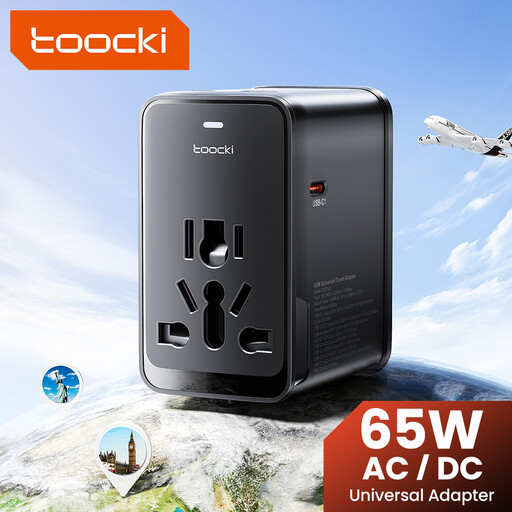
toocki Universal Travel Adapter 65W PD with three USB-C ports and one USB-A port

toocki Universal Travel Adapter 65W PD

May be useful if you want to power several devices via USB and your camera body can charge via USB. Check your camera’s charging requirements.

The product name lists 65 W PD, three USB-C ports and one USB-A port.

Place the adapter on a clear, hard surface and check that the product meets the applicable safety requirements before use.

View at Joybuy

Frequently asked questions

Can I plug a loose camera battery straight into a USB charging station?

No, not based on the USB port alone. Check whether the battery can be charged in a supported camera body, or use an external charger that specifies the exact battery type. For example, Sony describes the BC-ZD1 as being for NP-FZ100 batteries.

Where should I put the charger if I’m charging by my bed?

Place the charger on a clear, hard surface, not under a pillow or duvet, and don’t use a damaged cable or charger. The Netherlands Fire Service advises leaving room for heat to dissipate; the Twente Fire Service recommends charging during the day where possible, when you’re nearby. They also recommend having a smoke alarm in the room where you charge.

Does a USB battery charger always come with a power adapter and cable?

No, it varies by product. Sony states that the USB-PD power supply and USB cable aren’t included with the BC-ZD1, so check the packaging and the power supply and cable requirements for the charger you choose.

What warranty rights do I have in the Netherlands if a charger breaks too soon during normal use?

According to the Netherlands Authority for Consumers and Markets’ ConsuWijzer service, you’re entitled to a product with the features you could reasonably expect. If a product doesn’t meet those expectations during normal use, the seller must offer an appropriate free solution. There isn’t one fixed statutory warranty period for every product.

Does a charging station need a CE mark, and does USB-C mean every camera battery will fit?

Relevant European product safety requirements and CE marking apply to electrical chargers and power supplies. Check that the product you choose meets them. A USB-C connection doesn’t confirm that your camera or loose battery is compatible. Check the battery type, camera body and required charging protocol too.
