If you mainly film paper and hands at a computer, start with a document camera that gives you a useful overhead view. If you also want to create a range of detail and portfolio shots, compare a mirrorless camera with a suitable lens and mount. A camcorder may be a good fit if you often switch between wide and close-up views from a suitable position. Whichever option you choose, check the framing with your own paper, the sharpness of fine lines, the lighting on white paper and how well spoken explanations are captured.
Which camera setup suits you?
Creator filming their writing hand from above
You want to keep the paper and both hands in the same consistent frame throughout the lesson. A document camera and a suitable desk setup are worth comparing; IPEVO, Logitech and HUE describe models designed for this type of use.
Creator making detailed portfolio videos
You want to create close-ups and other compositions as well as lesson footage, and are happy to spend time choosing a lens, distance and settings. Canon and Sony describe mirrorless cameras with interchangeable lenses for different setups.
Teacher recording demonstrations with spoken explanations
You want to demonstrate techniques while explaining what you’re doing. So assess both the camera setup and the audio recording; Logitech and HUE mention a microphone on the models discussed.
What should you look for when choosing?
Document camera above your desk
A good fit if: the writing movement and the whole sheet are your priority, and you’ll be filming from a fixed computer setup.
Bear in mind: the capture area, focusing method, connection and recording software vary by model. A wide frame doesn’t guarantee that the pen nib will be sharp enough in the finished video.
Mirrorless camera with interchangeable lens
A good fit if: you want to create other angles or portfolio compositions as well as lesson footage, and choose your own lens and mount.
Bear in mind: the camera body alone doesn’t make a complete desk setup. Check the exact lens kit, working distance, visible paper size, power supply and audio recording.
Camcorder with built-in zoom
A good fit if: you want to switch regularly between wide and close-up views during a lesson from a suitable camera position, without changing lenses.
Bear in mind: zoom won’t automatically give you a straight overhead view. Check that the framing, focusing distance and mount suit your desk.
Start by measuring the space you need for the paper and your hands. Then check that the level of detail, audio and the computer or desk setup you need suit the way you record.
| What to consider |
What should you check? |
Who should prioritise this? |
| Full overhead view |
Measure the sheet, leaving room for both hands, and compare it with the capture area and the camera’s mounting position. IPEVO specifies a maximum capture area of 342 × 255 mm for the V4K PRO; this measurement doesn’t automatically apply to other models. |
If I want the paper, pen and both hands in shot together every time, I’ll prioritise framing that suits my desk. Around 36% of consumers put an overhead view first. |
| Clear writing detail |
Record a test clip in the lighting you plan to use, then check the exported file for sharpness, white paper and ink. Compare the focusing method and framing of the exact model you’re considering. |
For my portfolio, I want viewers to be able to make out fine lines in the finished writing, not just see the whole sheet. Around 29% of consumers prioritise clear writing detail above all else. |
| Spoken explanations |
Check the microphone, connection and recording software for the exact model. Record a short explanation from your usual teaching distance and listen back. |
If I explain things while writing, I want to check that I’m still easy to understand in the recording. Around 21% of consumers prioritise spoken lesson explanations. |
| A complete setup that fits |
Check the included mount and lens, if needed, as well as the connection to your computer, software and method for saving video. IPEVO lists USB Type-A and a 150 cm cable for the V4K PRO. |
If I want to connect the camera to my computer and workspace without missing any components, I’ll check the exact version and what’s in the box. Around 14% of consumers prioritise a setup that’s ready to fit straight away. |
Common purchasing pitfalls
-
Focusing on 4K alone
A stated resolution doesn’t tell you on its own whether the whole sheet and the finest lines will look sharp and clear in your final frame.
Assess a test recording from your intended working distance and in the format you plan to use for your video.
-
Assuming a camera body or general model name means you’re getting a complete kit
The Sony ZV-E10 II is also described as a lens kit, while Logitech lists different stand options for Reach. The version you choose determines which components are included.
Check the full variant name and what’s in the box before comparing setups.
You may need to buy a suitable lens or mount separately. Also allow time to choose and set them up.
-
Assuming a built-in microphone will sound the same everywhere
IPEVO links the recommended speaking distance of 30–70 cm to the audio performance of the V4K PRO; that doesn’t predict how the microphone will sound in every room.
Record a short explanation from your usual teaching distance and listen back to the file.
-
Filming other people recognisably without considering privacy
The Dutch Data Protection Authority explains that identifiable people in video footage count as personal data. The camera itself doesn’t change the privacy considerations around publishing it.
Where possible, film only the work and hands. If other people are identifiable, check which GDPR legal basis applies and what information you need to provide to them before publishing.
Brands to compare
IPEVO
IPEVO describes the V4K PRO as a document camera for an overhead view connected to a computer.
- For the V4K PRO, IPEVO specifies autofocus, USB Type-A, a microphone, a 150 cm cable and a maximum capture area of 342 × 255 mm.
- Check that the connection, cable length and capture area suit your desk. These specifications don’t automatically apply to the V4K or V4K PRO 120.
Logitech
Logitech describes Reach as a movable overhead camera for physical teaching materials, with a choice of table stand or clamp mount.
- Logitech lists 1080p/60 fps, autofocus and USB-C for Reach.
- Check which mount comes with the version you choose and whether it fits your workspace. Assess fine writing details in your own test recording.
HUE
HUE describes the HD Pro as a USB document camera for uses including instructional videos.
- For the HD Pro, HUE lists 1080p video, lighting and a built-in microphone.
- HUE specifies manual focus. Once set up, check that the pen nib stays sharp at your writing distance.
Canon
Canon describes the EOS R50 V as a mirrorless camera for a range of portfolio shots, using an RF or RF-S lens.
- Canon specifies 4K video features for the EOS R50 V.
- Canon states that this camera body doesn’t have sensor-shift image stabilisation. Work out separately which lens and desk mount will suit your setup.
Sony
Sony describes two different options here: the ZV-E10 II with an interchangeable E-mount lens, and the FDR-AX700 camcorder with built-in zoom.
- Sony specifies features including 4K 60p for the ZV-E10 II and describes a separate lens kit; for the FDR-AX700, Sony lists 12× optical zoom.
- The right lens or camera position will help determine whether the paper is framed properly. The zoom specification alone doesn’t guarantee a full overhead view.
Cameras at Joybuy
This selection includes compact vlog cameras, a webcam and a PTZ camera. For each model, check whether the mount and framing allow you to capture the paper and hands from above.
 No image available
DJI Osmo Pocket 4P Vlog Combo - Black
This compact handheld camera is described as being for vlogging; check separately how you can position it securely above the paper for a calligraphy lesson.
The product description lists a 1-inch sensor, a 20 mm wide-angle lens and 4K/240 fps in slow-motion mode.
It also mentions an integrated 3-axis gimbal for handheld filming.
View at Joybuy
 No image available
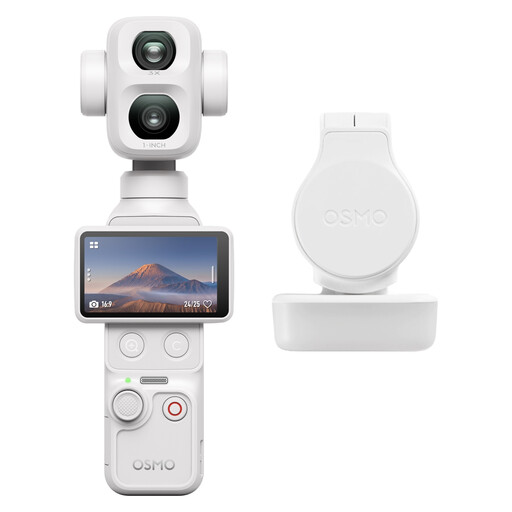
DJI Osmo Pocket 4P Standard Combo (White)
The product description presents this Osmo Pocket as a camera for handheld filming; check separately whether your chosen mount allows you to capture footage safely from above.
The description lists 8K HDR video, a 1-inch main sensor, a separate telephoto sensor and zoom up to 12×.
It also mentions a detachable screen and 3-axis mechanical stabilisation.
View at Joybuy
 No image available
AOC 4K PRO Webcam with Sony IMX363 sensor
The product description mentions autofocus for uses including documents, as well as a desk tripod; check whether the framing on your desk shows both the sheet and your hands.
The title lists PDAF autofocus and dual microphones. The description mentions 4K video and 1080p at 60 fps.
The listed connections are USB-A and USB-C.
View at Joybuy
 No image available
HP Poly Studio E60 Smart Camera 4K MPTZ with 12x optical zoom
The listed mounting options are a display, tripod or ceiling. Before buying, work out whether this type of installation will suit your desk and shooting angle.
The product description lists 4K Ultra HD, up to 60 fps and 12× optical zoom.
The listed connection options are Ethernet/PoE or a 12V adapter. Factor in the installation and connections you’ll need.
View at Joybuy
 No image available
Insta360 Luna Ultra Standard Bundle Cosmic Black
The product description mentions vlogging and a detachable screen; check how you can position the camera for a fixed overhead recording.
The description lists 8K HDR video, a main lens and telephoto lens, and zoom up to 12×.
The detachable screen is described as allowing preview and remote control from up to 20 m away.
View at Joybuy
Frequently asked questions
How can you check before buying whether the whole sheet will fit in shot?
Measure the sheet, including the space your hands need, and compare it with the stated capture area and the position where you can mount the camera. IPEVO lists a maximum of 342 × 255 mm for the V4K PRO; check the dimensions and working distance of other models separately.
Do you need a computer to record with a document camera?
For the IPEVO V4K PRO reviewed here, IPEVO describes a USB Type-A computer connection and Visualizer software that can record camera footage. Check that the connection, software and available storage are compatible with your computer.
What if your new camera breaks down too soon under normal use?
For consumer purchases in the Netherlands, statutory rights apply alongside any manufacturer’s or retailer’s warranty. ACM ConsuWijzer explains that the seller is responsible for providing an appropriate solution free of charge if the product doesn’t meet what you could reasonably expect; the outcome depends on the circumstances. If you’re buying for business use, don’t assume the same consumer rules automatically apply.
Can you show identifiable participants in a public portfolio video?
Identifiable people in video footage count as personal data. According to the Dutch Data Protection Authority, business or wider publication isn’t covered by the exception for purely private use, and a GDPR legal basis is required. Consent can be one legal basis, but it isn’t the only one. If you film only the work and other people aren’t identifiable, this specific issue of identifiability is different.


