For a fixed table setup, a mirrorless camera with a suitable lens lets you adjust the framing. A camcorder offers optical zoom without changing lenses, while a compact gimbal camera is a good fit if you move around regularly. Test the exact camera and lens to make sure the nib, hand and paper are in focus and clearly visible, and check the sound, power and storage for the length of the class. If other people will be identifiable in the footage, assess which GDPR lawful basis applies before recording and publishing.
Who is this choice relevant to?
Teacher with a fixed work table
You want to show the nib, hand and paper using a repeatable setup. The framing also depends on the lens, zoom and distance from the camera. Canon and Sony describe interchangeable lenses for their mirrorless cameras, while Panasonic specifies optical zoom for the HC-VX3.
Teacher in a noisy workshop
You record spoken instructions while other people are working in the same room. Canon lists a 3.5 mm microphone input for the EOS R50, but that alone doesn’t guarantee that your instructions will be easy to hear in the workshop.
Teacher moving between tables
You move the camera regularly and need to balance portability against framing and focusing distance. DJI specifies that the Osmo Pocket 3 weighs 179 g and can focus from 0.2 m; check whether that distance works for your filming position.
What should you look for when choosing?
Mirrorless camera with interchangeable lens
A good fit if: you usually film from one position and want to choose a lens to suit the distance to your work table. Canon and Sony describe interchangeable lenses for the EOS R50 and ZV-E10 II respectively.
Bear in mind: the lens needs to be compatible with the mount and suit the available distance. Canon also lists a 3.5 mm input for an external microphone on the EOS R50.
Camcorder with optical zoom
A good fit if: the camera stays in one place and you want to change the framing during the class without changing lenses. Panasonic specifies 24× optical zoom for the HC-VX3.
Bear in mind: the zoom ratio doesn’t tell you whether the nib will be in focus from your tripod position. Test it at the actual filming distance.
Compact gimbal camera
A good fit if: you regularly move between tables or filming positions. DJI specifies that the Osmo Pocket 3 weighs 179 g, has gimbal stabilisation and can focus from 0.2 m.
Bear in mind: the lens has a fixed focal length and the stated video zoom is digital. Check that you can get the framing you want from your filming position.
| What to consider |
What should you check? |
Who is this important for? |
| Nib and writing movement |
Test the exact lens or zoom setting from the planned position and check the focus at that distance. |
If I want to show how the letters are formed, the nib, hand and paper need to stay clearly visible from my fixed position. Around 36% of consumers prioritise these writing details. |
| Clear spoken instructions |
Make a test recording during normal workshop activity and check the microphone input and what’s included in the bundle. |
When people are working at the same time, I want to be able to hear the spoken instructions when I play them back, rather than assume the built-in microphone will be enough. Around 29% of consumers prioritise clear instructions. |
| Recording a full class |
Check the power supply and storage for the planned class length, and make a test recording of a similar duration. |
If I want to record a whole demonstration, I want to know in advance whether the power supply and storage I’ve chosen will last for the class. Around 21% of consumers prioritise uninterrupted recording. |
| Changing filming position |
Decide whether you’ll be moving during the class, then test the focus and framing from each position. |
If I’m filming between work tables, I want to show the demonstration from different positions. Around 14% of consumers choose with this mobility in mind. |
Common buying pitfalls
-
Assuming 4K will automatically show the nib clearly
Resolution doesn’t determine whether the nib will be large enough in the frame or in focus from your filming distance.
Test the full writing movement at the actual table distance, using the exact lens or zoom setting.
A different lens or adjusted camera setup may require extra preparation.
-
Assuming a built-in microphone means clear instructions
A microphone specification doesn’t measure how clear the sound will be while people are working in a shared space.
Listen to a test recording during normal workshop activity, and check the connections and what’s included in the bundle you’ve chosen.
-
Assuming the standard version and bundle are the same purchase
For the Osmo Pocket 3, the product information distinguishes between a standard version and a creator bundle. Don’t assume they include the same accessories.
Before buying, compare the stated contents of the exact version you’re considering.
-
Assuming a shared workshop is a private filming location
Under the GDPR, filming and publishing footage of identifiable people for professional or commercial purposes requires a lawful basis, according to the Dutch Data Protection Authority.
Before recording and publishing, decide on the purpose, the applicable lawful basis and who will be identifiable in the footage.
Brands and models to consider
Canon
The EOS R50 is a mirrorless camera for a fixed table setup, where you want to choose a lens and be able to connect an external microphone.
- Canon specifies 4K 30p and a 3.5 mm microphone input for the EOS R50.
- Check which RF lens is included in the exact bundle and whether it suits the available distance from the table. Specifications aren’t a test of how well it records calligraphy.
Sony
The ZV-E10 II is a mirrorless camera with an E-mount, for anyone who wants to set the framing with a suitable lens.
- Sony lists interchangeable E-mount lenses and a 16–50 mm power zoom lens for the kit shown.
- Your lens choice and filming distance still matter. A lens specification doesn’t guarantee that fine lettering will be readable from every setup.
Panasonic
The HC-VX3 is a camcorder option for a fixed class setup where you want optical zoom without changing lenses.
- Panasonic specifies 24× optical zoom and a USB-C power option for the HC-VX3.
- Panasonic lists the HC-VX3 and HC-VX3E-K as unavailable on its Dutch product page; check current availability. Manufacturer claims aren’t an independent test in a shared workshop.
DJI
The Osmo Pocket 3 is a compact option for anyone who regularly changes filming position.
- DJI specifies a weight of 179 g, gimbal stabilisation and focusing from 0.2 m.
- The lens has a fixed focal length and the stated video zoom is digital. Check that the standard or creator version you choose includes the accessories you need.
Joybuy product picks
For a table-top calligraphy demonstration, the selection below includes compact cameras, zoom cameras, a mirrorless camera and a webcam for use with a computer.
 No image available
DJI Osmo Pocket 3 Creator Combo
This compact gimbal setup is a good fit if you change your filming position during the class.
The product name lists 4K/120fps video, 3-axis stabilisation and an included microphone.
View at Joybuy
 No image available
Songdian digital camera, 8× optical zoom, white
The zoom may be useful if you want to adjust the framing from a fixed filming position.
The product name lists 8× optical zoom, 5K video and 64 MP. According to the product information, zoom and focus are adjusted manually using the lens ring.
View at Joybuy
 No image available
Sony ZV-E10 with 16–50mm zoom lens, black
The included zoom lens may be useful if you want to adjust the framing for a fixed table setup.
According to the product information, an SD memory card and adapter/charger aren’t included. Check what you’ll need for your recording.
View at Joybuy
 No image available
Insta360 Link 2C Standard Bundle, graphite black
This webcam may suit a demonstration you want to record using a computer.
The product name lists 4K and use with a PC or Mac. Check whether a webcam setup works for your filming position.
View at Joybuy
 No image available
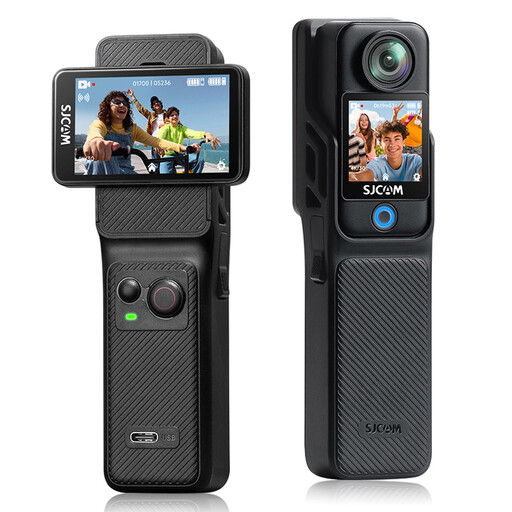
SJCAM C400 4K action camera with 6-axis stabilisation
The stabilisation may be useful if you move the camera during a demonstration.
The product name lists 4K video and an included memory card. The stated recording time of up to 437 minutes applies when using the grip and extra battery.
View at Joybuy
Frequently asked questions
How can you check before buying whether small letters will be visible?
Set up the camera you’re considering in the planned filming position, using the exact lens or zoom setting, and make a test recording of the nib, hand and paper. Check the focus at that distance too; DJI lists a minimum subject distance of 0.2 m for the Osmo Pocket 3.
What should you prepare for a longer recording?
Test a recording of a similar length using your chosen power supply and storage. DJI says the Osmo Pocket 3 records to an inserted microSD card and has no built-in storage. Panasonic describes a USB-C power option for the HC-VX3.
What are your rights if a camera bought online breaks down too soon?
According to ACM ConsuWijzer, the seller is your point of contact for an appropriate free solution if a product breaks down sooner than you could reasonably expect during normal use. Online consumer purchases also usually come with a 14-day cooling-off period after delivery. This is a separate right, and exceptions may apply.
Can you film other people in a shared workshop and publish the class?
Not automatically. According to the Dutch Data Protection Authority, the GDPR applies when filming and publishing identifiable people for professional or commercial purposes, and an applicable lawful basis is required. Consent is one possible lawful basis and must, among other things, be freely given, specific and informed. Where possible, point the camera at the demonstration, and assess separately who will be identifiable in the footage and how you’ll use the recording.


