First, choose a camera setup that keeps your paper, pen nib and hand steady in the frame. Then decide whether you want to record via a computer or need more freedom to choose your lens and framing. A document camera is designed for a fixed overhead view, while a mirrorless camera gives you more choices around lenses and mounting. Test the framing and lighting with a trial recording before putting together a complete setup.
Which camera setup is right for you?
Overhead video creator
You want to keep your pen nib, hand and paper together in a steady shot. IPEVO describes the V4K PRO 120 as having an adjustable arm and a capture area of up to A3; Ulanzi recommends diffused lighting on either side of the work surface.
Edited calligraphy video creator
You want to switch between wide and close-up shots, and have room to choose your lens and mount separately. Canon and Sony describe the models mentioned here as cameras with interchangeable lenses.
Teacher demonstrating live
You want to show or record your writing surface via a computer. IPEVO Visualizer supports video recording, while Logitech describes the Brio 4K as a webcam. Check that your computer and software work with the camera you choose.
Which camera suits the way you want to film?
Document camera above the paper
Choose this if: you mainly want to show or record a fixed writing area via a computer. According to IPEVO, the V4K PRO 120 has an adjustable arm and a capture area of up to A3; Visualizer supports video recording.
Consider: you’ll need a compatible computer and software, and should check that the paper, your hand and the lighting all fit within the actual frame.
Mirrorless camera with interchangeable lens
Choose this if: you want to shoot other compositions as well as overhead views, and choose your own lens and video controls. Canon lists interchangeable RF lenses and a vari-angle screen for the EOS R50 V; Sony lists interchangeable lenses for the ZV-E10 II.
Consider: the camera body isn’t a complete setup. Check the lens, mount, power supply and any audio accessories separately.
Webcam on a separate mount
Choose this if: you already work via a computer and can position the webcam securely above your work surface. Logitech lists autofocus, adjustable fields of view and a ¼-inch tripod mount for the Brio 4K.
Consider: the monitor clip isn’t an overhead arm. Test the working distance, mount and framing as one complete setup.
Compact camera for other angles
Consider this if: you want to film materials or the finished piece from other angles as well as your writing surface. DJI lists a three-axis gimbal and a minimum focusing distance of 0.2 m for the Osmo Pocket 3.
Consider: stabilisation while moving doesn’t replace a fixed mount for a static overhead view. Check the distance and framing from the mounting position.
| What to consider |
What to look for when buying |
Who is this important for? |
| Steady overhead view and capture area |
Measure your paper and the space around your hand; check the framing and mount at the planned mounting height. |
If I want to keep the pen nib, my hand and the paper together in a steady shot, I test the framing from the actual mounting position. Around 36% of consumers prioritise a suitable overhead view. |
| Writing details and framing |
Make a test recording with your paper, pen nib and lighting; if you’re choosing a mirrorless camera, check which lens is included in the kit. |
When I want to show small letterforms clearly or switch between wide and close-up shots, I check the focus and framing on my work surface. Around 29% of consumers give control over the image top priority. |
| Recording or teaching via a computer |
Check the connection, operating system and whether your recording or teaching app recognises the camera. |
If I want to demonstrate live or record directly via my computer, I first check that my app works with the camera. Around 21% of consumers prioritise computer or live use. |
| Filming beyond a fixed setup |
Check the minimum focusing distance and what kind of mount you need for a static overhead view. |
When I also want to film materials or the finished piece from other angles, I consider the distance and whether I need a separate desk mount. Around 14% of consumers prioritise filming on the move. |
Common buying mistakes
-
Assuming a high video resolution means the whole writing area will be in shot
The work surface, field of view and camera position all affect what you see in the recording. A resolution figure alone won’t tell you whether the paper and your hand will fit in the frame.
Measure your paper and test the framing from the planned camera position.
-
Buying a monitor webcam as if its clip were an overhead arm
The monitor clip on the Logitech Brio 4K won’t automatically position the camera above the paper. The listed tripod mount doesn’t mean a suitable mount is included in the kit.
Check the mount and working distance together with the framing you want.
-
Comparing only the body when choosing a mirrorless camera
A camera with an interchangeable lens won’t automatically give you the right framing above the paper. The lens and mount are separate choices.
Check which parts are actually included in the kit and what else your recording setup requires.
-
Confusing the manufacturer’s warranty with a fixed end date for your statutory rights
According to the Dutch government, the Netherlands has no fixed statutory warranty period. What you can reasonably expect from a product depends, among other things, on normal use and the circumstances.
Keep your purchase details and contact the seller if the product is faulty.
Camera brands to consider
IPEVO
USB document cameras for overhead views; the V4K PRO 120 is one option we looked at for a fixed writing area.
- According to IPEVO, the V4K PRO 120 has an adjustable arm and a capture area of up to A3; Visualizer supports video recording.
- Check compatibility with your computer, and whether the arm, paper and lighting will fit comfortably over your table.
Canon
Mirrorless cameras for those who want to choose their own lens and video controls, considered here through the EOS R50 V.
- Canon lists interchangeable RF lenses, a vari-angle screen, a microphone input and a headphone output for this model.
- A suitable lens and overhead mount are separate choices; these features are not an assessment of every Canon camera.
Sony
A mirrorless alternative with an interchangeable lens, considered here through the ZV-E10 II.
- Sony lists interchangeable lenses and video up to 4K 60p for the ZV-E10 II.
- Video features won’t automatically determine how much of the paper is in shot from your mounting height.
Logitech
Webcams for computer use, considered here through the Brio 4K.
- Logitech lists autofocus, adjustable fields of view and a ¼-inch tripod mount for this model.
- The monitor clip described isn’t an overhead arm; check what separate mount you need.
DJI
Compact cameras for creators who also film from other angles away from their desk, considered here through the Osmo Pocket 3.
- DJI lists a three-axis gimbal and a minimum focusing distance of 0.2 m for the Osmo Pocket 3.
- These features don’t guarantee a suitable, steady overhead view without an appropriate mount.
Joybuy cameras for extra angles and computer recording
This selection focuses on compact cameras for additional angles and webcams for computer recording. For a fixed overhead view, check separately that the mount and working distance suit your writing area.
 No image available
Osmo Pocket 4P, Standard Combo, Black
An option for filming other scenes as well as calligraphy; check separately how to mount the camera for a fixed overhead view.
The product description lists 4K/240fps in slow-motion mode and 107 GB of internal storage.
View at Joybuy
 No image available
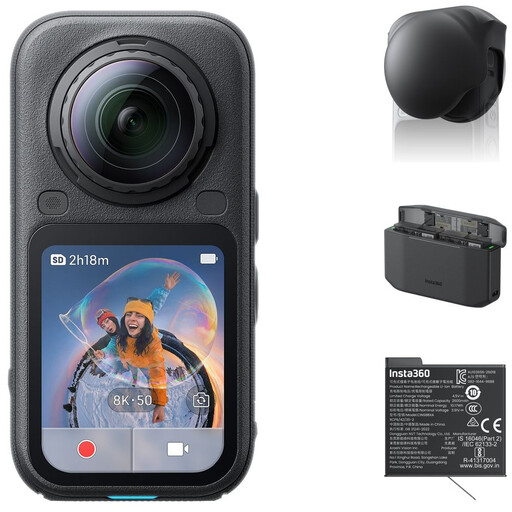
Insta360 X6 All-in-One Bundle
Suited to anyone who wants to capture wide or 360° footage as well as using a fixed calligraphy setup; check how to frame the writing area separately.
The product description lists 8K 50fps 360° video and 4K InstaFrame video. The bundle includes a lens cap, spare battery and charging case.
View at Joybuy
 No image available
DJI Osmo Pocket 4 Standard Combo
A compact camera for additional angles; stabilisation while moving doesn’t replace a separate mount for a static overhead view.
The product name lists a 1″ CMOS sensor, 4K/240fps, 3-axis stabilisation, 2× lossless zoom, 107 GB of built-in storage and a 2″ rotatable screen. The description limits 4K/240fps to slow-motion mode.
View at Joybuy
 No image available
Philips 4000 Series 4K UHD Webcam SPL6408BT/00
An option for recording via a computer; if you want to position the webcam above your writing area, check what separate mount you’ll need.
The product name lists 4K UHD, 8MP, autofocus, two built-in microphones, a privacy shutter and EU version.
View at Joybuy
 No image available
Insta360 Link 2C Standard Bundle Graphite Black
A webcam for recording via a computer; check separately whether you need a suitable overhead mount for your writing area.
The product name lists a 4K webcam for PC and Mac, a 1/2″ sensor, auto-framing, HDR and a microphone with AI noise reduction. According to the product description, this model isn’t compatible with ARM-based Windows systems.
View at Joybuy
Frequently asked questions
How can I stop my writing hand from casting a shadow over the letters?
Start with diffused light on both sides of the paper and check where the shadow falls as you write. Ulanzi recommends this arrangement for an overhead view; move the light if it obscures your writing.
Can a document camera also record a video file?
In the IPEVO setup reviewed, Visualizer supports recording camera footage on a computer. Before buying, check that your computer and preferred software support the camera; don’t assume every document camera records independently.
Is a two-year manufacturer’s warranty the same as the statutory warranty in the Netherlands?
No. According to the Dutch government, the Netherlands has no fixed statutory warranty period; you can expect a product to last a reasonable time under normal use. If a product is faulty, contact the seller; a manufacturer’s warranty may offer additional cover.
Can I post a calligraphy video online if other people are recognisable in it?
Not automatically. The Dutch Data Protection Authority considers images of identifiable people to be personal data. The exception for exclusively personal or household use doesn’t automatically apply when footage is posted online for an unrestricted audience. In that case, consider which GDPR obligations and lawful basis apply. Consent is one possible lawful basis, but it isn’t automatically the only one.


