
Vandaag of morgen in huis

Kwaliteit gegarandeerd

Welkomstaanbiedingen ontgrendelen: GRATIS bezorging | Tot 80% korting | Gratis 30 dagen JoyPlus-proefperiode
Download de app
Buying a laptop seems simple until you start comparing specifications. A low price may look appealing, but a model without a charger, with too little memory or an unsuitable keyboard layout can quickly lead to extra costs and frustration. Terms such as Copilot+ PC, AI performance and long battery life may sound impressive, but they do not automatically mean that a laptop is right for the way you use it.
Use these checks to compare a Windows laptop, MacBook, Lenovo laptop, HP laptop or ASUS laptop based on practical features rather than marketing language.
With several laptops currently on the market, the charger is no longer included as standard. This applies, for example, to certain ASUS, Lenovo and HP models. Always check:
As a result, a cheap laptop can become more expensive once you need to buy a suitable charger separately.
A Copilot+ PC has hardware for certain AI functions, such as an NPU. The ASUS Vivobook 14, for example, uses a Qualcomm Hexagon NPU with a stated capacity of up to 45 TOPS. However, feature availability depends on the Windows version, updates, software, region, internet connection and the possible requirement for a Microsoft account.
Do you use older business software, specialist peripherals or specific printer drivers? Check in advance whether they work with Windows on Snapdragon. A Copilot+ PC is suitable for many standard tasks, but compatibility is more important than the name on the sticker.
A 16-inch laptop gives you more room for spreadsheets, documents and video editing, but takes up more space in a bag. A 14-inch laptop is generally easier to carry on train journeys, to lecture theatres and when working from different locations. A 15-inch laptop is often a good compromise.
As well as screen size, look at:
For studying, office work, video calls and multitasking, 16GB RAM is a useful starting point. You can work with multiple browser tabs, documents, communication apps and streaming services at the same time. A laptop with 8GB RAM may be suitable for simple tasks, but offers less room for intensive multitasking. Also check whether the memory can be upgraded. In many slim laptops, the RAM is soldered to the motherboard and cannot be replaced.
A 512GB SSD provides space for Windows, programmes, documents and media. The available space is always lower than 512GB because the operating system, recovery partitions and system software use some of the storage. External or cloud storage may be needed for large video libraries, games or photography projects.
An AMD Ryzen 5, Ryzen 7, Intel Core, Apple chip or Qualcomm Snapdragon may be perfectly suitable, depending on the task. For a laptop for studying and standard office work, documents, browsers, video calls and presentations are usually more important than maximum processing power.
For a laptop for work, you should also check:
Creative professionals should also consider colour coverage, screen resolution, graphics performance and software support. An integrated graphics card is suitable for everyday use, but is not the same as a dedicated graphics card for demanding 3D or video work.
A laptop with a QWERTY keyboard is common in the Netherlands, but check whether it has a Dutch, international, American or British layout. The positions of keys such as Enter, Shift and punctuation marks may differ. The ASUS Vivobook below has a Dutch QWERTY layout; some HP and Lenovo models instead list English EU or International English QWERTY.
Also check the ports. USB-C can support data, display output and charging, but this depends on the laptop, cable and connected device. HDMI is useful if you want to connect a monitor or television without a dock.
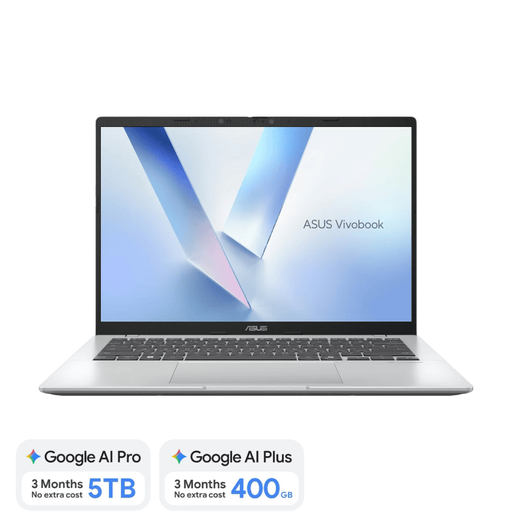
Why it suits this profile: A compact Windows laptop for studying, home use, streaming and everyday documents.
The product information lists 16GB RAM, a 512GB SSD and a Dutch QWERTY layout. However, bear in mind that a standard charger is not included.
14-inch WUXGA display, Wi-Fi 6E, two USB4 ports and a weight of approximately 1.49 kg.
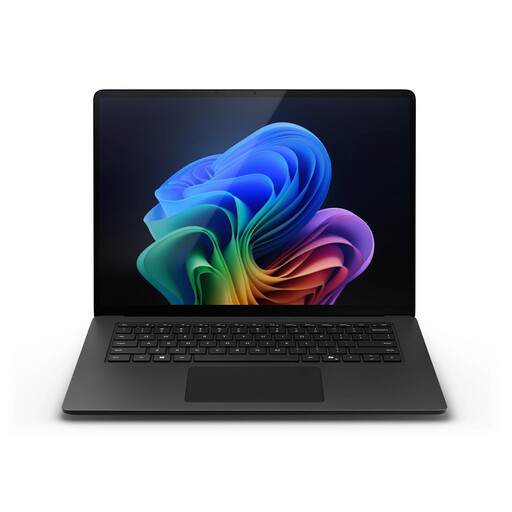
Why it suits this profile: Designed for business users and professionals who need plenty of screen space, memory and storage.
The configuration lists 32GB LPDDR5X, a 1TB SSD and Windows 11 Pro. However, check the compatibility of specific Windows programmes in advance.
15-inch touchscreen with a 3:2 aspect ratio, Wi-Fi 7, 1TB of storage and 32GB of memory.
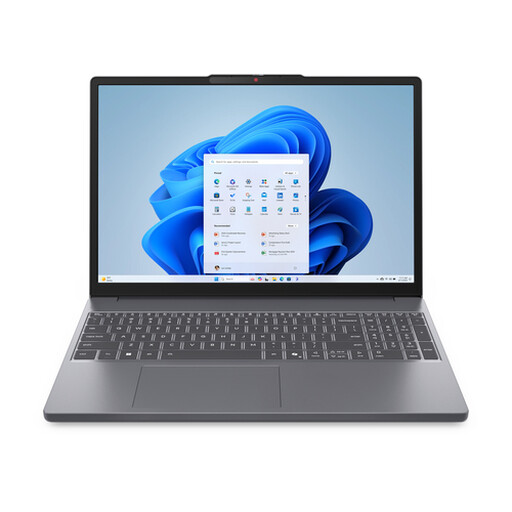
Why it suits this profile: Suitable for users looking for a larger workspace, numeric keypad and solid multitasking capability.
16GB RAM and a 512GB SSD reduce the risk of running out of memory or storage quickly. According to the product information, the charger must be purchased separately.
Ryzen 7 8840HS, 15.3-inch IPS display, numeric keypad and SD card reader.
We have compiled a complete, up-to-date list of products that fully meet these strict selection criteria and the applicable European safety regulations.
For word processing, online lessons, browsing and presentations, 8GB may be sufficient. 16GB RAM gives you more room for multitasking and is a more practical choice if you want to use the laptop for several years. Check whether the memory can be upgraded, as onboard RAM cannot always be replaced.
That depends on the programmes you use. A MacBook Air is suitable for users working with macOS apps, browsers, documents, video calls and creative software. Check in advance whether your business applications and accessories are available for macOS. If you rely on specific Windows programmes, you may be better off choosing a Windows laptop.
In addition to the purchase price, you may incur costs for a charger, protective case, docking station, external storage and software subscriptions. An SSD laptop generally uses less power than older systems with a mechanical hard drive, but consumption depends on screen brightness, processor load, video calls and connected accessories. So do not just check the price of the device; also consider what you actually need for your workspace.
