
Vandaag of morgen in huis

Kwaliteit gegarandeerd

Welkomstaanbiedingen ontgrendelen: GRATIS bezorging | Tot 80% korting | Gratis 30 dagen JoyPlus-proefperiode
Download de app
Buying a laptop seems straightforward until you start comparing specifications. A low price may be appealing, but a model with just 8GB of RAM is less suitable for lots of browser tabs and demanding software. A large screen is comfortable at a desk, but less practical if you travel by train every day. And a powerful gaming laptop can be unnecessarily expensive and heavy for email and studying.
So don’t just look at the processor or storage. Check the keyboard, upgradeability, screen, connections and what is actually included in the box.
A Ryzen 5, Core 5 or Snapdragon X doesn’t tell you everything. Also check the number of cores, the type of RAM, whether the graphics are integrated or dedicated, and the cooling system. A laptop with a Ryzen processor and integrated graphics is suitable for office work, studying and light creative tasks. For modern games or 3D editing, a dedicated graphics card such as an RTX 5060 is a more relevant criterion.
A 14-inch laptop is generally easy to carry around. A 15-inch laptop offers more workspace without immediately becoming too large. A 17-inch laptop is mainly practical in a fixed location, for example for spreadsheets, gaming or having several windows open side by side.
Also look at the resolution and aspect ratio. A 16:10 screen with 1920 × 1200 pixels displays slightly more vertical space for documents and websites than a standard Full HD screen.
With several models in this selection, the charger isn’t included as standard. This affects the overall cost. Check whether you need a suitable USB-C Power Delivery charger or a compatible power adapter. Use an adapter with the correct voltage and wattage; an ordinary phone charger isn’t automatically suitable for a laptop.
For a laptop for work and study, 16GB of RAM is a practical guideline if you work with documents, video calls, browser windows and spreadsheets at the same time. 8GB may be sufficient for basic use, but leaves less room for intensive multitasking.
A laptop with a 512GB SSD starts up quickly and provides space for programmes, documents and media. The actual available capacity will be lower because of Windows, recovery partitions and installed software. If you work with large video files or lots of games, you may need a larger SSD or external storage.
Check whether the memory can be upgraded. On some slim models, such as the ASUS Vivobook 14, 16GB of LPDDR5X is integrated and cannot be upgraded. The Lenovo IdeaPad Slim 3 15AHP10, by contrast, has one SO-DIMM configuration and a stated maximum of 16GB.
A higher refresh rate, such as 144Hz, 165Hz or 240Hz, is mainly relevant for gaming and fast-moving content. For word processing and administration, 60Hz is usually sufficient. An OLED laptop can offer deep blacks and high contrast, but always check whether the screen has touchscreen functionality. The ASUS Zenbook A14, for example, has a 14-inch WUXGA OLED screen, but it isn’t touch-sensitive.
Also check:
A laptop with a QWERTY keyboard isn’t always the same as a Dutch keyboard. Some models have a Dutch QWERTY layout, while others have an international or English QWERTY layout. If you touch-type or use lots of special characters, it’s worth checking the exact layout.
With a laptop featuring a Snapdragon processor, you should also check whether older Windows software, printer drivers or specialist programmes are compatible. Copilot+ PC features also require compatible software, Windows updates and, in some cases, a Microsoft account or internet connection. The presence of an NPU doesn’t mean that every application automatically supports AI features.
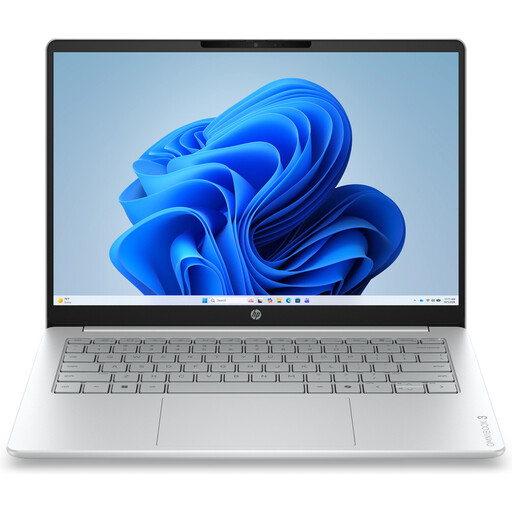
Why it suits this profile: A compact model for browsing, documents, online lessons and streaming, with a 14-inch format and a weight of approximately 1.42 kg.
The specifications clearly list a 512GB SSD, a 1920 × 1200 screen and a webcam with a privacy shutter. However, bear in mind that the charger isn’t included and the 8GB of memory cannot be upgraded.
14-inch IPS screen, 512GB NVMe SSD, Full HD webcam and QWERTY keyboard.
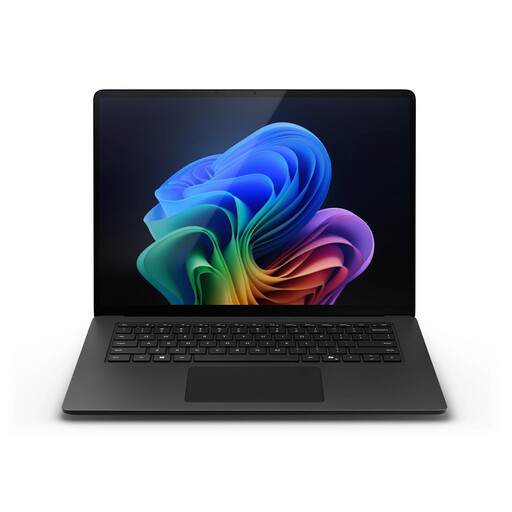
Why it suits this profile: Designed for business users and professionals who want plenty of RAM, storage and a touchscreen.
32GB of LPDDR5X and a 1TB SSD reduce the chance of quickly running into memory or storage limits. However, check software compatibility for Snapdragon-based Windows systems.
15-inch touchscreen, 2496 × 1664 resolution, Windows 11 Pro and Wi-Fi 7.
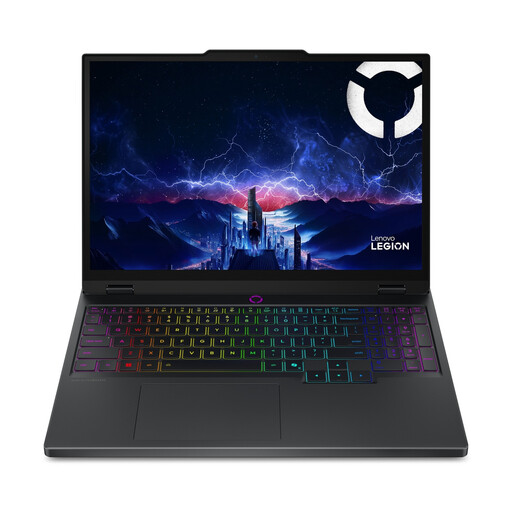
Why it suits this profile: For gamers and creative users looking for an RTX 5060, fast OLED display and upgradeable memory.
The product details specify the GPU, the 115W TGP and two memory slots. This means you can compare more than just the RTX 5060 name.
15.1-inch OLED screen with 2560 × 1600 resolution, 165Hz, 16GB DDR5 and RTX 5060 with 8GB GDDR7.
We’ve put together a complete, up-to-date list of products that fully meet these strict selection criteria and the applicable European safety regulations.
8GB can handle documents, video calls and browsing. 16GB of RAM provides more room for multitasking and is a sensible choice if you plan to use the laptop for several years.
Yes, especially if you regularly travel or switch between university, the office and home. Do check the keyboard and connections, though. If you mainly work with spreadsheets and multiple windows, a 15- or 16-inch laptop may be more suitable.
As well as the purchase price, a charger, docking station, external storage and software can increase the cost. A model with integrated graphics will generally use less power during light use than a powerful gaming laptop, but actual consumption depends on the settings and how you use it.
