
Vandaag of morgen in huis

Kwaliteit gegarandeerd

Welkomstaanbiedingen ontgrendelen: GRATIS bezorging | Tot 80% korting | Gratis 30 dagen JoyPlus-proefperiode
Download de app
Buying a computer mouse seems straightforward until you have to choose between a wireless mouse, wired mouse, Bluetooth mouse or gaming mouse. Marketing often focuses on high DPI, silent clicks or an “ergonomic” shape. Yet these terms do not tell you everything about everyday use.
Many disappointing purchases come down to three recurring pitfalls:
With the right specifications, you can compare products more effectively. Below are the key points to consider when choosing a mouse for a laptop, PC, home working or gaming.
A wired mouse usually uses a USB cable. This means no batteries and a direct connection, but the cable can restrict your freedom of movement. For a permanent desktop set-up, that can actually be practical.
A wireless mouse with 2.4GHz radio connects via a small USB receiver. Check beforehand that your laptop or PC has a suitable USB port. One advantage is that you can usually get started straight away without adjusting Bluetooth settings. The Logitech M280, for example, uses a nano USB receiver and, according to the product information, has a range of up to 10 metres.
A Bluetooth mouse connects directly to a compatible device. This is useful with laptops that have few USB ports. Make sure your operating system and device support Bluetooth. Some models, such as the Logitech MX Vertical, offer both Bluetooth and a connection via USB receiver.
DPI indicates how sensitively the cursor responds to movement. A lower setting, such as 1,000 or 1,200 DPI, is often sufficient for documents, browsing and spreadsheets. For large screens, graphic work or gaming, a mouse with adjustable DPI can offer greater flexibility.
An optical mouse uses a light sensor to track movement. This type is common for office and gaming mice. The surface you use it on remains important: highly reflective surfaces or glass can affect tracking.
As well as DPI, consider:
A gaming mouse with high DPI and programmable buttons is mainly worthwhile if you will actually use those features. For straightforward office work, extra buttons and lighting can mean unnecessary expense.
A right-handed mouse usually follows the shape of the right hand. A left-handed mouse or symmetrical model offers greater flexibility. Also check the dimensions: length, width and weight all affect your grip.
A vertical or ergonomic mouse places your hand in a different position. This can take some getting used to. According to Logitech’s product information, the MX Vertical has an angle of 57 degrees and a sensor of up to 4,000 DPI. These design claims come from the manufacturer, so make sure the shape suits your hand and working posture.
Also consider the number of buttons. Three buttons are sufficient for basic use. Side buttons, horizontal scrolling and programmable functions are useful for navigation, productivity or gaming, but they also make operation more complex.
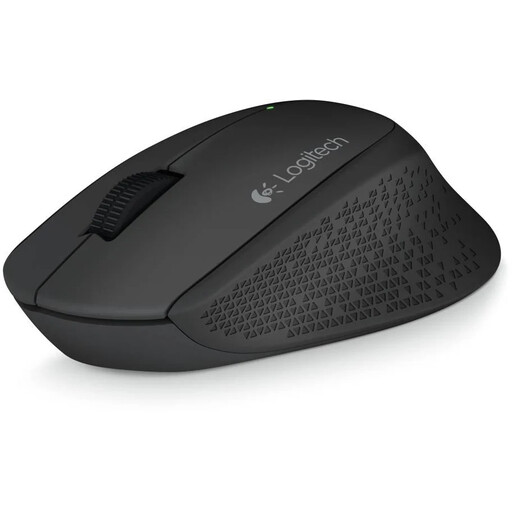
Why it suits this profile: This wireless mouse offers straightforward operation with three buttons, a 1,000 DPI optical sensor and a nano USB receiver. That makes it well suited to everyday use in the office or at home.
No unnecessary gaming features or software are required. The connection works via USB and the AA battery is included, according to the product description.
2.4GHz radio connection, a range of up to 10 metres according to the product information, and rubber grips.

Why it suits this profile: This model is designed for users who need to work with several devices, scroll extensively and use additional shortcut keys during the working day.
The specifications list both Bluetooth and a Logi Bolt receiver. This means you can choose the connection method that best suits your computer or laptop.
Adjustable 8,000 DPI, eight buttons, horizontal scrolling and a rechargeable battery.
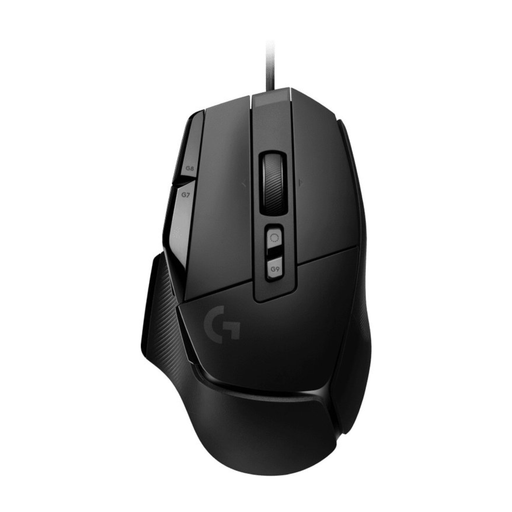
Why it suits this profile: This wired gaming mouse is designed for right-handed players who use programmable buttons and a high, adjustable sensor resolution.
The USB cable means you do not have to monitor the battery level during long sessions. However, the shape and button layout are specifically designed for right-handed use.
Optical sensor of up to 25.600 DPI, USB Type-A and, according to the product information, 13 buttons with programmable functionality.
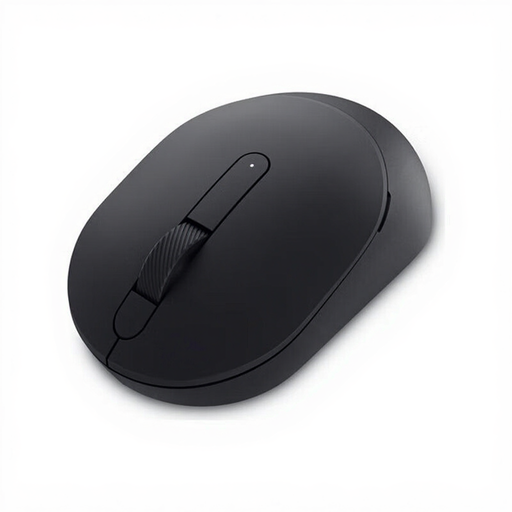
Why it suits this profile: This compact silent mouse is suitable for open-plan offices, home workspaces and users who switch between several devices.
You do not have to choose a silent mouse with just one connection: this model lists both RF and Bluetooth and is suitable for left- and right-handed use.
Three buttons, an optical sensor, adjustable DPI of up to 4.020 and a stated battery life of up to 36 months.
We have compiled a complete, up-to-date list of products that fully meet these strict selection criteria and the applicable European safety regulations.
It depends on your workspace. A wireless mouse keeps your desk free from cables. A wired mouse does not need a battery and connects directly. For gaming or a fixed PC set-up, a USB mouse can be practical; for a laptop, Bluetooth or a wireless receiver is often more convenient.
Its lifespan depends on usage, buttons, cable or battery and maintenance. Keep the optical sensor clean, avoid liquids and do not pull on the cable. With a wireless model, you also need to consider battery replacement or charging cycles.
Usually not. For word processing, email and web browsing, around 1,000 to 1,600 DPI is often sufficient. A mouse with adjustable DPI is particularly useful if you regularly switch between precise work, large screens and other applications.
