
Vandaag of morgen in huis

Kwaliteit gegarandeerd

Welkomstaanbiedingen ontgrendelen: GRATIS bezorging | Tot 80% korting | Gratis 30 dagen JoyPlus-proefperiode
Download de app
If you’re looking to buy pens, you’ll quickly find a huge range to choose from, from gel pens and brush pens to styluses for an iPad, Samsung tablet or laptop. The right choice isn’t just about colour or price. Compatibility, writing comfort and the surface you’re working on all affect how enjoyable a pen is to use every day.
A tablet pen won’t necessarily work with every tablet. An Apple Pencil is only compatible with certain iPad models. The Samsung S Pen is listed in the product information as compatible with the Galaxy Tab S9 FE and Tab S9 FE+. The Microsoft Surface Slim Pen and Wacom Pro Pen are also designed for specific devices.
Before you buy, check:
A universal capacitive stylus may be suitable for basic navigation, but it may not offer the same features as a model-specific pen.
Terms such as “lag-free”, “paper-like feel” and “pixel-perfect” often appear in product descriptions. Treat these as claims made by the brand, rather than universal guarantees. According to Apple’s own product information, the Apple Pencil 2nd Generation supports features including low latency, double-tap and magnetic pairing. Whether you notice a difference in practice also depends on your iPad, software and settings.
Focus on details you can check, such as:
A set with lots of colours may look appealing, but it isn’t always practical. For everyday writing, a set of a few black gel pens may be more useful than dozens of colours. Brush pens, fibre-tip pens and colouring pens are useful for children and creative projects.
Check that the ink is suitable for the surface you’ll be using it on, too. According to the product information, the Faber-Castell Brush Pen Set Black Edition is designed for light-coloured paper, not black paper. The manufacturer says the ink is made with food colouring and is washable. This makes the set a handy choice for drawings and lettering, but doesn’t automatically make it suitable for every type of paper or professional printing.
The nib affects how much control you have. A 0.5 mm nib is suitable for fine notes, journalling and detailed sketches. A fibre-tip pen with a 1 mm nib makes clearer, broader lines, making it better suited to colouring and simple illustrations. Brush pens have a flexible nib, so you can create thinner or thicker lines by varying the pressure.
Use this guide when choosing pens for drawing and writing:
An active pen only works properly when the hardware and software are compatible. For an Apple Pencil, check the iPad model; for a Samsung S Pen, check the specific Galaxy Tab model. For graphics tablets, the make and model number are key.
Features you may need include:
When it comes to writing supplies, the closure matters. A retractable gel pen means there’s no cap to lose. Fibre-tip pens dry out more quickly if left uncapped. The STABILO Cappi has a cap ring to keep the caps together. The product description says the pen can be left uncapped temporarily, but it’s still best to put the cap back on after use.
Keep pens out of direct sunlight and away from extreme temperatures. Gel pens are best stored with the nib retracted. Cap brush pens and fibre-tip pens straight after use. Clean a stylus with a soft, dry cloth only, and keep moisture away from the connectors.
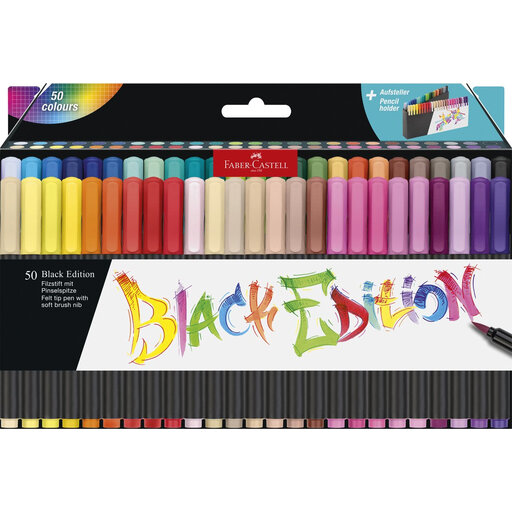
Why it suits this user: With 50 colours to choose from, beginners can try out different drawing styles and colour combinations on light-coloured paper.
The product information clearly states that the brush pens are only suitable for light-coloured paper, helping you avoid buying them for use on black paper.
50 assorted colours, washable ink according to the product description, and a flexible nib for both fine and thicker lines.

Why it suits this user: A good choice for iPad users who want to combine digital note-taking, sketching and PDF annotation.
The compatible iPad models are listed in the product information. Check your model number before ordering.
Magnetic pairing and charging, double-tap to switch tools, and support for palm rejection according to the specifications.

Why it suits this user: Illustrators and designers with a compatible Wacom graphics tablet can customise the pen to suit the way they work.
The compatibility list is specific: MovinkPad 11 and certain Cintiq Pro models. This helps you avoid choosing a professional pen for the wrong system.
Battery-free EMR design, with customisable weight, grip, buttons and balance point according to the product details.
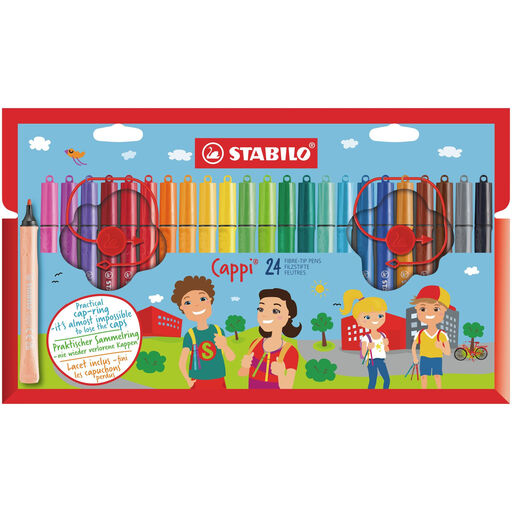
Why it suits this user: The cap ring keeps the fibre-tip pens together, making them handy at home, at school or on the go.
The caps can be attached to a ring, helping to reduce one of the common causes of pens drying out.
24 colours, a medium 1 mm nib and washable ink according to the product description.
We’ve put together a complete, up-to-date list of products that meet these strict selection criteria and comply with current European safety regulations.
It depends on the tablet model. For an iPad, look for a compatible Apple Pencil; for a Galaxy Tab, choose the right Samsung S Pen; and for a Surface device, choose a compatible Microsoft Surface Slim Pen. A universal stylus is mainly suitable for basic touch input on a capacitive screen.
Cap gel pens straight after use or retract the nib. Replace fibre-tip pen caps securely and store the pens out of direct sunlight. A cap ring, such as the one on the STABILO Cappi, helps keep loose caps together. Follow the storage instructions on the product packaging.
No. Brush pens, colouring pens or fibre-tip pens may be all you need for simple sketches, schoolwork and colouring books. Digital artists may benefit more from an active pen with pressure sensitivity, tilt recognition and palm rejection. Start by considering what you’ll use it for and which device you have, then pay for extra features only if you’ll actually use them.
