
Vandaag of morgen in huis

Kwaliteit gegarandeerd

Welkomstaanbiedingen ontgrendelen: GRATIS bezorging | Tot 80% korting | Gratis 30 dagen JoyPlus-proefperiode
Download de app
Buying a new monitor or PC screen seems simple, until you dive into the specifications. Manufacturers advertise with impressive numbers and technical terms, but what do they really mean for your daily use? Many people fall into marketing traps and end up with a display that doesn't suit their needs, or pay for features they never use.
Before you make a decision, it's helpful to know the most common pitfalls. This will help you avoid buyer's remorse and choose a monitor you'll enjoy for years to come.
Pitfall 1: The "High Refresh Rate" Myth A 144Hz monitor or even higher sounds impressive, but is it always necessary? A high refresh rate provides smoother motion, which is great for fast-paced games. For a standard office monitor used for email and word processing, a 75Hz or 100Hz screen is often a comfortable upgrade over the old 60Hz standard, without the extra cost.
Pitfall 2: Resolution vs. Size A large 32-inch monitor with a low Full HD resolution (1920x1080) can result in a pixelated and blurry image. Pixel density (PPI) is the culprit here. The larger the screen, the higher the resolution needs to be to remain sharp. A 4K monitor is extremely sharp, but it also requires a powerful computer to drive the display.
To see through the marketing, you can focus on a few key specifications that truly make a difference.
The combination of screen size and resolution determines how sharp the image is. A good rule of thumb:
The type of LCD panel has a major impact on image quality.
Always check which ports a monitor has. A modern laptop might only have USB-C, while an older PC or game console may need HDMI or DisplayPort. A monitor with a built-in USB hub can also be convenient for connecting peripherals like a mouse and keyboard directly to your screen.
To help you with your choice, we have highlighted a few monitors that fit specific user profiles.
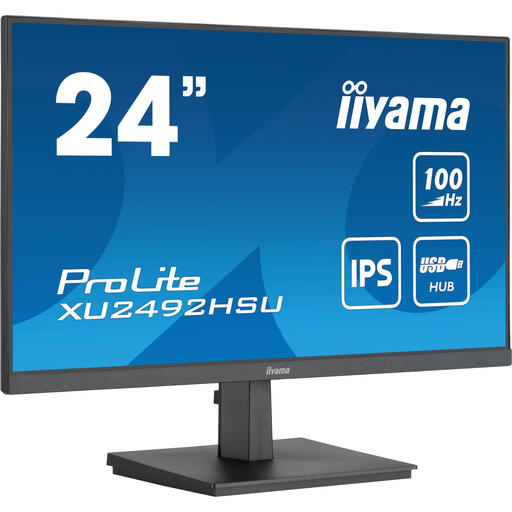
Why This Fits Their Persona: Perfect for those seeking a reliable and comfortable screen for office work and browsing. The built-in USB hub is practical for a tidy desk, and the 100Hz refresh rate makes scrolling and moving windows just a bit smoother than a standard 60Hz screen.
This screen avoids the "high refresh rate" trap by offering a noticeable upgrade (100Hz) without the high cost of a pure gaming monitor. The Full HD resolution on a 24-inch screen ensures a sharp image without unnecessarily taxing the PC.
IPS panel for good colours and viewing angles. Built-in 4-port USB hub for added convenience.
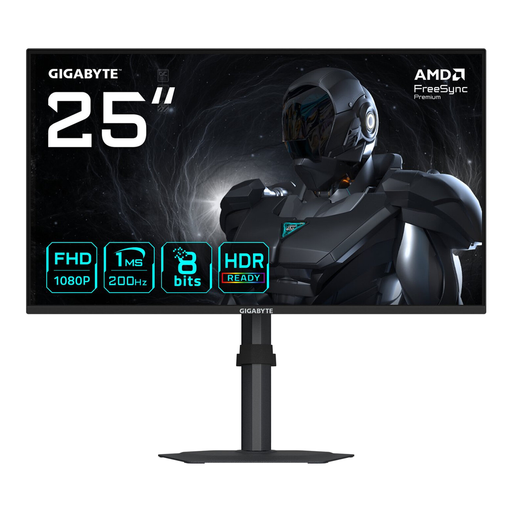
Why This Fits Their Persona: For gamers who play fast-paced shooters, reaction speed is everything. This screen is purely focused on performance, with a very high refresh rate and fast response time on a size that is popular in e-sports.
This is a purpose-built **gaming monitor**. It focuses on what matters to competitive gamers: speed. You're not paying extra for a 4K resolution that would lower your frame rate, but instead getting a screen optimised for smooth gameplay.
200Hz refresh rate for extremely smooth visuals. 1ms response time to minimise motion blur.
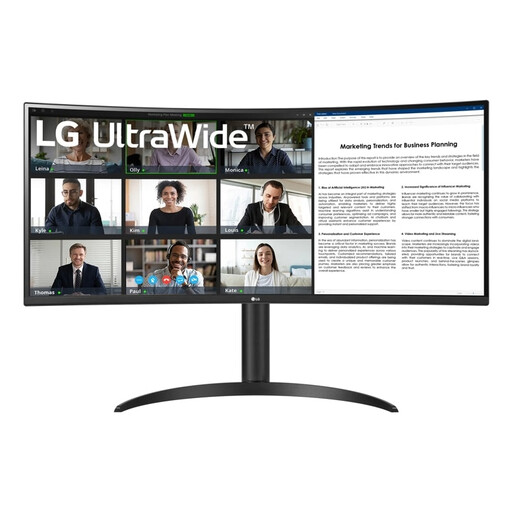
Why This Fits Their Persona: An **ultrawide monitor** is ideal for those who work with multiple windows side-by-side. This screen replaces a dual-monitor setup and provides a seamless workspace for spreadsheets, timelines, or code. The USB-C connection simultaneously charges your laptop.
This screen addresses the "resolution vs. size" pitfall. The Wide QHD resolution (3440x1440) on a 34-inch screen provides a sharp display and plenty of workspace, unlike a cheaper ultrawide with a lower resolution.
21:9 Ultrawide aspect ratio for superior multitasking. USB-C connectivity with 65W Power Delivery for a clean, single-cable setup.
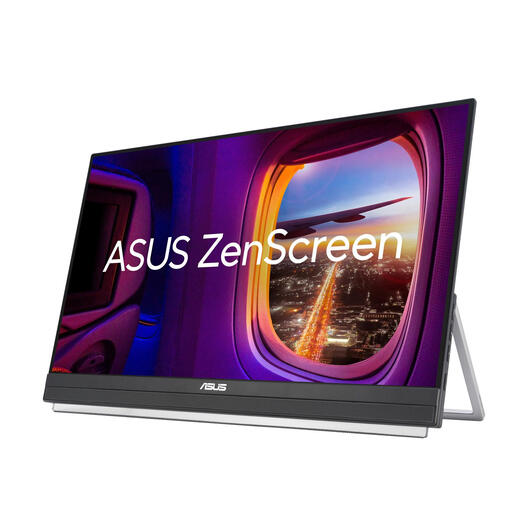
Why This Fits Their Persona: For those who are often on the move or work in different locations, a **portable monitor** offers the productivity of a second screen without being tied to a desk. This model is large enough for comfortable work but designed for flexibility.
This screen solves a specific problem that a standard monitor cannot: productivity on the go. It avoids the pitfall of compromise by offering a full-fledged desktop experience in a portable format.
Portable design with a handle and kickstand. USB-C connection delivers power and video via a single cable.
We have compiled a complete, up-to-date list of products that fully meet these strict selection criteria and local regulations.
A monitor generally lasts between 5 and 8 years, depending on its quality and usage. A common sign of ageing is the backlight becoming less bright over time. The lifespan is often expressed in operating hours, typically between 30,000 and 50,000 hours.
There is no scientific consensus proving that a curved monitor is objectively better. However, some users find it more comfortable and immersive because the screen's curvature follows the natural curve of the human eye. This can reduce image distortion at the edges and lessen the need for your eyes to refocus. It largely remains a matter of personal preference.
For most office tasks, a 4K monitor is not strictly necessary. A QHD resolution (2560x1440) on a 27-inch monitor already offers a significant improvement in sharpness for text and spreadsheets. Full HD (1920x1080) is often sufficient for standard use. However, a 4K screen can be beneficial if you work extensively with detailed charts, large datasets, or multiple documents simultaneously.
