
Vandaag of morgen in huis

Kwaliteit gegarandeerd

Welkomstaanbiedingen ontgrendelen: GRATIS bezorging | Tot 80% korting | Gratis 30 dagen JoyPlus-proefperiode
Download de app
Buying a new MacBook can be quite the undertaking. With the introduction of the M5 chip, the arrival of the MacBook Neo, and the continuous evolution of the Air and Pro models, the lineup is more diverse than ever. You're looking for an Apple laptop that meets your needs not just today, but for years to come. This guide is here to help. No marketing jargon—just a clear overview of the specifications and which model is right for whom.
Before we dive into the models, here are a few key considerations to simplify your choice.
The engine of every new MacBook is its chip. The MacBook M5 chip, found in the new Air and Pro, is engineered for serious performance. This chip integrates the processor, graphics, and memory, delivering incredible speeds for tasks like video editing or running demanding software. The A18 Pro chip in the MacBook Neo is focused on efficiency for everyday tasks like browsing, email, and word processing, resulting in exceptional battery life. Both chips are optimised for the new Apple Intelligence features, making your laptop smarter and more personal.
The choice between models depends entirely on how you'll use it.
Memory (RAM) determines how many tasks you can run simultaneously without slowing down your laptop. 8GB is sufficient for basic use. If you work with many programs at once or with large files, 16GB or more is a wise choice. Storage (SSD) determines how many files, photos, and applications you can keep. 256GB is a starting point, but if you store a lot of media or don't want to rely on the cloud, 512GB or 1TB is recommended.
Based on specifications and use cases, we've curated a selection of the new MacBook models.
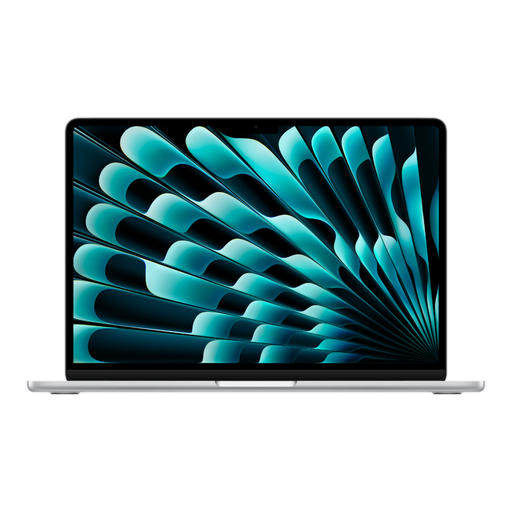
Why This Model Stands Out The MacBook Air with the M5 chip strikes the perfect balance between portability and power. It weighs just 1.23 kg and is incredibly thin, yet thanks to the MacBook M5 chip, it delivers performance previously reserved for Pro models. It's a true Apple Intelligence laptop, built to run smart features seamlessly.
Advantages
Who is This Model For? For the user who wants more than just basic functionality. Ideal for students in creative fields, professionals who are often on the go, and anyone looking for a fast, reliable, and lightweight laptop that will last for years.
View the MacBook Air 13-inch M5

Why This Model Stands Out This is the professional laptop for those who refuse to compromise. The MacBook Pro combines the powerful M5 chip with more memory, a superior display, and additional ports. The Liquid Retina XDR display with a 120Hz refresh rate makes everything incredibly smooth and detailed.
Advantages
Who is This Model For? For creative and technical professionals. Think video editors, 3D artists, software developers, and data analysts who need a machine that can handle their workflow without a hitch.
View the MacBook Pro 14-inch M5

Why This Model Stands Out The MacBook Neo is a fresh addition to the lineup. This model focuses on the essentials: a great user experience for everyday tasks in a colourful and durable design. The A18 Pro chip is optimised for efficiency, resulting in up to 16 hours of battery life, according to Apple.
Advantages
Who is This Model For? The ideal MacBook for students, pupils, or anyone looking for a secondary laptop for home use. Perfect for anyone who wants the Apple experience for email, web browsing, Office applications, and entertainment.
Have you found your new Apple laptop, but are you still looking for accessories to complete your workspace? From notebooks to a stylish silver metal pen, browse our selection to complement your setup.
What is the main difference between the MacBook Air and the new MacBook Neo? The biggest difference lies in the chip and the intended use. The MacBook Air with the M5 chip is aimed at users who need more performance for tasks like photo editing or multitasking with heavier apps. The MacBook Neo with the A18 Pro chip is designed for efficiency in everyday tasks, making it a more accessible entry-level model.
Is the M5 chip a major upgrade? Yes, the M5 chip is a significant leap forward, especially in graphics performance and AI tasks. According to Apple, the combination of a faster GPU and the Neural Engine in the M5 chip makes the new MacBook Air and Pro considerably faster when using smart features and demanding programs.
What is Apple Intelligence and do I need it? Apple Intelligence is a suite of new, smart features built into macOS. It helps you with writing, organising your tasks, and personalising your experience. While you can use a MacBook without it, the new models (like the Apple Intelligence laptop with an M5 chip) are specifically designed to run these features optimally and with privacy protection. It makes your daily use of the laptop easier and more efficient.
