
Vandaag of morgen in huis

Kwaliteit gegarandeerd

Welkomstaanbiedingen ontgrendelen: GRATIS bezorging | Tot 80% korting | Gratis 30 dagen JoyPlus-proefperiode
Download de app
Buying a laptop seems straightforward until you start comparing the specifications. A low price can be tempting, but fixed 8GB RAM, the wrong keyboard layout or a missing charger can be frustrating after purchase. Terms such as AI laptop, OLED and fast Wi-Fi only matter if they suit the way you use your laptop every day.
A Copilot+ PC or a laptop with an OLED screen may offer interesting features, but not everyone needs local AI processing, HDR content or a wide colour gamut. For email, word processing, online lessons and video calls, RAM, keyboard layout, screen size and ports are often more important.
A laptop with 8GB RAM is suitable for basic use, but multiple browser windows, spreadsheets and video calls need more memory. Several models in this guide have memory mounted on the motherboard. So check whether the RAM can be upgraded later before you buy. A laptop with 16GB RAM or 12GB RAM gives you more room for multitasking, though that memory may also be soldered in place.
A laptop with a 512GB SSD offers a practical amount of space for Windows, programmes and documents. The storage actually available will be lower because of system and recovery files. You may need an external SSD or cloud storage for large video libraries, photo collections or lots of games.
Also check which accessories are included. Several models in this selection are listed as not including a charger as standard. So check which USB-C charger or mains adaptor you’ll need to buy separately.
For basic home use, study and office work, 8GB RAM may be enough. If you often work with lots of tabs, video calls and documents open at the same time, it’s worth looking at 12GB or 16GB RAM. Check whether the memory is upgradeable or onboard.
An NVMe SSD will generally start Windows and applications quickly. 512GB is a useful starting point for most people. A 1TB SSD, as found in the Acer Aspire C24-A all-in-one, gives you more room for local files.
A 14-inch laptop is practical for students, commuters and home workers who regularly take their device with them. A 16-inch laptop offers more workspace without taking up as much room as a desktop. A 17-inch laptop is best suited to use in one place: it has a larger screen, but is less portable.
A 16:10 aspect ratio, such as 1920 × 1200, shows more lines of text or spreadsheet rows than a standard 16:9 screen. An IPS panel with an anti-glare coating is a sensible choice for everyday work. An OLED screen, such as the one on the ASUS Zenbook A14, may appeal if you value contrast and colour reproduction. According to the product specifications, the ASUS has a 14-inch WUXGA OLED screen, 100% DCI-P3 and a 60Hz refresh rate.
Both an Intel laptop and an AMD Ryzen laptop can be suitable for documents, browsing, video calls and streaming. Don’t just look at the brand name: check the exact processor model, the number of cores and how it’s paired with the RAM.
Windows 11 Home is common for home use and study. Windows 11 Pro may be useful for a business laptop, for example if device management or security features are important. If you use software that requires specific drivers or peripherals, check compatibility too.
Wi-Fi 6 and Wi-Fi 6E are common choices for wireless working. Wi-Fi 6E also uses the 6GHz band, but the speed you get in practice depends on your router, broadband plan, distance and local conditions. Some business models, such as the Dell Latitude 7650, list Wi-Fi 7.
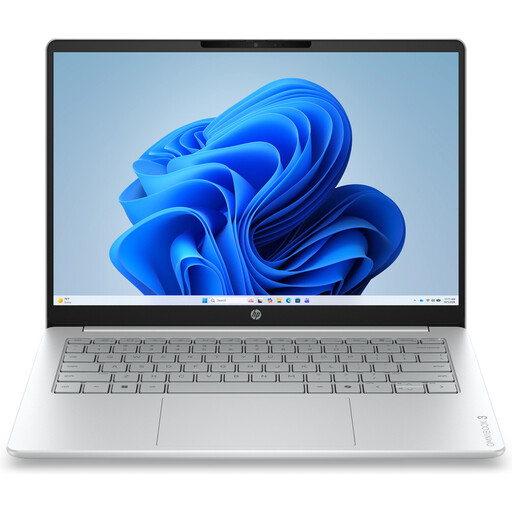
Why it suits this profile: This compact 14-inch laptop is designed for browsing, documents, online lessons and video calls. It weighs around 1,42kg.
The product information clearly states that it has 8GB onboard RAM and doesn’t include a charger. That helps you avoid surprises when planning your purchase.
1920 × 1200 IPS screen, 512GB NVMe SSD, Ryzen 5 7520U and a webcam with a privacy shutter.
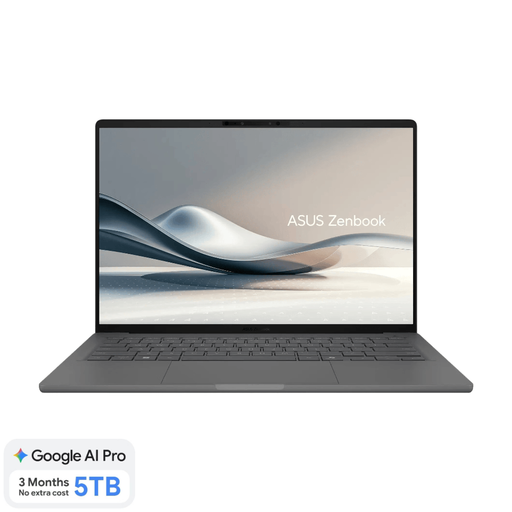
Why it suits this profile: Designed for people who value portability, an OLED display and 16GB RAM. According to the specifications, it weighs around 0,98kg.
The specifications list 16GB onboard RAM, a 512GB SSD and a Dutch QWERTY keyboard layout. You’ll need to arrange a charger separately.
14-inch WUXGA OLED, Snapdragon X, Wi-Fi 6E and an integrated NPU of up to 45 TOPS, according to the product details.
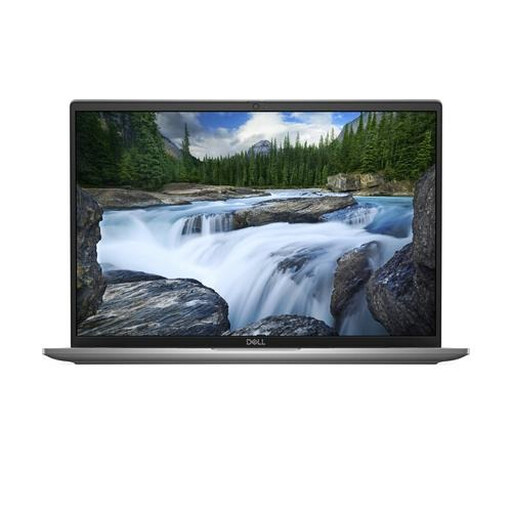
Why it suits this profile: This business laptop is designed for working on the move, with Windows 11 Pro, 16GB RAM and business-ready ports.
Key business specifications are clearly listed: 16GB LPDDR5x, a 512GB SSD, TPM, a fingerprint reader and a webcam privacy shutter.
16-inch 1920 × 1200 IPS screen, two Thunderbolt 4 ports and Wi-Fi 7, according to the product specifications.
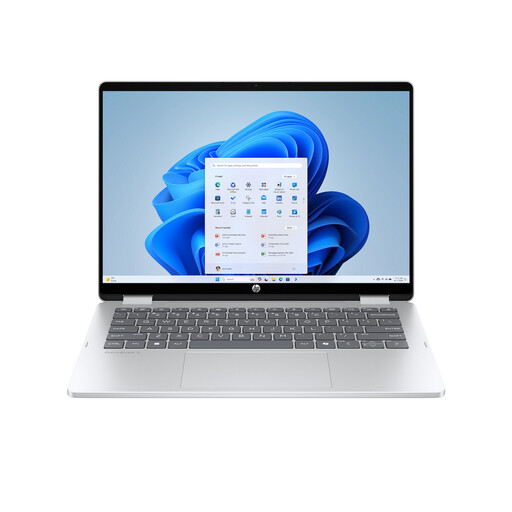
Why it suits this profile: This 2-in-1 laptop can be used as a laptop, tablet, in tent mode or as a stand. It’s a good fit for presentations, reading and flexible study spaces.
The product information clearly states that the screen is a touchscreen, while the RAM is onboard and can’t be upgraded. The charger and stylus are also not included.
14-inch 1920 × 1200 touchscreen, 360-degree hinge, 512GB SSD and backlit keyboard.
We’ve put together a complete, up-to-date list of products that meet these strict selection criteria and comply with the applicable European safety regulations.
8GB RAM may be enough for word processing, browsing and video calls. For multitasking, large spreadsheets and long-term use, 12GB or 16GB RAM is a more practical choice. Always check whether the memory is upgradeable.
A 14-inch laptop is a good choice if you travel often. A 16-inch laptop gives you more room for documents and spreadsheets. A 17-inch laptop is comfortable to use at a desk, but its larger size makes it less convenient to carry around.
As well as the purchase price, allow for a suitable charger, any external storage you need and accessories such as a docking station or monitor. Power consumption depends on the processor, screen brightness, connected devices and how you use the laptop. Before ordering, check exactly what’s in the box and which ports you need.
