
Vandaag of morgen in huis

Kwaliteit gegarandeerd

Welkomstaanbiedingen ontgrendelen: GRATIS bezorging | Tot 80% korting | Gratis 30 dagen JoyPlus-proefperiode
Download de app
A new keyboard and mouse might seem like a simple purchase, until you get lost in a maze of marketing terms and specifications. Many people fall into the same traps, ending up with a set that's uncomfortable, doesn't work properly, or needs replacing after just a few months. Before you spend your money, it's wise to know what to look for.
These are the three most common pitfalls:
To avoid buyer's remorse, focus on a few core specifications that really make a difference. Don't be distracted by flashy packaging; instead, check these three points.
The way your keyboard and mouse connect determines their reliability and flexibility.
Comfort is personal, but a good design can help prevent issues like RSI.
The size of your keyboard should match your workspace and usage.
Always double-check that the layout is QWERTY for standard English use.
Based on these objective criteria, we have selected a few products that suit different user profiles.
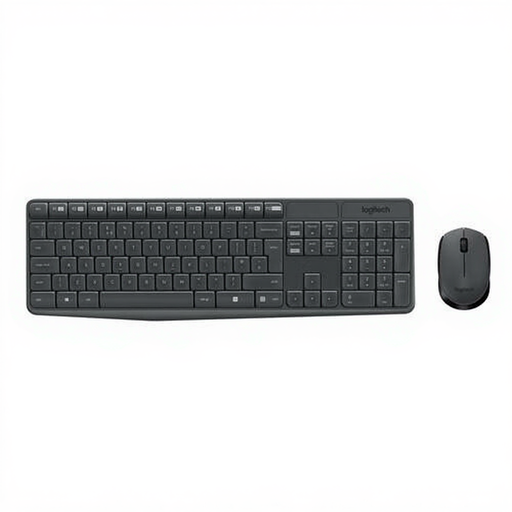
Why This Fits Their Persona: This set is designed for functionality and reliability. No unnecessary extras, just a solid QWERTY keyboard and a comfortable mouse that work right out of the box. Ideal for the home office or for students.
The set uses a stable RF connection, helping you avoid the pitfall of a spotty wireless connection. The clear QWERTY layout prevents typing errors.
Long battery life (up to 3 years for the keyboard, according to Logitech) and a spill-resistant design. Plug-and-play simplicity without any software installation.
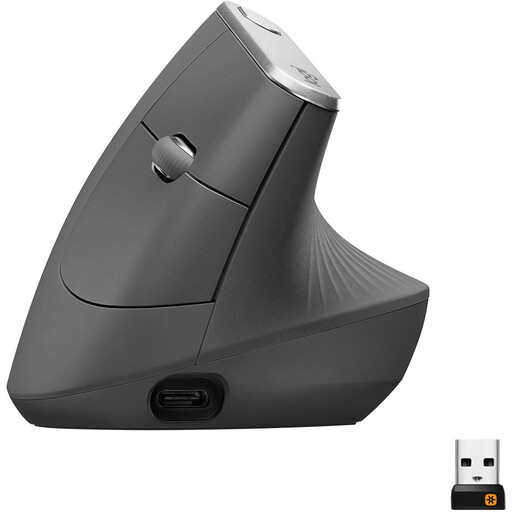
Why This Fits Their Persona: For anyone who spends long days at a desk and values comfort. This mouse is specifically designed to place the wrist and forearm in a more natural posture.
This is not an "ergonomic" marketing gimmick. The 57-degree vertical angle is a fundamentally different design from a standard mouse, aimed at reducing muscle activity.
Rechargeable via USB-C and can connect to multiple devices (Bluetooth or Unifying receiver). The 4000 DPI sensor ensures precision with less hand movement.
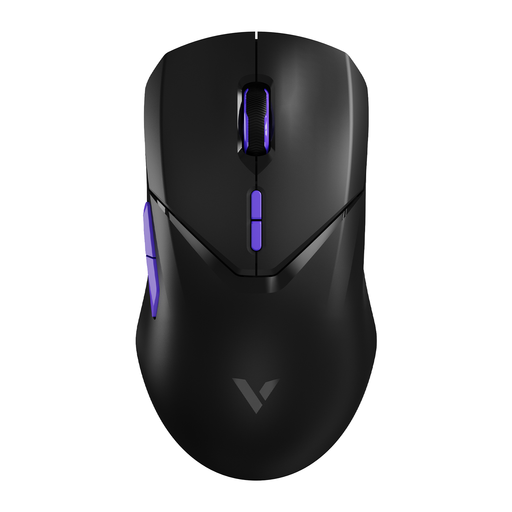
Why This Fits Their Persona: For gamers, response speed is everything. This mouse is built for performance, with specs aimed at minimizing latency and maximizing precision.
This gaming mouse tackles the wireless lag pitfall head-on with a 4000Hz polling rate, ensuring an extremely fast response comparable to wired models.
Equipped with a high-end PAW 3398 sensor (26000 DPI) for superior accuracy. The lightweight design (68 grams) allows for quick and effortless movements.
We have compiled a complete, up-to-date list of products that fully meet these strict selection criteria and safety regulations.
The name refers to the first six letters on the top row of the keyboard. QWERTY is the international standard used in most countries. AZERTY is primarily used in Belgium and France and has a different placement of letters (A and Q are swapped, W and Z are swapped) and symbols. Always check this before purchasing to ensure you get the correct layout for your language.
This varies greatly by model and usage. Basic models using AA or AAA batteries often last several months to a year. Premium models, like the Logitech MK235, claim a battery life of up to 36 months for the keyboard. Models with a rechargeable battery, such as the Logitech MX Vertical, typically last several months on a full charge and can be recharged quickly.
A vertical mouse is designed to place the hand in a more neutral, "handshake" position. Manufacturers claim this can reduce muscle strain in the wrist and forearm compared to a traditional flat mouse. While it is not a medical solution, many users who work long hours experience more comfort and less tension. It's worth considering if you're looking for a more relaxed posture during computer use.
