
Vandaag of morgen in huis

Kwaliteit gegarandeerd

Welkomstaanbiedingen ontgrendelen: GRATIS bezorging | Tot 80% korting | Gratis 30 dagen JoyPlus-proefperiode
Download de app
A keyboard may seem like a simple product, but you notice the wrong choice every day. An incorrect layout can lead to misplaced punctuation marks, a wireless model may not connect to your device, and a compact keyboard may be missing exactly the keys you need. If you are looking to buy a keyboard, it is therefore sensible to check the intended use and technical specifications first.
A QWERTY keyboard, AZERTY keyboard and Belgian keyboard are not automatically the same. QWERTY is common in the Netherlands, while a Belgian AZERTY layout is often used in Belgium. The physical position of letters, punctuation marks and special characters varies between versions.
An operating system can change the language setting, but this does not alter the labels printed on the keys. Therefore, always check:
An RGB keyboard can look attractive, but lighting says little about the type of switches, stability or comfort. With a gaming keyboard, features such as anti-ghosting, N-key rollover, polling rate and the way the keys respond are often more relevant.
‘Mechanical feel’ is not the same as a mechanical keyboard either. Some membrane keyboards use a construction that, according to the product description, imitates a mechanical keystroke. If you are looking for a genuine mechanical keyboard, check which switch type is actually specified.
A TKL keyboard does not have a numeric keypad. This leaves more room for your mouse, but is less practical if you enter numbers every day. A full-size keyboard with a numeric keypad takes up more space, but is better suited to spreadsheets, administration and accounting.
Pay attention to the dimensions too. A compact keyboard is not always low-profile or lightweight, and a wireless keyboard may need extra space for batteries or a USB receiver.
A switch specification is no guarantee of personal comfort. Noise level, key travel and actuation force together determine whether a model feels comfortable to use.
A USB keyboard is usually ready to use straight away and does not require a battery. Check whether the cable uses USB-A or USB-C and whether it is detachable. A detachable cable is useful for transport and replacement.
A wireless keyboard can work via Bluetooth, a 2.4GHz USB receiver or both. Bluetooth is useful for tablets and multiple devices, while a receiver can be a simple solution for a desktop PC. Consider the battery type, charging time, range and the number of devices you can switch between.
For a keyboard for iPad, compatibility is particularly important. Do not just check the screen size: check the exact iPad model and generation as well. A Smart Connector accessory works differently from a universal Bluetooth keyboard.
Choose full-size if you need a numeric keypad. TKL or 80% is appealing to gamers and those with smaller desks. A 60% model saves even more space, but often accesses function keys through key combinations.
Extra features that can be useful include:
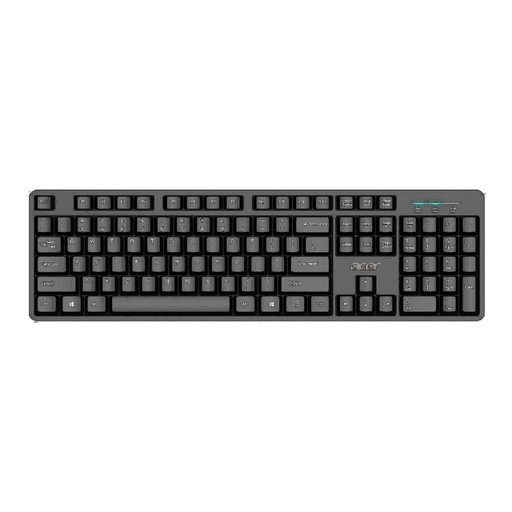
Why it suits this profile: A wired full-size model for working from home, studying and straightforward everyday use.
The USB connection requires neither a battery nor Bluetooth pairing. The product details also specify a numeric keypad and a 1.45-metre cable.
Full-size QWERTY US International layout, USB 2.0 connection and, according to the product description, a water-resistant design.
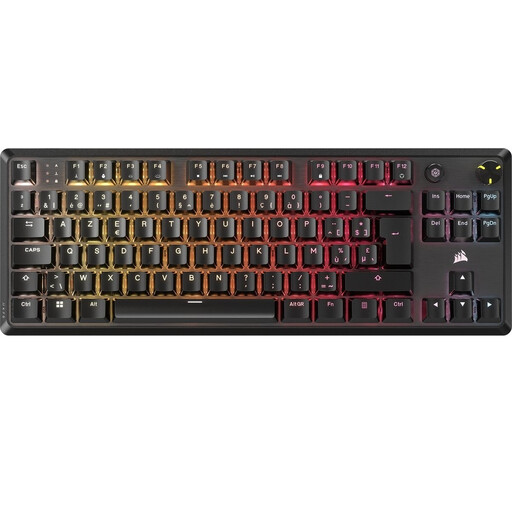
Why it suits this profile: Designed for gamers and typists looking for a compact mechanical keyboard with a Belgian AZERTY layout.
The layout is explicitly listed as BE ISO AZERTY. This makes the choice clearer for Belgian users than a generic US model.
TKL format, linear Corsair MLX Red v2 switches, per-key RGB, NKRO and a detachable USB-C cable.
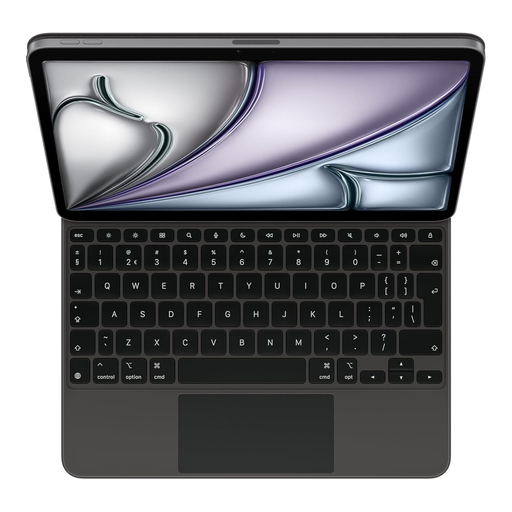
Why it suits this profile: For iPad users who want to combine typing, navigation and charging in one protective accessory.
The product details specify a Dutch QWERTY layout and compatibility with specific iPad models. Check your own model number before buying.
Smart Connector, integrated trackpad, 14 function keys and a USB-C port for charging the iPad.
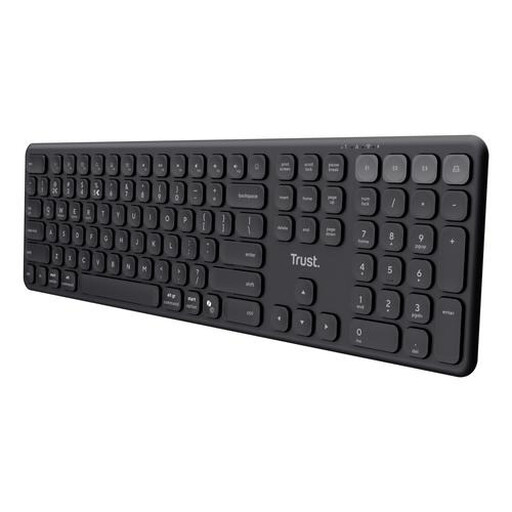
Why it suits this profile: Handy for anyone switching between a laptop, tablet and smartphone while still wanting to retain a numeric keypad.
The connection options are clearly specified: one USB receiver and three Bluetooth channels. The US QWERTY layout is also clearly stated.
Up to four paired devices, quiet scissor keys, USB-C charging and a full-size layout with numeric keypad.
We have compiled a complete, up-to-date list of products that fully meet these strict selection criteria and the applicable European safety regulations.
For working from home, quiet membrane, chiclet or scissor keys are often practical. Choose full-size if you enter lots of numbers. A wireless keyboard keeps your desk free from cables, while a USB keyboard is useful if you do not want to recharge a battery.
That depends on the switch and your personal preference. Linear switches generally feel smooth, while tactile or clicky variants can provide more feedback and produce more noise. Check the key travel, noise level and whether a wrist rest is included. When using a keyboard for long periods, take regular breaks and maintain a relaxed posture.
Its lifespan varies according to the type, usage and maintenance. Manufacturers may specify a particular number of keystrokes, but this is a technical classification rather than a fixed service life. Keep the keyboard dry, do not pull on the cable and clean it according to the manual. When buying, also check the statutory warranty and the seller’s contact details.
